

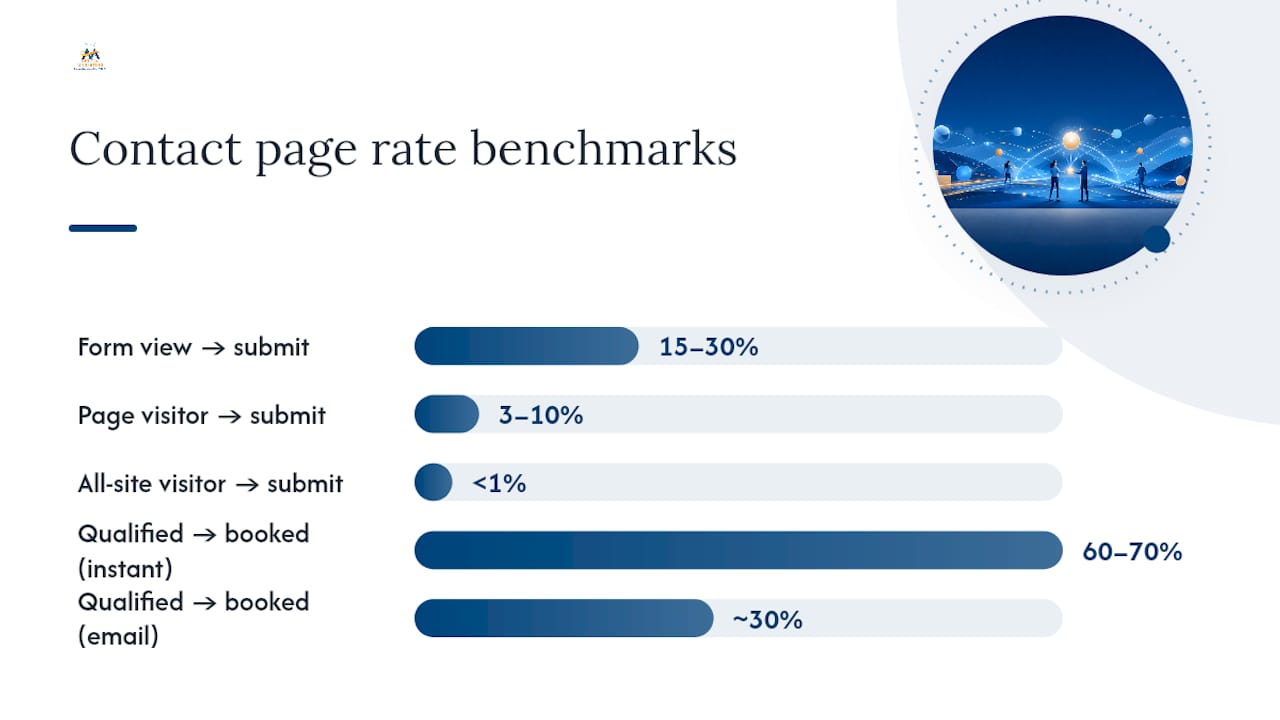
Treat your contact page as a conversion page, not a formality: exact NAP, a short targeted form, a clear promise of what happens next, and ContactPage schema behind it all. That combination satisfies both search engines chasing rich results and AI summaries, and visitors who just want to know they'll hear back. A realistic benchmark to aim for is a 15% to 30% form-view-to-submit rate once friction is removed.
TL;DR:
- Matching NAP details exactly to your Google Business Profile can prevent search engine ambiguities and improve page trust signals.
- Simplifying contact forms to only include name, email, and message on the first screen increases conversion rates, aiming for 15% to 30%.
- Implementing ContactPage schema and embedding your actual Google map can help search engines and AI systems attribute your business correctly.
- Routing inquiries promptly within one hour and enabling instant booking for qualified leads significantly boost conversion and booked meetings.
- Regularly testing and removing low-value fields and layout friction points ensure continuous improvement without needing a full redesign.
Table of Contents
- What Are the Essential Elements of Contact Page Optimization?
- What Contact Form Best Practices Actually Reduce Abandonment?
- How Does Structured Data Help AI and Search Engines Read Your Contact Page?
- What Design Choices Reduce Friction on a Contact Page?
- What Metrics Should You Track to Optimize a Contact Page?
- What Happens After Someone Submits Your Contact Form?
- Contact Page Examples: Before and After Quick Wins
- What Digital Marketing All Has Learned from Real Contact Page Data
- A Prioritized Contact Page Checklist Worth Running This Week
- How Digital Marketing All Turns Contact Pages Into Booked Meetings
- Sources
- FAQ
What Are the Essential Elements of Contact Page Optimization?
Search engines and visitors are checking your contact page for the same basic proof: is this a real, reachable business? Get the fundamentals wrong and everything else you build on top, schema, design polish, clever CTAs, sits on a weak foundation.
Start with your name, address, and phone number written exactly as they appear on your Google Business Profile. Even small mismatches (a suite number here, an abbreviation there) create ambiguity that search engines have to resolve, and they often resolve it by trusting neither version fully. Yoast's research into strong contact pages backs this up: business identity, verifiable contact details, and location-specific content consistently separate the pages that convert from the pages that don't.
Beyond the address block, your contact page needs:
- Current hours of operation, matched word-for-word with your Google Business Profile listing
- Multiple contact paths: a form, a clickable phone number, a direct email, and ideally a calendar link for instant booking
- A one-line explainer of what happens after someone reaches out and roughly how long it takes
- Trust signals, including a team photo, a short testimonial or review summary, and visible credentials
- An embedded map that links directly to your Google Business Profile rather than a generic address pin
Skip any one of these and you're asking visitors, and crawlers, to fill in gaps with guesswork. Neither does that well.
What Contact Form Best Practices Actually Reduce Abandonment?
Every field you add to a contact form is a small tax on your visitor's patience. The best contact form best practices treat each one as a cost that has to earn its place, not a nice-to-have for later segmentation.
Here's a practical sequence for building or auditing a form:
- Ask for name, email, and message only on the first screen. Push job title, budget range, or company size to a follow-up question or a qualification call.
- Stack fields in a single column. Side-by-side fields slow down scanning, especially on mobile, and multi-column layouts consistently underperform simple vertical ones.
- Label fields above the input, not inside it as placeholder text. Placeholder-only labels disappear the moment someone starts typing, which trips up screen readers and anyone who gets interrupted mid-form.
- Write microcopy that sets expectations. A line like "We respond within one business day" next to the submit button does more for conversion than a bigger button.
- Use benefit-first CTA copy. "Get Your Free Quote" outperforms a flat "Submit" because it restates the value the visitor is about to receive.
- Add multi-step or conditional logic only when qualification genuinely requires it. Case studies on B2B contact pages show that multi-stage forms with descriptive labels can lift conversion, but only when the extra steps feel like progress rather than a wall.
Pro Tip: Before adding a new field, ask whether a salesperson could get that answer in the first two minutes of a call. If yes, cut the field and let the conversation do the qualifying.
Mobile accounts for the majority of contact-page traffic on most small business sites, so test every layout decision on a phone first, not as an afterthought.
How Does Structured Data Help AI and Search Engines Read Your Contact Page?
Schema markup doesn't push your contact page up the rankings by itself. It removes the guesswork that search engines and AI systems would otherwise have to do, which is arguably more valuable.
Implement ContactPage schema nested under your Organization or LocalBusiness markup, and make sure every NAP detail inside the JSON-LD matches your Google Business Profile exactly. Recent guidance frames ContactPage schema as a trust layer rather than a ranking shortcut: it helps AI systems and search engines correctly attribute your business details instead of inferring them from inconsistent text on the page.
A few more moves that matter here:
- Write a title tag and meta description that name your city or service area, not just the word "Contact." A page titled only "Contact Us" reads as thin content to both crawlers and visitors.
- Use headings and internal links, pointing to service pages, an about page, or a form optimization guide, so AI summarization tools have more context to draw from when they describe your business.
- Add hours, service areas, and even staff names where relevant. MorningScore's guidance treats these details as the difference between a page that gets indexed and one that gets summarized accurately.
- Embed your map using the share or embed code from your actual Google Business Profile, not a generic map pointing at your street address. That distinction affects how map engagement signals get attributed to your listing.
- Go beyond NAP with specific attributes, parking availability, accessibility features, languages spoken, so AI systems can summarize your unique value rather than defaulting to generic boilerplate.
What Design Choices Reduce Friction on a Contact Page?
Good contact page design guides the eye before it asks for anything. Visitors should see, in order, a headline that confirms they're in the right place, a one-line explainer, the form or contact options, and trust elements reinforcing that this is a real business worth trusting with their information.
A few layout rules hold up across most industries:
- Keep navigation minimal on the contact page itself. Every extra menu item is an exit ramp away from the action you want.
- Use real photos of your team or workspace instead of stock imagery. Visitors notice the difference, even subconsciously.
- Display badges, certifications, or review scores near the form rather than buried in a footer.
- Run a mobile performance check specifically on this page. A contact page that loads slowly is the one page where slow load times directly cost you a lead, not just a bounce.
- Confirm the form is fully navigable by keyboard and that every input has a properly associated label for screen reader users.
Whether the form belongs above the fold depends on context. If your business needs almost no explanation (a plumber, a dentist), put the form above the fold and let it start converting immediately. If you're selling something that needs context first, like a complex B2B service, put a short explainer and trust block above the form so visitors understand what they're filling it out for.
Pro Tip: Record a handful of real sessions on your contact page using a heatmap or session-recording tool. Watching someone hesitate over a field tells you more than any A/B test hypothesis.
What Metrics Should You Track to Optimize a Contact Page?
You can't fix what you don't measure, and contact pages generate more measurable signal than most business owners realize. Four numbers matter more than the rest:
- Form-view-to-submit rate: how many people who saw the form actually completed it. Straightforward forms typically land between 15% and 30%.
- Contact-page-visitor-to-submit rate: a wider net that includes people who never scrolled to the form at all, typically running 3% to 10%.
- All-site-visitor-to-contact-submit rate: usually well under 1%, and mostly a reflection of your traffic quality rather than the page itself.
- Qualified-submit-to-meeting-booked rate: the number that actually predicts revenue, and the one most businesses never track.
Field-level drop-off data, device split, and session recordings tell you where people abandon and why. When you're ready to test, prioritize deletion over addition: removing friction points like unnecessary fields or distracting navigation tends to outperform cosmetic changes to color or copy.
One benchmark worth anchoring to: enabling instant booking after a qualified submission can push booking rates to 60% to 70%, compared to roughly 30% when follow-up depends on email alone.
What Happens After Someone Submits Your Contact Form?
The submit button isn't the finish line. What happens in the next sixty seconds, and the next hour, determines whether that lead ever becomes a meeting.
Your thank-you page should do real work: confirm the submission, restate when they'll hear back, and offer an immediate next step like a calendar link or a case study relevant to what they asked about. Anxiety after submitting a form is real, and a generic "we'll be in touch" page does nothing to reduce it.
Route inquiries by type. A simple selector separating support requests from sales inquiries keeps your fastest-moving leads out of a general queue where they might sit for a day. Speed matters more than most businesses assume: measuring time-to-first-contact and holding a tight SLA, ideally under one business hour for sales inquiries, consistently outperforms a larger volume of leads that get slow follow-up.
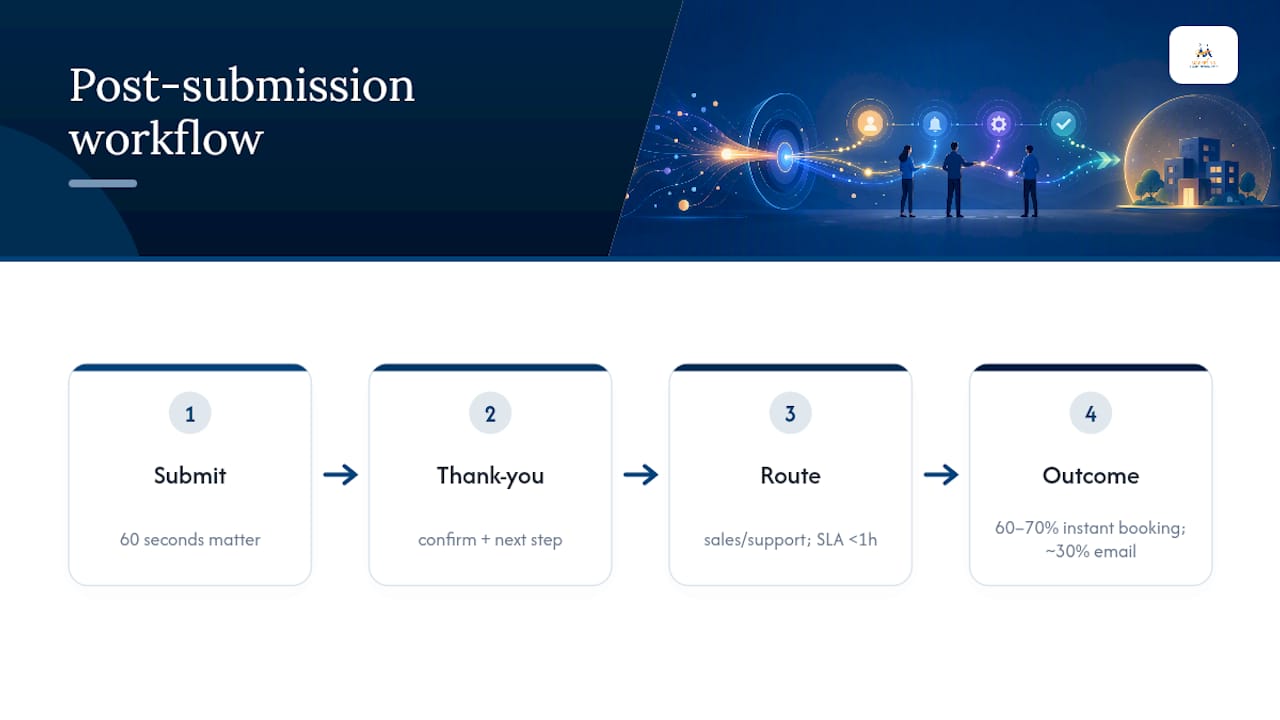
Use instant booking for straightforward requests where a calendar slot answers the need immediately. Save human follow-up for anything that requires qualification first.
Contact Page Examples: Before and After Quick Wins
Small wording changes often move the needle faster than a full redesign. A generic "Submit" button next to a five-field form with no explanation of next steps is a common pattern that quietly suppresses conversions. Swap it for a benefit-first CTA like "Get My Free Estimate," trim the form to name, email, and message, and add a line confirming response time, and you've addressed three friction points without touching the layout.
Some fixes you can make today; others need real traffic data before you commit to them.
Quick wins, implement now:
- Match NAP exactly to your Google Business Profile
- Rewrite your CTA button to state the benefit, not the action
- Add a response-time line near the submit button
Tasks that need testing before you commit:
| Task type | Example | Owner |
|---|---|---|
| Technical | Add ContactPage schema and verify NAP in JSON-LD | Developer |
| Technical | Embed map using GBP share code | Developer |
| UX | Test single-field removal against current form | Marketer |
| UX | A/B test CTA copy variants | Marketer |
What Digital Marketing All Has Learned from Real Contact Page Data
Trimming form fields isn't a cosmetic tweak. Digital Marketing All's own form optimization case work found that cutting unnecessary fields lifted conversions by 120% on a client form, a result consistent with the broader pattern of deletion outperforming addition. The lesson generalizes: every field beyond name, email, and message needs a specific reason to exist.
A few resources worth pairing with this article:
- The LLM optimization guide for making your contact details easier for AI systems to summarize correctly
- The form optimization breakdown for field-by-field guidance on what to cut and what to keep
- Guidance on turning a virtual business into a faster-converting lead source, relevant if your routing and follow-up speed need work
This piece draws on that internal case data alongside published conversion benchmarks, and it's written by Diane O'Brien, whose perspective closes out the article below.
A Prioritized Contact Page Checklist Worth Running This Week
If I had one week and a contact page that needed fixing, I'd run three things in order. First, fix NAP and add ContactPage schema, that's a few hours of work with almost no downside. Second, cut the form to name, email, and message, and add a one-line SLA promise near the button. Third, set up routing so sales inquiries hit a real inbox within the hour, not a shared queue nobody owns.
For a first test, remove your single lowest-value field, usually "company size" or "how did you hear about us," and measure the submit rate for two weeks before touching anything else. Small, sequenced changes beat a full redesign nine times out of ten, mostly because you can actually tell which change worked.
— Diane O'Brien
How Digital Marketing All Turns Contact Pages Into Booked Meetings
Digital Marketing All builds contact pages as conversion tools, not static forms sitting in a footer link. That means trimmed fields, ContactPage schema matched exactly to your Google Business Profile, and routing logic that gets qualified leads to a real person fast instead of a shared inbox nobody checks daily. For businesses that want to skip the guesswork on scheduling and follow-up speed, our Waiting Room service handles the instant-booking layer that turns a form submission into a calendar hold before the lead has a chance to go cold. If your contact page is currently costing you leads instead of producing them, request a review of your current setup and we'll show you exactly where the friction is.
Sources
- Schema
- How to build a perfect local business contact page (Search Engine Land)
- Why Your B2B SaaS Contact Us Page Isn't a Sales Engine (Red Branch Media)
- A/B testing a B2B contact page: how to get a 61% lift (Vigilante Web)
- Contact Us Page SEO: How To Optimize Your Contact Page (MorningScore)
FAQ
What Should a Contact Page Include?
At minimum, exact NAP matching your Google Business Profile, hours, multiple contact options, a short explanation of what happens after someone reaches out, and trust signals like a team photo or reviews.
What Does Page Optimization Mean for a Contact Page?
It means adjusting form fields, copy, layout, and structured data so the page ranks accurately in search, reads correctly to AI summarization tools, and converts more visitors into qualified leads.
How Do I Start SEO for a Contact Page as a Beginner?
Start by matching your NAP exactly to your Google Business Profile, then add ContactPage schema and write a title tag that names your city or service area instead of a generic "Contact Us."
Is Contact Page Optimization Still Worth Doing?
Yes. Contact pages remain one of the highest-intent pages on any site, and benchmarks show form-view-to-submit rates of 15% to 30% are achievable once friction is removed, a return most other pages can't match.
How Do I Reduce Contact Form Abandonment?
Cut every field that isn't name, email, and message from the first screen, use a single-column layout, and add microcopy that states your response time near the submit button.