

TL;DR:
- A social media content workflow is a structured, stage-by-stage system that guides content from ideation to analysis, ensuring consistency and measurable growth. Implementing clear roles, batching tasks, and integrating AI with human oversight enhances efficiency and quality across platforms. Regular performance reviews and flexible planning help SMBs adapt to trends while maintaining a streamlined production process.
A social media content workflow is a repeatable, stage-by-stage system that moves content from raw ideas to published posts with defined roles, consistent quality, and measurable results. Without one, most small to medium-sized businesses default to reactive posting, which kills brand consistency and wastes time. The right workflow connects your content creation process, approval steps, scheduling tools, and engagement routines into one predictable cycle. Tools like Metricool and Planable, tactics like content batching, and AI-assisted drafting have made this system more accessible than ever for SMB marketers who need to do more with less.
What are the essential stages of a social media content workflow?
A well-structured workflow follows a repeatable sequence from ideation through measurement, with clear ownership at every stage. This predictability is what separates strategic social media from random posting. Each stage has a specific goal, a typical frequency, and a responsible team member or tool.
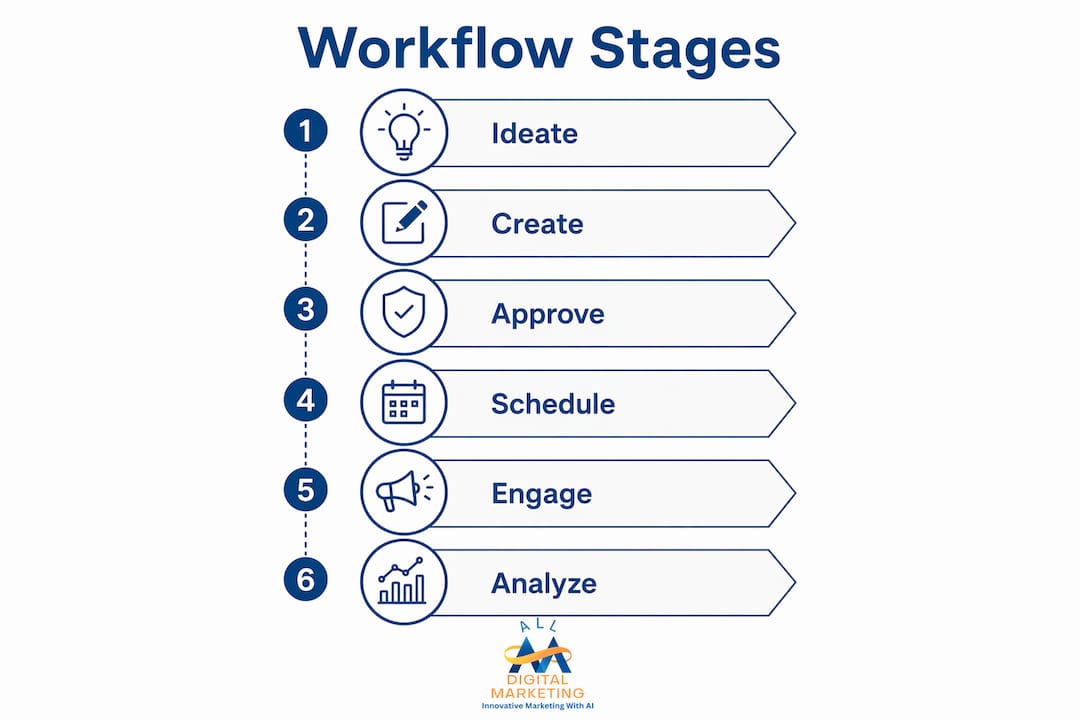
Here are the six core stages every SMB social media workflow should include:
-
Ideate. This is where content topics, formats, and campaign themes are generated. Hold a weekly or biweekly brainstorm using customer questions, trending topics, competitor gaps, and seasonal hooks. Assign one person to own the content calendar so ideas get captured and prioritized, not lost in a Slack thread.
-
Create. Writing captions, designing graphics, filming video, and editing assets all happen here. Batch this work into focused weekly blocks rather than creating one post at a time. A copywriter handles captions, a designer handles visuals, and a video editor handles Reels or short-form clips. Clear task ownership prevents bottlenecks.
-
Approve. Every piece of content passes through a review stage before it goes live. A typical approval model runs: draft, in review, approved, scheduled, published. Build in 48 to 72 hours for feedback rounds so deadlines are never missed due to last-minute revision cycles.
-
Schedule and publish. Approved content gets loaded into a scheduling tool and set to go live at optimal times for each platform. This stage also includes adapting one core asset into platform-native formats, such as turning a blog excerpt into a LinkedIn post, an Instagram carousel, and a Facebook caption.
-
Engage. Posting is not the finish line. Assign daily engagement windows, typically a morning and afternoon session, for responding to comments, answering DMs, and proactively interacting with relevant accounts. This stage is often skipped by SMBs, which is a costly mistake.
-
Analyze. Monthly reporting closes the loop. Review what performed, what missed, and why. Update your content calendar and workflow based on the data. This stage feeds directly back into ideation, making the whole system smarter over time.
Role clarity is the backbone of this structure. When everyone knows what they own, approvals move faster, content quality improves, and nothing falls through the cracks.
How can batching and AI improve your content creation process?

Batching similar tasks reduces context switching, which is one of the biggest hidden costs in social media production. When a marketer writes one caption, then jumps to a design request, then answers an email, then writes another caption, they lose 15 to 20 minutes of focused output every time they switch. Batching fixes this by grouping all caption writing into one block, all graphic design into another, and all video filming into a third.
Here is how a practical batching schedule looks for a small marketing team:
- Monday: Content planning and ideation. Review the editorial calendar, assign topics, and finalize briefs for the week.
- Tuesday and Wednesday: Creation blocks. Copywriters write all captions and copy. Designers produce all static graphics. Video creators film and edit short-form content.
- Thursday: Review and approval. All content moves through the approval workflow. Feedback is consolidated in one tool, not scattered across email and chat.
- Friday: Scheduling. Approved content is loaded into Metricool, Buffer, or a similar scheduling platform and set for the following week.
AI tools accelerate the creation block significantly. Platforms like ChatGPT, Jasper, and Copy.ai generate first-draft captions, headline variations, and content briefs in minutes. This is not about replacing your team. It is about removing the blank-page problem so writers spend their time refining, not starting from zero.
That said, AI-generated drafts require human review before publishing. AI does not know your brand voice, your current promotions, or the nuance behind a sensitive topic. A human-in-the-loop model works best: AI handles research and first drafts, humans handle quality control and final approval. Skipping this step is how brands end up publishing content that sounds generic or factually off. For more on integrating AI responsibly, Digitalmarketingall's guide on AI content marketing covers real examples with measurable ROI.
Pro Tip: Create a brand voice document with 10 to 15 example captions your team considers "on-brand." Paste this into every AI prompt as context. The output quality improves dramatically and requires far less editing.
Human oversight is not optional in AI-assisted workflows. It is the quality gate that protects your brand's credibility and audience trust.
What tools and approval workflows ensure smooth content management?
The right tools turn a chaotic content process into a predictable production line. The key is choosing platforms that combine content calendar visibility, status-based workflows, and team communication in one place rather than stitching together five separate apps.
Here is a comparison of the most widely used social media planning tools for SMB teams:
| Tool | Best for | Key features | Approval workflow |
|---|---|---|---|
| Metricool | Analytics-first teams | Scheduling, analytics, competitor tracking | Basic status stages |
| Planable | Agency and brand teams | In-context feedback, approval inbox, bulk scheduling | Step-by-step one-click approvals |
| Buffer | Solo marketers and small teams | Simple scheduling, AI assistant, link in bio | Basic review and publish |
| Kontentino | Mid-size teams | Calendar view, client approvals, task assignments | Multi-level approval with deadlines |
| Hootsuite | Enterprise and growing SMBs | Broad platform support, streams, team roles | Team-based approval routing |
Planable's approval system stands out for teams that deal with multiple stakeholders. Feedback is left directly on the post preview, not in a separate email thread. Approvals move from draft to published with one-click confirmation, which cuts coordination time significantly. This matters for SMBs where the business owner, a marketing manager, and sometimes a client all need to sign off before content goes live.
Content calendars work best when they include clear status stages and built-in approval buffers. A status model like draft, in review, approved, scheduled, and published gives every team member instant visibility into where a piece of content stands. Without this, teams waste time asking "Is this ready to go?" instead of actually publishing.
Assigning content owners is equally important. Every post should have one person responsible for creation and one person responsible for final approval. When two people share responsibility, neither takes full ownership and deadlines slip.
Pro Tip: Set a rule that no content moves to "scheduled" without a completed visual asset attached. This prevents the common scenario where a caption is approved but the graphic is still missing on publish day.
Automation handles the mechanical parts of scheduling and notification. Tools like Metricool and Hootsuite send automatic reminders when content is due for review, when approval deadlines are approaching, and when posts go live. This keeps the workflow moving without requiring a manager to manually chase every task. For a deeper look at content workflow efficiency, Digitalmarketingall has published a practical breakdown worth reviewing.
How to schedule, publish, and actively engage to maximize content impact?
Scheduling without a strategy is just organized randomness. Effective content scheduling best practices start with data: review your platform analytics to identify when your specific audience is most active, then schedule posts to land 15 to 30 minutes before those peak windows so the algorithm has time to begin distributing before engagement spikes.
Platform-specific nuances matter more than most SMB marketers realize. Consider these scheduling realities:
- Instagram and Facebook: Meta Business Suite supports scheduling Reels, but lacks bulk scheduling, which forces high-volume teams to use third-party tools like Metricool or Buffer for efficiency.
- LinkedIn: Posts published Tuesday through Thursday between 8 a.m. and 10 a.m. consistently outperform weekend posts for B2B audiences. Scheduling tools that support LinkedIn native video upload are worth prioritizing.
- TikTok: The platform's algorithm rewards posting frequency and early engagement velocity. Scheduling three to five posts per week and responding to comments within the first hour of publishing significantly improves reach.
- Google Business Profile: Posts expire after seven days, so scheduling weekly updates as part of your workflow prevents gaps in local search visibility.
Engagement is where most SMB social media strategies break down. Publishing great content and then going silent is the equivalent of opening a store and ignoring customers who walk in. Daily engagement windows drive up post performance by signaling to platform algorithms that your content generates real interaction. Regularly replying to comments and DMs can increase engagement by up to 42% on some platforms. That number reflects a simple truth: algorithms reward accounts that act like communities, not broadcasters.
Treat engagement as a daily queue, not an afterthought. Allocate 20 to 30 minutes in the morning and again in the afternoon for replies, reactions, and proactive outreach. Use response templates for common questions to save time without sacrificing personalization. A template for "How much does your service cost?" saves three minutes per reply and still sounds human when customized with the person's name.
Crisis monitoring belongs in this stage too. Set up keyword alerts in tools like Hootsuite or Mention so your team is notified immediately when your brand name appears in a negative context. A fast, professional response to a public complaint often does more for brand trust than the original post ever did.
How to measure, analyze, and refine your workflow for continuous improvement?
Measuring social media performance beyond vanity metrics is what separates brands that grow from brands that just post. Likes and follower counts feel good but rarely connect to revenue. The metrics that actually inform decisions are conversion rate, saves, shares, audience growth rate, and link clicks.
Here is a framework for monthly reporting that covers both content performance and workflow efficiency:
| Metric category | What to track | Why it matters |
|---|---|---|
| Content performance | Reach, engagement rate, saves, shares, link clicks | Shows what content resonates with your audience |
| Conversion | Website visits from social, form fills, purchases | Connects social activity to business outcomes |
| Audience growth | Net new followers, follower quality, demographics | Indicates whether your content attracts the right people |
| Workflow efficiency | Turnaround time per post, approval duration, missed deadlines | Reveals bottlenecks in your production process |
| Platform health | Account reach trends, algorithm penalties, ad performance | Flags technical or strategic issues before they compound |
Monthly standardized reporting improves stakeholder communication and gives your team a clear basis for workflow adjustments. When a business owner can see that Instagram Reels generate three times the reach of static posts, the decision to allocate more video production time becomes obvious rather than debatable.
Workflow efficiency metrics are underused by most SMB teams. Tracking how long a post takes from brief to published, and how many revision rounds it requires, reveals where your process is slow. If approval consistently takes five days instead of two, that is a process problem, not a content problem. Fix the workflow before blaming the content.
Treat your social media editorial calendar as a living document. Update it monthly based on what the data shows. If a content pillar consistently underperforms, replace it. If a format like short-form video consistently outperforms, increase its frequency. The calendar should reflect reality, not the plan you made in January. For a full assessment of whether your current approach is working, Digitalmarketingall's social media strategy audit is a practical starting point.
Key takeaways
A social media content workflow requires six defined stages, clear role ownership, and monthly performance reviews to produce consistent results and measurable growth.
| Point | Details |
|---|---|
| Six-stage workflow | Cover ideation, creation, approval, scheduling, engagement, and analysis every cycle. |
| Batch content creation | Group similar tasks into weekly blocks to cut context switching and increase output quality. |
| Use AI with human review | AI accelerates drafting, but human oversight protects brand voice and factual accuracy. |
| Choose tools with approval workflows | Platforms like Planable and Metricool reduce coordination overhead with status-based content management. |
| Measure workflow efficiency | Track turnaround times and approval durations alongside content KPIs to find and fix bottlenecks. |
Why rigid workflows are the enemy of great social media
I have worked with dozens of SMB marketing teams, and the most common mistake I see is treating the content calendar like a contract rather than a guide. Teams spend hours building a perfect monthly plan, then refuse to deviate from it even when something newsworthy happens in their industry or a trending format takes off overnight.
The brands that consistently win on social media build their workflows with deliberate flexibility. They reserve 20 to 30 percent of their weekly content slots for reactive content, which means posts that respond to current events, trending audio, or timely customer questions. This is not a lack of planning. It is smart planning that accounts for the reality of how social platforms actually work.
The second pitfall I see constantly is unclear ownership. When a post has no single owner, it gets stuck in approval limbo or published without proper review. Assigning one person to own each stage of the workflow, not just the content itself, eliminates this problem entirely. A well-structured SMB marketing strategy always includes defined roles alongside defined processes.
The third issue is skipping the analysis stage. Teams that never review performance data keep repeating the same content mix regardless of results. Monthly reviews do not need to be long. A 30-minute team meeting with a standardized report is enough to identify what to do more of, what to stop, and what to test next. Build it into the workflow as a non-negotiable step, not an optional add-on.
The best workflows I have seen are simple enough that a new team member can follow them on day one, but structured enough that content never misses a deadline or goes live without approval. That balance is achievable for any SMB willing to document their process and review it regularly.
— Diane
How Digitalmarketingall can support your social media presence
Building a social media content workflow is only part of the equation. Your content needs a professional web presence to send traffic to, capture leads, and convert visitors into customers. Digitalmarketingall helps SMBs build and manage high-converting websites that integrate directly with your social media strategy, so every post you publish has a destination worth clicking through to. If daily website maintenance is a burden your team cannot afford, the zero-maintenance website rental service removes that overhead entirely, letting you focus on content and growth. Reach out to Digitalmarketingall to see how a professional web presence can amplify the workflow you are building.
FAQ
What is a social media content workflow?
A social media content workflow is a repeatable system that moves content through defined stages, from ideation and creation to approval, scheduling, engagement, and analysis. It assigns clear roles at each stage to maintain consistency and quality across platforms.
How many stages should a social media workflow include?
A complete workflow covers six stages: ideate, create, approve, schedule, engage, and analyze. Each stage has a specific owner and frequency, such as weekly creation batches and daily engagement windows.
What tools work best for social media workflow management?
Platforms like Metricool, Planable, Buffer, and Kontentino each support status-based content management and team collaboration. Planable is particularly effective for teams that need in-context feedback and multi-step approval workflows.
How does AI fit into a social media content workflow?
AI tools like ChatGPT and Jasper accelerate first-draft creation and headline brainstorming, but human review remains required to align tone, verify facts, and protect brand voice before publishing.
What metrics should I track to improve my workflow?
Track content performance metrics like engagement rate, saves, and link clicks alongside workflow efficiency metrics like approval duration and post turnaround time. Monthly standardized reporting connects both sets of data to inform smarter decisions.