

Yes, you should add UTM parameters to your Google Business Profile links. Doing so is the fastest way to turn anonymous GBP clicks into leads and revenue you can actually report on. Start with your primary website link and copy this exact format:
https://yourwebsite.com/?utm_source=google&utm_medium=organic&utm_campaign=gbp
Before you apply that string anywhere, confirm a few basics or your data will be noise instead of signal:
- The destination URL returns a 200 status with no redirect chain
- Your team has agreed on naming rules (lowercase, dashes, consistent campaign names)
- You have Google Analytics 4 (GA4) access and can view Traffic acquisition reports
- You know which GBP fields you're tagging first (start with the website link)
Once those four boxes are checked, you're ready to tag every clickable field in your profile.
Key Takeaways
Accurate GBP measurement depends on consistent UTM naming, canonical 200 URLs, and regular GA4 verification rather than a one-time setup.
| Point | Details |
|---|---|
| Tag the primary link first | Apply your UTM string to the main website field before any secondary CTA. |
| Use utm_medium=organic | GBP traffic is unpaid, so organic keeps your GA4 channel reporting accurate. |
| Check for redirects | Confirm a 200 status on every destination URL before publishing a tagged link. |
| Test monthly, not once | Re-check your top links every 30 days since third-party tools can strip parameters. |
| Consider a managed rollout | Digital Marketing All builds tagging templates, QA, and GA4 reporting for multi-location clients. |
Table of Contents
- Why UTM Tracking Local Campaigns Depend On
- Which GBP Fields Should You Tag First?
- What UTM Parameters and Naming Rules Work Best?
- How Do You Build, Test, and View GBP UTM Data in GA4?
- Why Do UTM Links Break, and How Do You Fix Them?
- How Digital Marketing All Manages GBP Tracking For Clients
- Let Us Handle Your GBP Tracking Setup
- Where to Learn More and Validate Your Links
- Sources
- FAQ
Why UTM Tracking Local Campaigns Depend On
Google Business Profile clicks disappear into a black hole inside most analytics setups. GA4 typically buckets untagged GBP traffic under generic "google / organic" or even "direct," lumping it in with search results, review snippets, and Google Maps activity you have zero campaign context for. You know people are clicking your listing. You just can't prove what that click was worth.
That's the attribution gap. And it has a real business cost: without tagging, you cannot connect a GBP click to a form submission, a phone call, a booking, or a dollar of revenue. You're managing your profile on instinct, not data.
Here's the difference in practice. A dental practice with an untagged GBP link sees some organic sessions in GA4 with no idea how many came from the listing versus a Google search result. The same practice with utm_source=google&utm_medium=organic&utm_campaign=gbp on that link can isolate those 50 sessions in a dedicated report, tie them to appointment form completions, and calculate exactly how much new-patient revenue the profile generated that month.
UTM tracking closes the gap between vanity metrics, like listing clicks, and actual business results, like leads and sales. Without it, most local businesses have no reliable way to calculate real return on investment from their Google Business Profile.
The mechanics are straightforward once you commit to them:
- Google Business Profile (GBP) hosts the clickable fields you're tagging
- Google Analytics 4 (GA4) is where the tagged data actually surfaces
- Campaign URL Builder (Google) generates clean, error-free tagged links
UTM parameters let you separate GBP-driven clicks from other traffic entirely, which is the whole point of doing this work in the first place.
Which GBP Fields Should You Tag First?
Not every clickable field in your profile deserves the same attention. Prioritize by traffic volume and business impact, not by how many fields exist.
Your primary website link comes first, full stop. Whether you run a single location or fifty, this is where the bulk of GBP-driven traffic lands, and it's the field most directly tied to conversions.
After that, work through your secondary CTA fields in order of relevance to your business type:
- Appointment booking links
- Menu links (restaurants, cafes)
- "Place an order" links
- Reservation links
- Product links and Google Posts links
Some fields deserve caution rather than immediate tagging. Skip or double check anything that redirects through a third-party layer, deep product feeds controlled by an external catalog editor, or any URL managed by a listing API that might silently overwrite your parameters on the next sync.
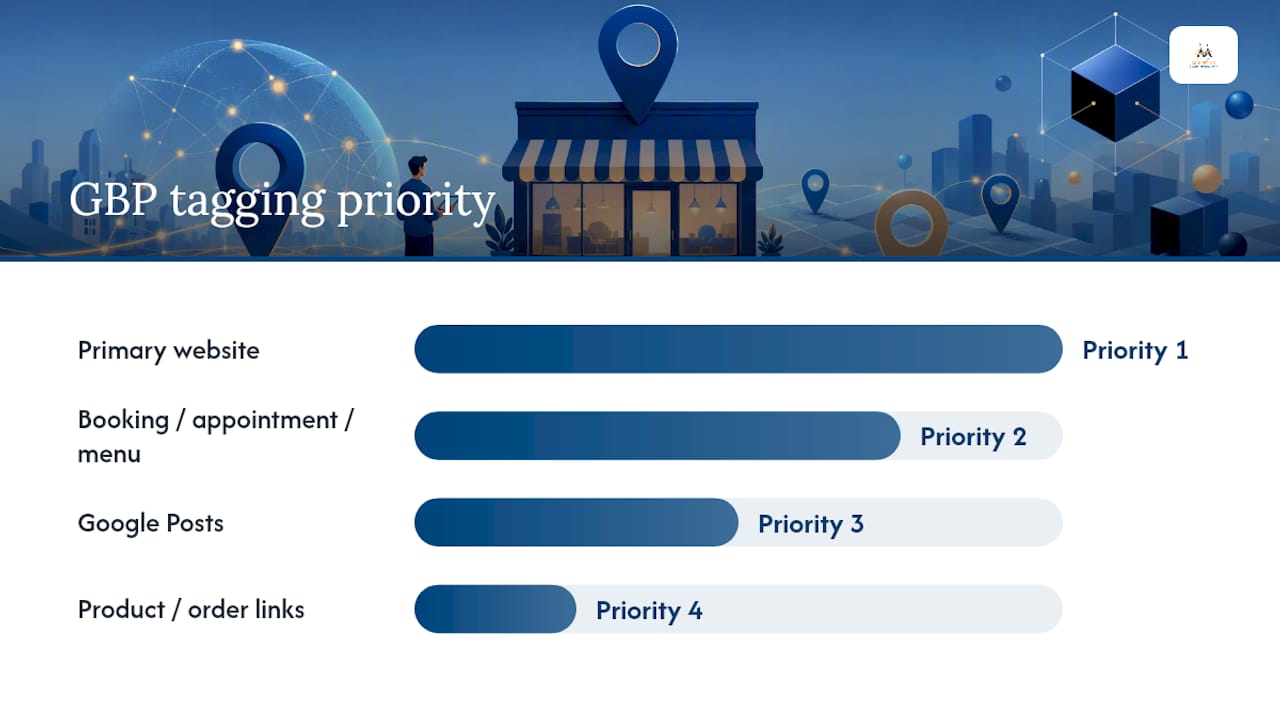
A sane prioritization order looks like this: 1) primary website, 2) booking, appointment, or menu links, 3) Google Posts, 4) product or order links. BrightLocal's tagging documentation backs this sequence with real-world multi-location examples worth reviewing before you roll out.
Pro Tip: Always check for redirects and confirm a 200 status code before applying a UTM string to any GBP field. A single 301 redirect can silently strip your parameters, and you won't notice until your reports come back empty.
What UTM Parameters and Naming Rules Work Best?
Four fields matter for GBP tagging: utm_source, utm_medium, utm_campaign, and occasionally utm_content. Skip utm_term entirely. It's built for paid search keyword tracking, and it adds nothing but clutter to a local listing URL.
Yext's guidance on GBP parameter structure recommends utm_medium=organic for GBP links, since the traffic is unpaid and Google's own systems classify it that way by default. Here's how the values typically break down:
| Parameter | Recommended value | Why |
|---|---|---|
| utm_source | google or gbp | Identifies Google Business Profile as the origin |
| utm_medium | organic | Matches GA4's default channel logic for unpaid listing clicks |
| utm_campaign | gbp-listing or gbp-post | Distinguishes the main profile link from individual posts |
| utm_content | store code or post ID | Separates individual locations or specific posts in multi-location setups |
Naming conventions matter more than most marketers assume. Use lowercase across every parameter, connect words with dashes instead of underscores or spaces, and agree on short store codes for multi-location businesses before you tag a single link. A five-location HVAC company might use austin-01, austin-02, and round-rock-01 as content values rather than full addresses, which keeps URLs short and reports readable.
Here are templates ready to copy and adapt:
Single-location primary URL:
https://yoursite.com/?utm_source=google&utm_medium=organic&utm_campaign=gbp-listing
Multi-location primary URL:
https://yoursite.com/locations/austin/?utm_source=google&utm_medium=organic&utm_campaign=gbp-listing&utm_content=austin-01
Google Posts template:
https://yoursite.com/promo/?utm_source=google&utm_medium=organic&utm_campaign=gbp-post&utm_content=spring-sale-2026
Appointment or booking link:
https://yoursite.com/book/?utm_source=google&utm_medium=organic&utm_campaign=gbp-appointment
One practical detail trips up a lot of otherwise careful marketers: if your base URL already contains a query parameter (say, a booking widget ID), your first UTM parameter needs an ampersand, not a question mark. ?bookingid=42&utm_source=google is correct; ?bookingid=42?utm_source=google will break the page.
Pro Tip: Keep total URL length reasonable. Extremely long tagged URLs can get truncated by some third-party listing tools or shortened link services, silently dropping parameters you need.
How Do You Build, Test, and View GBP UTM Data in GA4?
Building a clean tagged URL takes thirty seconds with the right tool. Verifying it works correctly takes a few minutes more, and skipping that step is how most tagging projects quietly fail.
- Open Google's Campaign URL Builder and enter your destination URL along with the source, medium, and campaign values from your naming template.
- Copy the generated URL and paste it directly into the relevant GBP field, whether that's the website link, an appointment button, or a Google Posts call to action.
- Test the link yourself before publishing. Open an incognito browser window, search for your business by brand name, click through from the listing, and check the address bar for the UTM string.
- Confirm the page loads with a 200 status and no redirect has stripped the parameters.
- Check GA4's real-time report immediately after your test click to confirm the session registers with the correct source and medium.
Once you've confirmed the link works, GA4 is where you'll live day to day. Navigate to Reports, then Acquisition, then Traffic acquisition, and filter or segment by First user source or Session source/medium. This separates your tagged GBP sessions from the generic "google / organic" bucket that swallows everything else.
From there, search for your specific utm_campaign value inside the report to isolate exactly which sessions came from your listing versus a standard search result. Check whether those sessions are mapped to your key events, whether that's form submissions, phone call clicks, or completed bookings, so you can see conversion rates by campaign rather than just raw traffic counts.
A few tools make the build and test process more reliable:
- Google's Campaign URL Builder for generating error-free strings
- A URL validator or simple crawler to confirm 200 status and no redirects
- Short URL services, used cautiously, since some strip query parameters unless configured to preserve them
Pro Tip: If you're capturing leads through a form, confirm your CRM or form builder actually stores UTM values in hidden fields at the moment of submission. Without that step, your GA4 report shows the traffic, but your sales team has no idea which lead came from the listing.
Why Do UTM Links Break, and How Do You Fix Them?
Tagged links fail in predictable ways, and every one of them is fixable once you know what to look for.
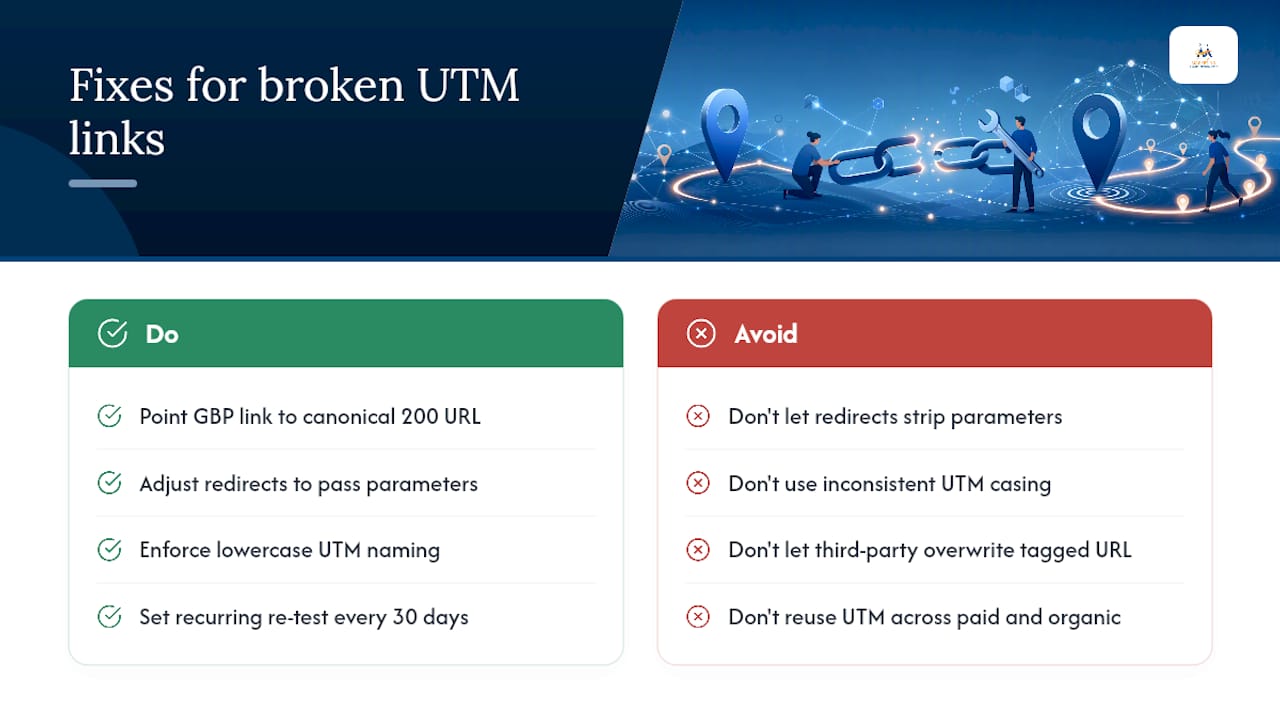
Redirects strip parameters. If your primary website link routes through a 301 or 302 redirect before landing on the final page, the UTM string can vanish along the way. Point your GBP link at the canonical 200 URL directly, or adjust the redirect rule to pass parameters through.
Inconsistent naming fragments your reports. Gbp-Listing and gbp-listing register as two separate campaigns in GA4 because UTM values are case-sensitive. Enforce lowercase naming across your team and run a periodic audit to merge historical variants before they pile up.
Third-party listing managers overwrite your work. If a reputation management tool or listing aggregator has write access to your GBP profile, it can silently replace your tagged URL with an untagged one on its next sync. Coordinate directly with that provider and keep a master spreadsheet of your approved links as a reference point.
Auto-tagging and paid campaigns can collide. If you're running Google Ads alongside your organic GBP tagging, keep utm_medium values distinct between the two so paid and organic traffic don't blend together in reports.
When something looks wrong, reproduce the issue in an incognito window, check GA4's DebugView for real-time confirmation, and inspect your CRM's hidden fields to see whether the parameter ever arrived. Community threads have documented cases where GBP tools quietly removed UTM parameters, which is exactly why a monthly spot check belongs on your calendar.
Pro Tip: Set a recurring reminder to re-test your top three GBP links every 30 days. It takes five minutes and catches problems before a month of missing data piles up.
How Digital Marketing All Manages GBP Tracking For Clients
When we roll out UTM tracking for a client, the workflow stays consistent regardless of how many locations they operate. We audit every existing GBP link first, build a master tagging template the client's team can reference, then QA every URL with a crawl check and a live GA4 test before anything goes live.
Governance matters as much as the tagging itself. We document naming rules in writing, get sign off from the client's marketing lead, and follow a change control process any time a link needs updating. For multi-location clients, that documentation is what keeps twelve store codes from turning into twelve inconsistent naming schemes within a year.
Let Us Handle Your GBP Tracking Setup
If you'd rather skip the manual template building and monthly link audits, Digital Marketing All builds and manages GBP UTM tracking as part of our local SEO services, and we do it faster than most businesses can staff the project internally. A typical engagement covers a full audit of your current GBP links, a custom tagging template built for your naming conventions, GA4 integration, and ongoing reporting broken down by location.
Clients walk away with attribution that actually holds up: which listing fields drive calls, which drive form fills, and what each location contributes to overall revenue. If your GBP links currently funnel into a landing page that isn't built to convert that traffic once it arrives, our website design services can fix that half of the equation too. Reach out through our contact page to get a tagging audit started this week.
Where to Learn More and Validate Your Links
A handful of resources cover the technical edges this guide only touches on. Google's own Campaign URL Builder remains the fastest way to generate error-free tagged links without hand-typing query strings. GA4's Traffic acquisition report under Reports and Acquisition is where your tagged data actually lives once it's flowing.
For deeper reading, the analytics fundamentals in Reddog Consulting Group's guide to Google Analytics goals pair well with UTM tagging, since goals and conversions are what give your tagged traffic real meaning. If you want a broader view of how tracking fits into a full measurement framework, this overview of analytics in digital marketing is worth a read.
- Google Campaign URL Builder for generating clean tagged links
- GA4 Traffic acquisition reports for viewing tagged GBP sessions
- A URL validator or crawler to confirm 200 status before publishing
Sources
- Understanding traffic source and medium in Google Analytics
FAQ
What Does UTM Mean for Tracking?
UTM stands for Urchin Tracking Module, a set of parameters added to a URL that tells your analytics platform where a click originated, such as your Google Business Profile listing versus a standard search result.
Is UTM Tracking Free?
Yes. Google's Campaign URL Builder is free, and GA4, where you view the resulting data, is also free for standard usage tiers.
How Can I Track a UTM Link?
Paste your tagged URL into a browser to confirm it loads correctly, then check GA4's real-time report or the Traffic acquisition report under Reports and Acquisition to see whether the session recorded with the correct source and medium.
What Does UTM Stand For?
UTM stands for Urchin Tracking Module, named after Urchin, the web analytics company Google acquired before building Google Analytics.
Should Every Local Business Use UTM Tracking on Their GBP Listing?
Any business that wants to know whether its Google Business Profile drives real leads and revenue should tag its listing links; without it, GBP traffic gets buried inside generic organic reporting with no way to isolate its actual performance.