

Yes, small business marketing automation pays off, but only if you resist the urge to automate everything at once. Start with three to five high-leverage workflows, choose a tool that matches how your team actually works today, and measure results before adding complexity. This guide walks through which automations to build first, how to pick software without getting locked into an expensive contract, what a realistic starter budget looks like, and a month-by-month roadmap to get from zero to a working system.
TL;DR:
- Starting with three to five high-impact workflows, such as welcome sequences and lead routing, ensures quick results and avoids overwhelm.
- Select automation tools based on ease of use, integration capability, and pricing structure to fit your current contact list and team skills.
- Costs for basic automation typically range under $100 monthly for solo businesses and increase with contact volume and added channels like SMS.
- Build and test foundational automations in phases, measuring performance after a few weeks, before scaling or adding more complex workflows.
- Outsourcing setup to experts can shorten implementation time, especially for CRM integration and complex campaigns, while small businesses can handle simple automations independently.
Table of Contents
- What Are the Best Small Business Marketing Automation Workflows to Start With?
- How Do You Choose the Right Marketing Automation Software?
- What Does a Starter Marketing Automation Stack Cost?
- How Do You Implement Marketing Automation Step by Step?
- What Mistakes Should You Avoid With Marketing Automation?
- Approach to Small Business Automation
- Get Automation Running Without Building It Yourself
- Sources
- FAQ
What Are the Best Small Business Marketing Automation Workflows to Start With?
Marketing automation handles repetitive tasks across email, text, and forms so your team can spend time on the conversations that actually need a human. Fit Small Business documents a consistent set of starter workflows that show up in nearly every small business playbook, and they work because they attach to moments a customer is already paying attention: right after signup, right after a missed call, right before an appointment.
Here are the seven automations worth building first, ranked by how fast they typically show impact.
- Welcome sequence. A three-to-five-email series triggered the moment someone joins your list or buys for the first time. Practitioner audits from Ian Adair find welcome sequences often produce the highest click-to-conversion rates of any automation, yet plenty of small businesses never build one past a single "thanks for signing up" email. The metric it moves: early engagement and first-purchase conversion.
- Lead routing. The instant a form is submitted or a call comes in, the lead gets assigned to the right person or queue, with an internal alert. This shrinks response time, which matters more than almost any other single factor in whether a lead converts.
- Appointment reminders. Automated texts or emails 24 to 48 hours before a scheduled visit, plus a same-day nudge. The metric it moves: no-shows, which cost service businesses real revenue every week.
- Review requests. Triggered a set number of hours or days after a completed service or delivery, timed to when satisfaction is highest. This is one of the simplest automations to build and one of the most visible, since it directly affects your public review count and star rating.
- Abandoned cart or quote follow-up. For e-commerce, this fires when a cart sits untouched for an hour or more; digital product sellers can find useful alternative tools and integrations at BananaSpace. For service businesses, it fires when a quote goes unanswered for a few days. The metric it moves: recovered revenue that would otherwise just disappear.
- Re-engagement flow. A sequence aimed at contacts who haven't opened or clicked in 60 to 90 days, either winning them back or suppressing them from future sends. The metric it moves: retention and, just as important, your sender reputation.
- Post-purchase or post-service nurture. A short educational sequence that isn't selling anything, just delivering value related to what the customer bought. This keeps you top of mind for the next purchase cycle without feeling pushy.
None of these require a big data set. Most run on a single trigger, a handful of fields (name, email or phone, purchase or appointment date), and one or two segments at most. Before switching any of them live, run a short testing checklist: send yourself a test version, check every merge field populates correctly, confirm the unsubscribe link works, and time-check the send window so a reminder doesn't land at 3 a.m.
Pro Tip: Sequence your rollout so you're not launching all seven at once. Start with welcome and lead routing in week one, add review requests and reminders in week two, then layer in abandoned-cart and re-engagement once the first four are stable. Launching everything simultaneously overwhelms both your inbox and your staff, who suddenly have to handle replies to automations nobody trained them on.
How Do You Choose the Right Marketing Automation Software?
The right tool is the one that fits your current contact list, your team's technical comfort, and your budget, not the one with the longest feature list. A vendor-agnostic checklist works better than chasing whichever platform ranks first on a "best of" list, because most of those lists are written for businesses much bigger than yours.
Run any candidate tool through these criteria before you commit:
- Ease of use. Can a non-technical team member build and edit a workflow without submitting a support ticket every time?
- Integrations. Does it connect natively to your CRM, your booking system, and your website forms, or will you need a third-party connector for everything?
- CRM fit. Salesforce recommends a CRM-centered approach because it stores every customer interaction in one place and triggers automations off real behavior. Disconnected tools that don't share data cleanly tend to create duplicate contacts and broken personalization.
- Channel support. Does it handle email and SMS, or just email? Appointment reminders and review requests both perform better over text for many service businesses.
- Pricing model. Is it priced by contact count, by number of emails sent, or by a flat seat fee? Each model rewards a different kind of business.
- Deliverability tools. Does it include a way to monitor bounce rates and sender reputation, or is that entirely on you?
- Templates. Are there prebuilt templates for the workflows you actually plan to use, or will you be building every sequence from a blank canvas?
- Onboarding and support. Is there a real human to talk to when a workflow breaks, or only a help center?
Watch for a few contract traps before signing anything. Contact-count pricing can spike the moment you cross a threshold, sometimes doubling your monthly cost for a modest list growth. Some platforms cap how many contacts you can export, which matters enormously if you ever want to leave. Others bundle in "premium" segmentation or A/B testing features behind a higher tier you don't need yet.
Quick gut check: if a platform's pricing page requires a sales call before it will tell you the cost, budget extra time to negotiate and read the contract closely for auto-renewal terms.
The decision flow that works best for small teams: match your requirements against the checklist above, test the platform's free tier or trial with real (not sample) data, then validate two or three actual workflows end to end before migrating your full contact list over. If lead routing and welcome emails work cleanly in the trial, the rest of the platform is likely to hold up too.
What Does a Starter Marketing Automation Stack Cost?
Costs scale with contact count, message volume, and how much hand-holding you need during setup, not with how sophisticated your business is. Forbes advises budgeting conservatively, generally in the 2% to 5% of revenue range for marketing overall, and matching tool complexity to your actual goals rather than buying headroom you won't use for a year.
Three realistic stacks illustrate how that plays out at different business sizes:
- Lean solo operation. A single automation platform handling email, a basic CRM built into that same tool, and a form connected to your website. Monthly cost typically runs in the range of a basic monthly software subscription, often well under $100, assuming a list under a few hundred contacts.
- Service business with a CRM core. A CRM with automation built in, SMS added for appointment reminders and review requests, and one integration to your booking software. This tier commonly lands in the low hundreds per month once SMS volume and a growing contact list are factored in.
- E-commerce stack. Email and SMS combined with cart-abandonment and post-purchase flows, plus connectors to your store platform and possibly a loyalty or referral tool. Costs here climb faster because SMS volume and contact counts both tend to be higher, and advanced segmentation, useful once your list exceeds roughly 1,000 active contacts, adds another cost layer.
A few specific factors drive the price up regardless of which stack you start with: total contact count, SMS send volume (texts are billed per message on most platforms), advanced segmentation and behavioral triggers, and professional setup fees if you hire outside help to configure the workflows. A social media content workflow layered on top adds scheduling costs too, though it's worth treating as a separate budget line from core marketing automation.
Upgrade when you hit a genuine ceiling, not on a calendar schedule. Signs you've outgrown your starter tier include manually segmenting lists your platform should segment automatically, contact counts pushing you into the next pricing bracket anyway, or workflows that need a data connection your current plan doesn't support. Realistic ROI takes time to materialize. Fit Small Business notes that returns vary heavily by offer quality and execution, so treat any multi-dollar-return claim you see elsewhere as a ceiling, not a guarantee, and expect a few months of tuning before a new workflow hits its stride.
How Do You Implement Marketing Automation Step by Step?
Building automation in the right order matters more than building it fast. Skip straight to complex workflows before you understand your traffic and conversion points, and you end up automating a process that was broken to begin with.
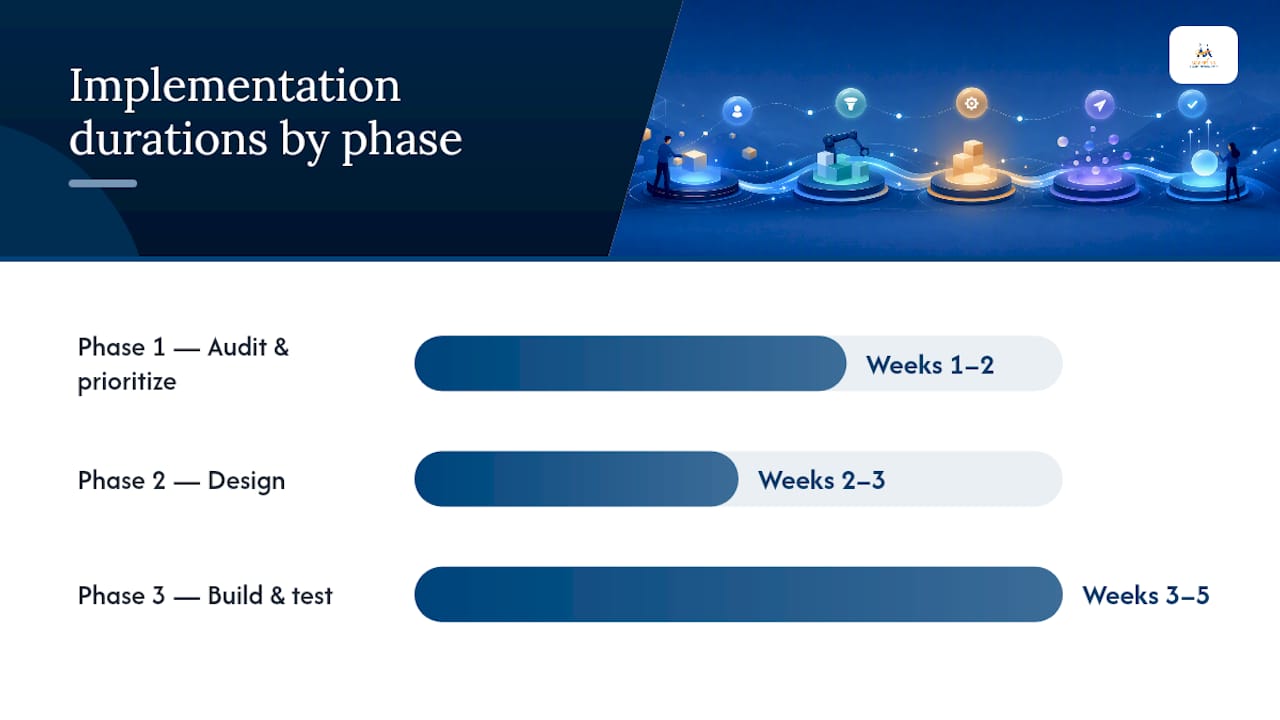
Phase 1: Audit and prioritize (weeks 1 to 2). Map every point where a visitor or lead currently converts: form fills, phone calls, booking clicks, purchases. Note which traffic sources feed each one. Rank potential automations by how many people pass through that conversion point each month, since a workflow attached to a high-traffic moment will show results faster than one buried in a rarely used page.
Phase 2: Design (weeks 2 to 3). For each prioritized automation, define the trigger (what starts it), the message sequence (how many touches and what each one says), any segmentation needed (who gets which version), and acceptance criteria (what "working correctly" looks like before it goes live). Keep this phase on paper or in a shared doc before touching the software. Practitioner estimates suggest foundational automations like welcome series and simple lead routing can be built in a few hours to a few days once the design is clear, with custom integrations adding time.
Phase 3: Build and test (weeks 3 to 5).
- Build the minimum viable version of the workflow, not the fully polished version.
- Run a QA checklist: test every trigger condition, confirm merge fields populate, check links, and verify timing.
- Send a deliverability check, since a broken sender authentication record can quietly kill an entire campaign before it starts.
- Soft launch to a small segment of your list before turning it on for everyone.
- Fix whatever breaks, then expand to your full audience.
Phase 4: Measure and iterate (ongoing, starting week 6). Track a small number of KPIs per workflow rather than everything the platform reports. For a welcome sequence, watch open rate and click-to-conversion. For lead routing, watch response time. For review requests, watch review volume and average rating. For abandoned-cart or quote follow-ups, watch recovered revenue directly. A ROI measurement framework helps tie these workflow-level numbers back to overall marketing spend.
Once a workflow hits its target metric for two to four weeks straight, test one variable at a time: subject line, send time, or message order. Scale to the next automation on your priority list only after the current one is stable, not before.
Pro Tip: Treat your first 30 days as a controlled experiment, not a launch. The goal isn't to have every automation live by day 30. The goal is to have three or four running cleanly, with real performance data, so your next round of building is informed instead of guessed.
What Mistakes Should You Avoid With Marketing Automation?
Automation amplifies whatever you feed it, good or bad, so the most common failures aren't technical. They're judgment calls made too early or too casually.
- Overbuilding before you have traffic or data. Complex, multi-branch workflows built on a list of 40 contacts produce almost no learning and plenty of wasted setup time. Secure reliable traffic and conversion data first, then build to match it.
- Sequences that read as too salesy, too fast. A welcome series that pitches a discount in email one and a second pitch in email two trains new subscribers to tune out immediately. Nurture messaging should lead with value and education, saving the sales ask for a clear signal the contact is ready.
- Skipping deliverability checks. A campaign can be perfectly written and still land in spam if sender authentication isn't set up correctly. Check this before scaling any email volume.
- Ignoring list hygiene. Inactive contacts drag down your open rates and can flag your account with email providers. A quarterly cleanup, paired with a re-engagement flow, protects your sender reputation.
- Treating automation as "set it and forget it." A workflow written a year ago may reference an old promotion, an outdated price, or a discontinued service. Quarterly audits catch this before a customer does.
Automation is a tool for efficiency, not a substitute for strategy. Human oversight still matters most at the points where a real conversion decision gets made, and businesses that skip that oversight before their processes are mature tend to automate their way into confusion rather than growth.
Practitioners who manage these systems for a living tend to repeat the same short list of advice: start with welcome, lead routing, and review requests before anything else, because that trio covers first impressions, response speed, and reputation, the three areas most likely to cost you money if handled slowly. Then schedule a quarterly audit on the calendar the same way you'd schedule a tax deadline, because workflows quietly go stale without one.
Approach to Small Business Automation
Every automation project starts the same way: prioritize before building anything. The process maps a client's conversion points first, identifies the two or three workflows likely to produce the fastest measurable return, and builds minimum viable versions of those before touching anything more advanced. That order matters more than the tool selected, and it's the same order recommended to a business handling this entirely in-house.
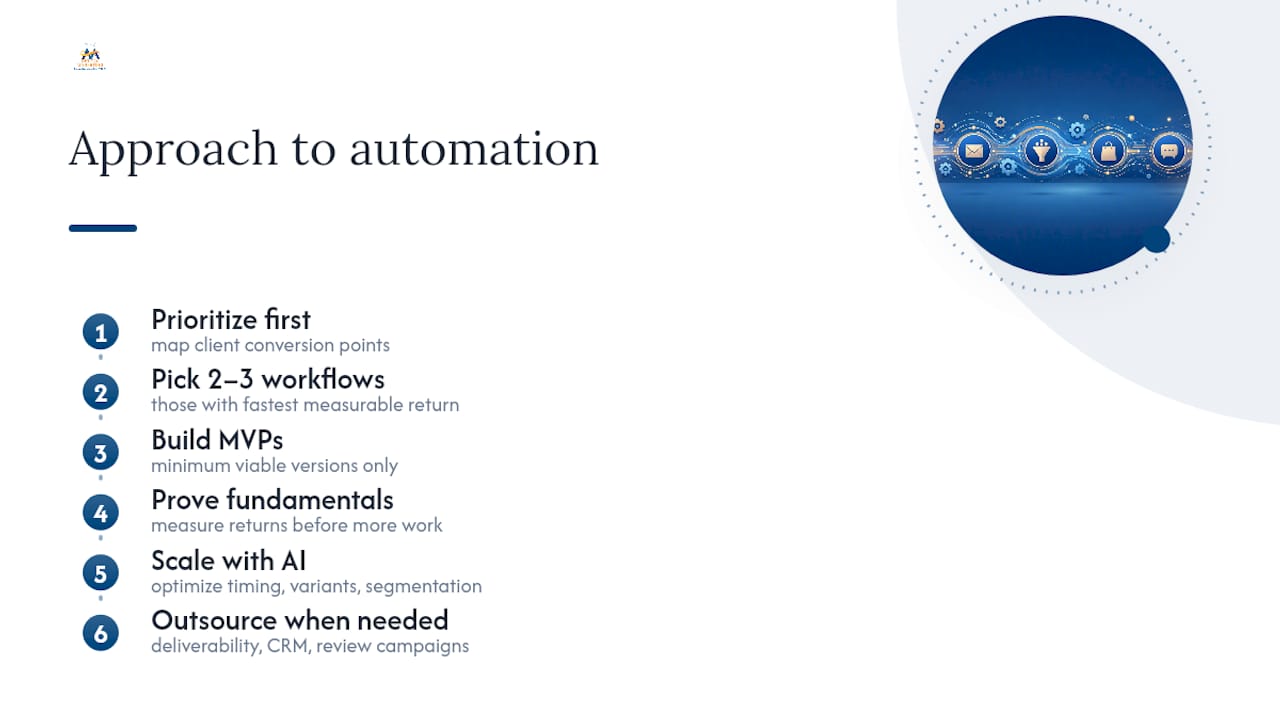
Where AI earns its place in this process is at the scaling stage, not the starting one. Once a welcome sequence or lead-routing workflow is proven, AI-assisted optimization can help refine send timing, message variants, and segmentation faster than manual testing alone. Applying that layer before the fundamentals are proven just adds noise to a signal you haven't established yet.
Plenty of small business owners handle the first phase of this themselves, and they should. A welcome sequence and a basic lead-routing rule don't require an agency. Outsourcing can speed outcomes in deliverability setup, CRM integration work that touches multiple systems at once, and review-generation campaigns needing consistent execution across every completed job, not just the ones an owner remembers to follow up on manually. If a team is stretched thin enough that these workflows keep sliding to next month, managed setup can reach these goals faster than another attempt to fit it in on a Friday afternoon.
— Diane O'Brien
Get Automation Running Without Building It Yourself
If reading through seven automations, a checklist, and a four-phase roadmap sounds like the right plan but not something your week has room for, that's exactly the gap Digital Marketing All fills. Rather than handing you another platform to learn, we set up the welcome sequences, lead routing, and appointment reminders directly inside systems you already use, then hand you a working stack instead of a to-do list. Our review generation and management service is often the fastest win for service businesses, since it automates the post-job request and reputation tracking that most owners know they should do but rarely get to consistently.
A few ways to get started:
- Request a quick audit of your current lead response and review process.
- Book a discovery call to walk through which three automations would move the needle fastest for your business.
- Explore conversion-focused websites if your forms and booking flow are the actual bottleneck feeding your automations.
Expect a straightforward setup process and a workflow you can see running within weeks, not months. Get a quick automation audit to see where your current process is losing leads.
Sources
- How to automate small-business marketing with AI tools — Forbes
- Marketing Automation for Small Businesses — Salesforce
FAQ
What Is the Best First Automation for a Small Business?
A welcome sequence paired with lead routing tends to deliver the fastest visible return, since both attach to moments a customer is already paying attention to. Review requests are a close third because they're simple to build and immediately visible.
How Much Does Small Business Marketing Automation Cost Per Month?
A lean solo setup often runs under $100 a month, while a service business adding SMS and CRM automation typically lands in the low hundreds. Costs rise mainly with contact count, SMS volume, and advanced segmentation needs.
How Long Does It Take to Set Up Basic Marketing Automation?
Foundational workflows like a welcome series or simple lead routing can often be built in a few hours to a few days once the trigger and message sequence are planned. Custom integrations or advanced segmentation add time.
Do I Need a CRM Before I Start Automating?
Not necessarily at the very start, but a CRM-centered approach reduces data errors and enables behavior-triggered journeys as you scale past a handful of disconnected tools. Many platforms include basic CRM functionality built in for smaller lists.
Should I Build Automation Myself or Hire an Agency?
Simple workflows like a welcome email or lead-routing rule are reasonable to build yourself. Deliverability setup, multi-system CRM integration, and consistent review-generation campaigns are where agency-managed setup, such as what Digital Marketing All offers, tends to save the most time.
How Do I Avoid Over-Automating My Marketing?
Build three to five high-leverage workflows first, measure their performance for several weeks, and only add complexity once those are stable. Schedule a quarterly audit so old sequences don't run untouched for months.