
The highest-converting review request email is short, personalized, and sent once the customer has actually used or received what they bought, not the day they paid for it. It contains one clear call-to-action, references the specific purchase or visit, and gets exactly one follow-up if it goes unanswered. That's the whole formula. Everything else, subject lines, incentives, timing windows, are fine-tuning around that core.
Here are three copy-ready openers you can adapt right now:
- Subject: "How's the [product name] working out?" / Opening: "Hi [First Name], you picked up [product] on [date], and we'd love a 60-second read on how it's going."
- Subject: "Quick favor, [First Name]?" / Opening: "Thanks for choosing us for [service]. Mind sharing a quick word about your experience?"
- Subject: "[First Name], got 60 seconds for us?" / Opening: "We hope [product/service] is treating you well. A short review helps other customers like you decide."
Pro Tip: If you plan to offer a discount or entry into a giveaway for leaving feedback, the FTC's 2024 final rule requires that the incentive apply regardless of the star rating given. Conditioning a reward on a positive review is now explicitly banned.
Key Takeaways
A short, personalized review request email sent after delivery or service completion, with one CTA and a single reminder, consistently outperforms generic or early-triggered campaigns.
| Point | Details |
|---|---|
| Trigger on delivery, not order date | Switching the send trigger to delivery or service completion produces the largest conversion lift of any single change. |
| Cap follow-ups at two emails | Send one reminder 5–7 days after the first ask, then stop to protect deliverability. |
| Keep the CTA singular | One button, one destination, mobile-sized, with action-verb labels like "Leave a Review." |
| Structure incentives correctly | Offer rewards regardless of rating; conditioning them on a positive review violates FTC rules. |
| Add SMS as a second touch | For opted-in customers, a text nudge 3–5 days after the email lifts total review collection. |
Table of Contents
- Review Request Email Templates for Every Situation
- What Makes a Review Request Email Actually Work
- When Should You Send a Review Request Email?
- Which Subject Lines Get Review Emails Opened?
- Can You Offer Incentives for Reviews Legally?
- Design and Deliverability Rules for Review Emails
- Should You Follow Up With SMS After the Email?
- How Do You Know If Your Review Emails Are Working?
- Want This Running on Autopilot?
- Templates Convert, But Timing Is What Actually Moves the Needle
- Sources
- FAQ
Review Request Email Templates for Every Situation
Different purchases call for different timing and tone. A $40 candle doesn't need the same review request email as a $12,000 kitchen remodel. Below are five templates built around the moments customers actually notice, grouped by use case so you can copy, edit the brackets, and send.
1. Post-delivery product template
Subject: "How's your [Product Name] working out?"
Hi [First Name],
Your [Product Name] arrived on [delivery date], and we wanted to check in. If you have 60 seconds, we'd love to hear what you think.
[Leave a Review — Button]
Thanks for being a customer. [Business Name]
Send this several days after delivery confirmation, not the order date. Populate first name, product name, and delivery date; skip the order number, customers don't care about it and it clutters the message.
2. Service visit template
Subject: "Thanks for having us, [First Name]"
Hi [First Name],
We finished up [service type] at your place on [visit date]. We're always trying to improve, and a quick review helps other homeowners know what to expect.
[Share Your Experience — Button]
Appreciate you. [Business Name]
Fire this within 24 to 48 hours of the appointment while the experience is fresh. Placeholders to fill: first name, service type, technician name if you use one, and visit date.
3. SaaS milestone template
Subject: "[First Name], quick question about [Product]"
Hi [First Name],
You've been using [Product] for a few days now. How's it going so far? We'd love a short review to help other teams evaluating us.
[Leave Feedback — Button]
Thanks for trying us out. [Business Name]
Trigger this 3 to 5 days after a meaningful in-app milestone (first project created, first report exported), not simply after signup. A trial user who hasn't touched the product yet has nothing to say.
4. Gentle reminder template
Subject: "One more ask, [First Name]"
Hi [First Name],
Just circling back in case our first note got buried. If you have a minute, we'd still love your thoughts on [product/service].
[Leave a Review — Button]
No pressure either way, and thanks again. [Business Name]
Send exactly one reminder, 5 to 7 days after the original ask, and never a third message. Two total emails is the ceiling before continued asks start hurting deliverability and reader goodwill.
5. Compliant incentive template
Subject: "Share your thoughts, get a small thank-you"
Hi [First Name],
We'd love your honest feedback on [product/service]. As a thank-you, everyone who leaves a review, regardless of rating, gets [10% off your next order / entry into our monthly draw].
[Leave a Review — Button]
Thanks for taking the time. [Business Name]
The bracketed reward language matters here: "regardless of rating" isn't decoration, it's the line that keeps the offer inside FTC guidelines.
Where you send people also affects how many finish. A direct link to your Google Business Profile review form or a hosted third-party review page usually beats an embedded on-page form, because customers trust the recognizable interface and it takes one less click to submit. If you use an in-email form instead, keep it to a single star rating with an optional comment field; anything longer belongs on the thank-you page, not the first screen. Tools like the automation platforms compiled here can trigger these emails automatically off delivery or appointment data instead of order date.
What Makes a Review Request Email Actually Work
Every template above shares five components, and each one earns its place for a specific reason.
- Subject line: Needs recognition (your brand or product name) plus enough curiosity to earn the open. "How's your [Product] working out?" beats "We want your feedback" because it references something concrete.
- Opening line: Names the purchase or visit and says thank you before asking for anything. Skipping this step is the fastest way to sound like a mass blast.
- The ask: One sentence. State the time cost plainly, "60 seconds" or "a quick minute", because vague asks ("share your thoughts when you can") get deprioritized indefinitely.
- The CTA: One button, one destination, high contrast, labeled with an action verb like "Leave a Review" or "Share Your Experience" rather than a generic "Click Here."
- The close: A short thank-you and nothing else. No upsell, no second link, no "while you're here" offer competing for attention.
Pro Tip: Test your CTA button text before you test anything else. "Leave a Review" and "Rate Your Experience" often perform differently depending on audience, and it's the cheapest variable to A/B test since it doesn't touch your subject line or timing.
The single-ask rule deserves emphasis on its own. A review request email that tries to double as a newsletter signup or a cross-sell pitch dilutes the one action you actually need, and click-through data across operator tests consistently favors messages with exactly one button.
When Should You Send a Review Request Email?
Timing outperforms copywriting almost every time. Operators who switch their trigger from order date to delivery or ready-to-review date consistently see the biggest single jump in review conversion, larger than any subject-line tweak.
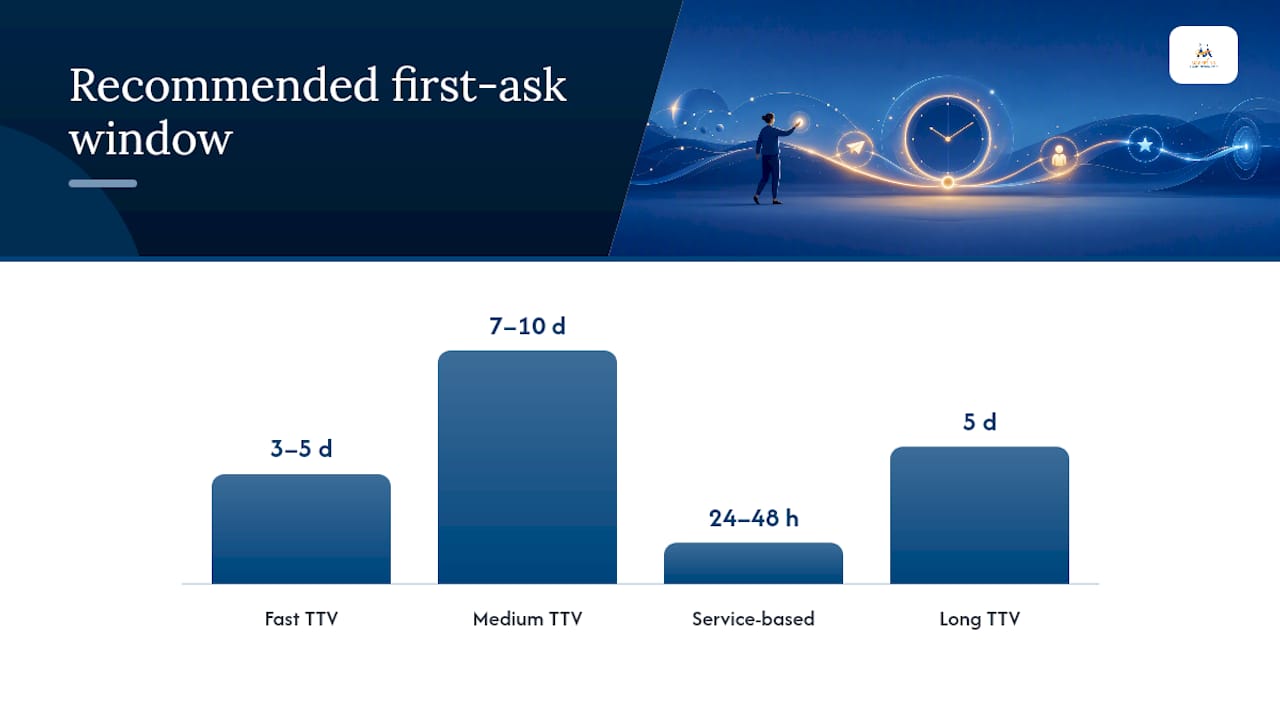
The right window depends on how long it takes a customer to form an opinion:
| Product/service type | Recommended first-ask window |
|---|---|
| Fast time-to-value (candles, snacks, small accessories) | 3–5 days after delivery |
| Medium time-to-value (electronics, apparel, home goods) | 7–10 days after delivery |
| Service-based (repairs, consultations, appointments) | 24–48 hours after the visit |
| Long time-to-value (SaaS, subscriptions, courses) | 5 days after a meaningful usage milestone |
A few cadence rules keep this from becoming spam:
- Send exactly one reminder, 5 to 7 days after the initial ask, to customers who haven't responded.
- Stop after two total emails. A third ask rarely converts and tends to raise complaint rates instead.
- Favor midweek sends, Tuesday through Thursday, in the morning or early afternoon; late-night and weekend sends underperform across most categories.
If your open rates are stuck, shift the send window before you touch the copy. Tools like Quotewren — Quote it. Get paid. Get reviewed. can help service businesses integrate quoting and payment with review prompts for better results. A Tuesday 10 AM send and a Friday 8 PM send of the identical email can produce noticeably different open rates, and that lever costs nothing to pull.
Which Subject Lines Get Review Emails Opened?
Curiosity beats a direct ask almost every time. Subject lines that name the product and pose a soft question, "How's your [Product] holding up?", "[First Name], thoughts on your recent order?", "Quick question about your visit", consistently outperform blunt "Leave us a review" subject lines, sometimes by wide margins according to subject-line pattern testing.
A few patterns to steal:
- "How's your [product] working out?"
- "[First Name], got a minute for us?"
- "Quick question about your order"
- "Thanks again, [First Name] — one small favor"
Avoid spelling out "leave a review" or "rate us" in the subject line itself. It reads as a transactional ask before the reader has even opened the email, and it tends to suppress opens rather than help them.
A simple testing plan works better than guessing:
- Test subject lines first, since they control whether the email gets opened at all.
- Track the full funnel, open rate, click rate, and submission rate, not just opens.
- Run each subject-line variant against at least a few hundred recipients per side before declaring a winner; smaller samples produce noisy results that don't hold up the next month.
Can You Offer Incentives for Reviews Legally?
Yes, but only under one condition: the reward has to apply no matter what rating the customer leaves. The FTC's 2024 final rule explicitly prohibits businesses from conditioning an incentive on a positive review or hiding negative feedback from public view.
The FTC's final rule treats review-gating, showing only positive reviews collected through an incentive program, as a deceptive practice, alongside directly paying for five-star ratings. Businesses that incentivize reviews must offer that incentive to every participant regardless of what they write.
A compliant version of an incentive email might read: "Leave us a review, and however it goes, you'll get 15% off your next order." That single "however it goes" clause is doing the legal work.
Practical checks worth building into your process:
- Never ask customers to leave "five stars" or any specific rating in your copy.
- Never filter, suppress, or selectively publish only favorable reviews collected through an incentive program.
- Track redemptions separately from ratings so you can prove, if ever asked, that rewards weren't tied to review content.
- Add plain-language terms to incentive emails ("one reward per customer," "valid for 30 days") to avoid ambiguity.
Design and Deliverability Rules for Review Emails
A review request email that looks like a promotional blast gets treated like one, both by spam filters and by the customer's thumb. Keep the design plain, order-confirmation plain, not marketing-newsletter plain.
- Use a single CTA button, sized for easy tapping on mobile, since most review emails get opened on a phone.
- Skip heavy imagery and banner graphics; a clean text layout with one button reads as authentic rather than promotional.
- Write a preheader that reinforces the subject line instead of repeating your logo tagline.
- Authenticate your sending domain with SPF, DKIM, and DMARC, and include a List-Unsubscribe header on bulk sends. Deliverability-safe operator rules built around these three protocols keep complaint rates low enough that inbox providers keep trusting your domain.
- Space reminders conservatively. Two emails total, spaced 5 to 7 days apart, protects your sender reputation far better than a rapid-fire sequence.
Pro Tip: If you're sending review requests through the same domain as your marketing newsletter, a spike in complaints from one campaign can quietly hurt inbox placement for the other. Consider a dedicated subdomain for transactional and review emails if your volume is high.
Should You Follow Up With SMS After the Email?
Yes, for customers who've opted in to text messages. SMS typically gets opened faster and more often than email, which makes it a strong second touch rather than a replacement for the first ask.
A workable sequence looks like this:
- Send the review request email 7 to 10 days after delivery or the service visit.
- Wait 3 to 5 days. If there's no response and the customer opted into texts, send a short SMS nudge: "Hi [First Name], quick favor: got a minute to review your recent [product/service]? [link]"
- Stop all outreach by Day 21 regardless of channel. Continued asks past that point rarely convert and risk complaints.
Keep SMS copy under two sentences and never send more than one text nudge per purchase. Frequency creep on SMS generates opt-outs faster than it does on email.
How Do You Know If Your Review Emails Are Working?
Four numbers matter: open rate, click rate, submission rate (the review conversion that actually counts), and unsubscribe or complaint rate. Submission rate is the one that pays the bills, since a high open rate with a low submission rate usually points to a weak CTA or too much friction on the review form.
Email-only programs typically top out around 12 to 15% total review collection, while layering in staggered SMS or WhatsApp touches can push that to 18 to 25% depending on audience and product type.
Three experiments consistently move the needle more than anything else:
- A/B test subject lines before touching body copy; it's the highest-leverage, lowest-effort change.
- Shift your send timing window by a few days and compare submission rates, not just opens.
- Test a single-click star rating embedded in the email against a multi-step form on a landing page; fewer steps almost always wins.
Who Handles This for You: Digital Marketing All and Diane O'Brien
Digital Marketing All builds and manages review-generation programs for small and medium-sized businesses, including delivery-triggered email flows, subject-line testing, and FTC-compliant incentive campaigns, as part of its broader reputation-management services.
- Delivery- and appointment-based triggers replace guesswork around order-date timing.
- Subject-line and CTA testing run continuously rather than as a one-time setup.
- Incentive programs are structured to meet FTC guidance from the start, not retrofitted after a complaint.
This article's editorial perspective is written by Diane O'Brien, drawing on the operational patterns and compliance standards covered above.
Want This Running on Autopilot?
Building five templates is the easy part. Getting the timing, subject-line testing, and FTC-compliant incentive wording right, and keeping it running without babysitting it every week, is where most small businesses stall out. Digital Marketing All's review generation and management program sets up delivery-based triggers, tests subject lines against your actual audience, and keeps your incentive offers on the right side of the FTC's 2024 rule so you're not writing these emails from scratch every quarter.
Templates Convert, But Timing Is What Actually Moves the Needle
The most durable lesson buried in the data here is one most small business owners resist: your subject line is not your biggest problem. Everyone wants to obsess over clever copy, "How's your candle doing?" versus "We'd love your feedback!", but the operator evidence keeps pointing to the same conclusion. Moving your send trigger from order date to delivery date matters more than any wording change you'll make this year.
The conventional advice oversells personalization and undersells restraint. Plenty of guides tell you to "make it personal" and stop there, as if a first name merge tag fixes a fundamentally mistimed campaign. It doesn't. A perfectly personalized email sent three days after checkout, before the customer has even opened the box, will underperform a plain-text email sent nine days after delivery.
If you take one thing from this guide, take the discipline: one clean template, one correct trigger date, one reminder, then stop. Businesses that chase a third follow-up or stack incentives on top of urgency language tend to see complaint rates climb faster than review counts.
Sources
Claims here draw on FTC review guidance, operator timing and benchmark studies, and SMS-versus-email channel research cited throughout the article above.
FAQ
How Do You Politely Ask for a Good Review?
Reference the specific purchase or visit, thank the customer first, then make one clear, low-effort ask ("60 seconds") with a single CTA button rather than a demand for a specific star rating.
What Is a Good Sample Review Message?
A working example: "Hi [First Name], your [product] arrived on [date], and we'd love to hear how it's going. [Leave a Review button]. Thanks for being a customer." It names the purchase, states the ask plainly, and closes without extra links.
How Do I Send an Email for a Review?
Trigger the send from your delivery or appointment confirmation, not the order date, using an automation tool or your email platform's workflow feature, then route the customer to a Google Business Profile link or hosted review form.
How Do I Ask for a Review Without Sounding Desperate?
Keep it to one ask, one email, and one reminder at most. Avoid urgency language, multiple exclamation points, or repeated follow-ups past two total emails, which is what actually reads as desperate rather than the initial request itself.