

TL;DR:
- Tracking local marketing results involves measuring actions like calls, direction requests, and booked appointments that directly impact revenue. Using tools such as Google Business Profile, Google Analytics 4, and call tracking software helps businesses identify profitable neighborhoods and optimize marketing spend accordingly. Consistently reviewing segmented data and building independent measurement layers enable smarter decisions and improved local business growth.
Tracking local marketing results means measuring specific location-based user actions that connect directly to business outcomes, such as calls, direction requests, and booked appointments. Generic national averages hide the truth about which neighborhoods drive revenue and which drain your budget. This guide shows you how to use Google Business Profile, Google Analytics 4, and call tracking software to build a clear picture of your local marketing performance. You will learn which local marketing performance metrics actually matter, which tools to use, and how to turn raw data into decisions that grow your business.
Which local marketing metrics should you track?
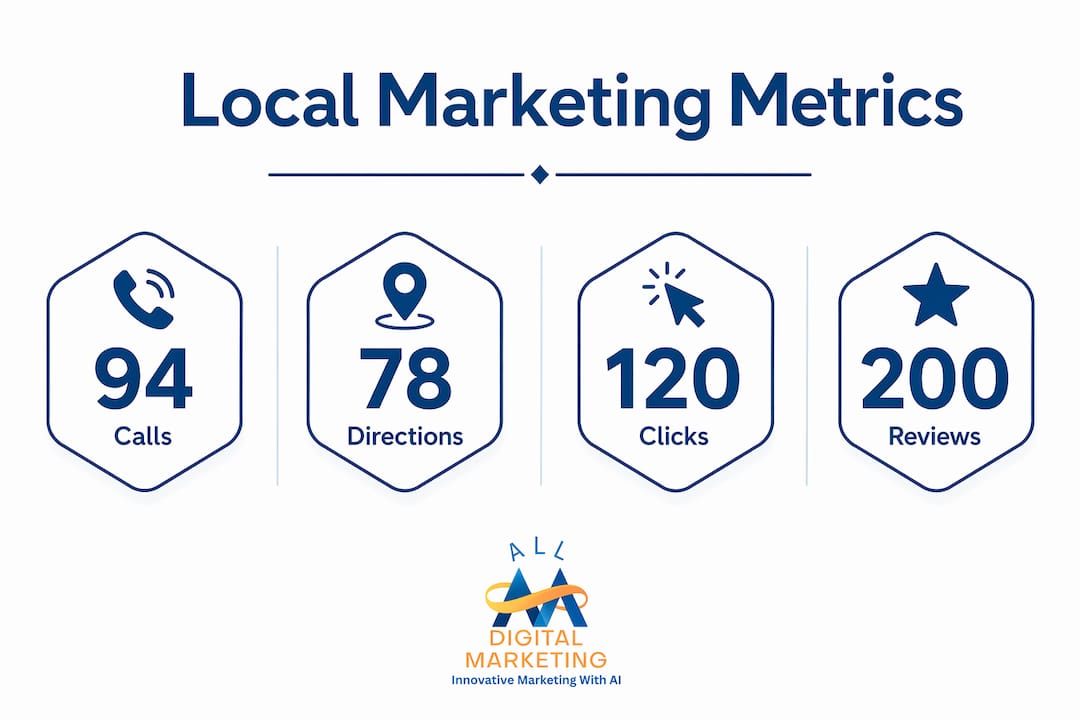
The four metrics that define local marketing performance are calls per location, direction requests, website clicks, and booked appointments. Action-based metrics like these connect directly to revenue, while impression counts and generic page views tell you almost nothing about business outcomes. A thousand impressions with zero calls means your listing is visible but not compelling.
Calls per location is the single most telling metric for most local businesses. A phone call signals high purchase intent. Someone searching for a plumber at 7 p.m. and calling your number is far more valuable than someone who scrolled past your ad.

Direction requests reveal foot traffic intent. When someone asks Google Maps for directions to your shop, they are almost certainly planning a visit. Tracking this number weekly shows you whether your Google Business Profile is converting searchers into physical visitors.
Website clicks from local search tell you how many people moved from your listing to your site. Pair this with Google Analytics 4 conversion data to see how many of those visitors booked an appointment, filled out a contact form, or made a purchase.
Booked appointments and leads by source close the loop between marketing activity and revenue. If you run a dental practice in Austin, Texas, knowing that 40 appointment requests came from Google Search and 8 came from Yelp in a given month tells you exactly where to invest next.
- Calls per location: tracks high-intent inbound contact
- Direction requests: measures foot traffic conversion from search
- Website clicks: connects your listing to on-site behavior
- Booked appointments: links marketing directly to revenue
- Review volume and rating trends: signals reputation health and influences click-through rates
Reviews deserve a place in your local marketing analytics dashboard. A business with 4.8 stars and 200 reviews consistently outperforms a competitor with 3.9 stars, even if the competitor ranks slightly higher in search results. Review trends over time also reveal whether a campaign or operational change affected customer satisfaction.
Pro Tip: Set up a simple spreadsheet that logs your top four metrics weekly by location. Patterns become visible within 30 days, and you will spot problems before they cost you real money.
What tools can help you measure local marketing results?
Google Business Profile, Google Analytics 4, call tracking software, and local rank tracking platforms are the four tool categories every local business needs. Each one captures a different layer of your performance data, and combining them gives you a complete picture.
Google Business Profile insights
Google Business Profile insights report on calls, direction requests, and website clicks directly from local search. These are action-oriented signals from people with genuine local intent. The platform shows you how customers found your listing, whether through direct search, discovery search, or branded queries, which helps you understand whether your SEO efforts are reaching new audiences or just existing customers.
Google Analytics 4
Google Analytics 4 tracks what happens after someone clicks through to your website. You can set up conversion events for form submissions, phone number clicks, appointment bookings, and purchases. Linking GA4 to your Google Business Profile and Google Ads accounts creates a connected view from search impression to completed transaction.
Call tracking and CRM integration
Call tracking tools assign unique phone numbers to different marketing channels, so you know whether a call came from your Google listing, a Facebook ad, or a local directory. Integrating call data with your CRM means every lead has a source attached to it. Building independent data layers that combine CRM records, call tracking, and offline sales is what separates businesses that truly understand their ROI from those guessing based on platform dashboards.
Local rank tracking tools
| Tool | Primary use | Best for |
|---|---|---|
| BrightLocal | Local rank tracking and citation audits | Single and multi-location businesses |
| Local Falcon | Grid-based local search visibility maps | Visualizing rank by neighborhood |
| GeoRanker | Geo-targeted keyword rank tracking | Businesses targeting multiple cities |
| AgencyAnalytics | Reporting dashboards with GBP integration | Agencies managing local clients |
Local rank tracking tools like BrightLocal and Local Falcon show you where your business ranks in search results across specific zip codes and neighborhoods. This geographic granularity is critical because your ranking in one part of a city can differ significantly from your ranking five miles away.
Pro Tip: Use UTM parameters on every link in your local campaigns. Tag by location, channel, and campaign name. This turns vague traffic data into traceable conversion paths you can act on.
How to build local marketing reports that reveal profit zones
A local marketing report that reveals true profit zones starts with business outcomes by location, not with traffic numbers. Effective local audits connect marketing data to revenue and customer acquisition cost at the location level. Start there, and work backward to the marketing activities that drove those outcomes.
Here is a practical monthly reporting process you can follow:
- Pull location-level data. Export calls, direction requests, and website clicks from Google Business Profile for each location or service area. Download GA4 conversion data segmented by city or zip code.
- Segment by geography. Break your data down by neighborhood, zip code, or city district. Tracking ROI by city reveals profit zones with return ratios up to 4:1, while national averages mask these differences entirely.
- Map marketing spend to outcomes. For each geographic segment, calculate how much you spent on ads, SEO, or content and how many leads or sales resulted. This gives you a cost per acquisition by location.
- Identify your profit zones. Some neighborhoods will show a 4:1 return. Others may barely break even. This data tells you where to increase spend and where to pull back.
- Choose one metric to improve. Pick the single weakest metric in your top-performing zone and focus your next 30 days on improving it. Fixing one metric at a time isolates cause and effect, so you know what actually moved the needle.
Sample monthly local performance snapshot
| Metric | Target | Actual | Status |
|---|---|---|---|
| Calls from GBP | 80 | 94 | On track |
| Direction requests | 120 | 87 | Needs attention |
| Website clicks from local search | 300 | 312 | On track |
| Booked appointments | 45 | 38 | Needs attention |
Keep your dashboard to the metrics that connect most directly to revenue. Multi-location brands that simplify their reporting to visibility, reputation, engagement, and conversions make faster decisions and avoid the paralysis that comes from tracking 30 metrics at once. A simple table like the one above, reviewed monthly, is more useful than a complex dashboard reviewed never.
Synthesizing online and offline data is where most local businesses fall short. Your web analytics show clicks and form fills. Your call tracking shows inbound calls. Your point-of-sale system shows actual purchases. Connecting these three data streams gives you a true picture of which marketing activities drive real revenue, not just digital activity. Tools like data-driven marketing platforms help local businesses make this connection without needing a full analytics team.
Common pitfalls when tracking local marketing results
The most common mistake local businesses make is relying entirely on platform dashboards for their measurement. Google Ads, Meta Ads, and even Google Business Profile each report data in ways that favor their own platform. Independent measurement layers that combine CRM data, call tracking, and offline sales give you an accurate view that no single platform can provide on its own.
Here are the pitfalls that most often derail local marketing measurement:
- Tracking too many metrics at once. When you monitor 20 different data points, none of them get the attention they deserve. Focus on four to six metrics that connect directly to revenue.
- Misreading impression data. High impressions with low clicks usually mean your listing title or photos are not compelling, not that your SEO is failing. Impressions alone never tell the full story.
- Ignoring geographic segmentation. Reporting on your business as a whole hides which locations or service areas are performing. Always break data down by geography before drawing conclusions.
- Reacting to short-term fluctuations. A single bad week does not indicate a trend. Look at 30-day and 90-day patterns before changing your strategy.
- Skipping data validation. Check that your call tracking numbers are correctly assigned, your GA4 conversion events are firing, and your UTM tags are consistent. Dirty data leads to wrong decisions.
"Owning the measurement process gives local brands a strategic advantage over competitors who rely solely on platform dashboards and attribution models." — Near-i
When you notice a metric dropping, resist the urge to change everything at once. Check your data sources first. Confirm that tracking is still working correctly. Then identify the single most likely cause and test one change. This approach, combined with a monthly improvement cadence, gives you clear evidence of what works instead of a pile of simultaneous changes with no clear winner.
One often-overlooked troubleshooting step is comparing your Google Business Profile data to your GA4 data. If GBP shows 200 website clicks but GA4 shows only 40 sessions from Google organic, something is broken in your tracking setup. Discrepancies like this are common and fixable, but only if you are looking for them.
Key Takeaways
Measuring local marketing performance accurately requires integrating action-based metrics, cross-channel tools, and geographic segmentation to identify where your marketing spend actually generates revenue.
| Point | Details |
|---|---|
| Focus on action metrics | Track calls, direction requests, website clicks, and appointments instead of impressions. |
| Use integrated tools | Combine Google Business Profile, Google Analytics 4, and call tracking for a complete data picture. |
| Segment by geography | Break data down by zip code or neighborhood to find profit zones with returns up to 4:1. |
| Report monthly with one focus | Choose one metric to improve each month to clearly isolate what drives results. |
| Own your measurement | Build independent data layers beyond platform dashboards to get accurate local ROI. |
What I've learned from years of local marketing measurement
The businesses I have seen grow fastest from their local marketing are not the ones with the biggest budgets. They are the ones that measure with discipline. I have worked with local businesses that were spending thousands of dollars on Google Ads every month with no idea which zip codes were generating profitable customers. When we segmented their data by neighborhood and mapped spend to actual revenue, the answer was clear: two zip codes drove 70% of their profitable leads, and three others were nearly break-even at best.
The instinct most business owners have is to track everything. More data feels like more control. In practice, the opposite is true. When you are looking at 25 metrics across five platforms, you end up making decisions based on whichever number caught your eye that morning. The businesses that win are the ones that pick four to six metrics, review them on a consistent schedule, and make one deliberate change at a time.
I also believe strongly that you should never trust a single platform's reporting as your source of truth. Google will tell you your ads drove 50 conversions. Your CRM might show 30 new leads that month. Your call tracking might show 22 inbound calls. The real number lives somewhere in the overlap of all three. Building that integrated view takes effort upfront, but it pays back every month in clearer decisions and less wasted spend.
If you are just starting out with local search performance, do not wait until your tracking is perfect to start making decisions. Start with Google Business Profile insights and a simple call tracking setup. Add layers as you grow. The goal is not a perfect analytics system. The goal is enough clarity to make smarter decisions than your competitors. That bar is lower than most people think, and reaching it is entirely within your reach.
— Diane
How Digitalmarketingall can strengthen your local marketing results
Tracking your local marketing performance is only half the equation. Your online reputation directly shapes how many people click your listing, call your business, or walk through your door. Reviews are a core local marketing performance metric, and managing them actively is one of the highest-return activities a local business can do. Digitalmarketingall offers review generation and management services designed to help local businesses build a steady stream of authentic reviews that improve both search rankings and customer trust. Pair strong reviews with the measurement framework in this guide, and you will have a clear view of how reputation drives revenue. Explore SMB marketing strategies that connect reputation, local SEO, and conversion to real business growth.
FAQ
What are the most important local marketing metrics to track?
The four most important local marketing metrics are calls, direction requests, website clicks, and booked appointments. These action-based signals connect directly to revenue and customer acquisition, unlike impression counts or page views.
How do I track local marketing results across multiple locations?
Use Google Business Profile insights segmented by location, combined with Google Analytics 4 and a call tracking tool that assigns unique numbers to each location. Segment all data by city or zip code to compare performance across your service areas.
What is the difference between local marketing analytics and national analytics?
Local marketing analytics focuses on geographic-specific actions and outcomes, such as calls and direction requests from a specific neighborhood. National analytics averages performance across all locations, which can hide the fact that some areas deliver a 4:1 return while others barely break even.
How often should I review my local marketing performance data?
Review your core local marketing performance metrics monthly. A monthly cadence gives you enough data to spot real trends while keeping the review process manageable and focused on one improvement at a time.
Why should I not rely solely on Google Ads or Meta Ads reporting?
Platform dashboards report data in ways that favor their own attribution models, which can overcount conversions. Building an independent data layer that combines CRM records, call tracking, and offline sales gives you a more accurate picture of your true local ROI.