

TL;DR:
- Setting up local business ads involves creating targeted campaigns that increase visibility among nearby customers ready to buy. Small businesses should verify their Google Business Profile and install Meta Pixel before launching ads to ensure effective results. Combining Google search ads with Meta's audience discovery enhances reach and improves overall local marketing success.
Setting up local business ads is the process of creating geographically targeted ad campaigns that put your business in front of nearby customers who are ready to buy. For small to medium-sized business owners, local advertising, also called geotargeted paid media, is the most direct path from ad spend to foot traffic and phone calls. The two platforms that drive the most measurable results for local businesses are Google and Meta. Google captures customers who are actively searching for what you sell. Meta finds customers who do not know you yet but fit your ideal profile. Used together, these platforms form the foundation of any effective local business marketing strategy.
What do you need before you set up local business ads?
The right accounts and tools must be in place before you spend a single dollar on ads. Skipping this step is the most common reason local campaigns fail in the first week.
Google Business Profile
Every local business needs a free, optimized Google Business Profile as the foundation of its local ad presence. This profile drives map and search traffic and feeds directly into Google Local Services Ads. Keep your hours, address, phone number, and photos current. Outdated or missing information causes Google to lower your ad quality score, which raises your cost per click.
Pro Tip: Add at least five photos to your Google Business Profile before launching any ads. Profiles with photos receive significantly more direction requests and website clicks than those without.
Meta Business Manager and ad account
Meta requires a Business Manager account before you can run any paid campaigns. Inside Business Manager, you create an Ad Account, which holds your payment method, campaign history, and audience data. Set up your Facebook Page and connect it to the Ad Account. This connection is required for any local awareness or lead generation campaign.
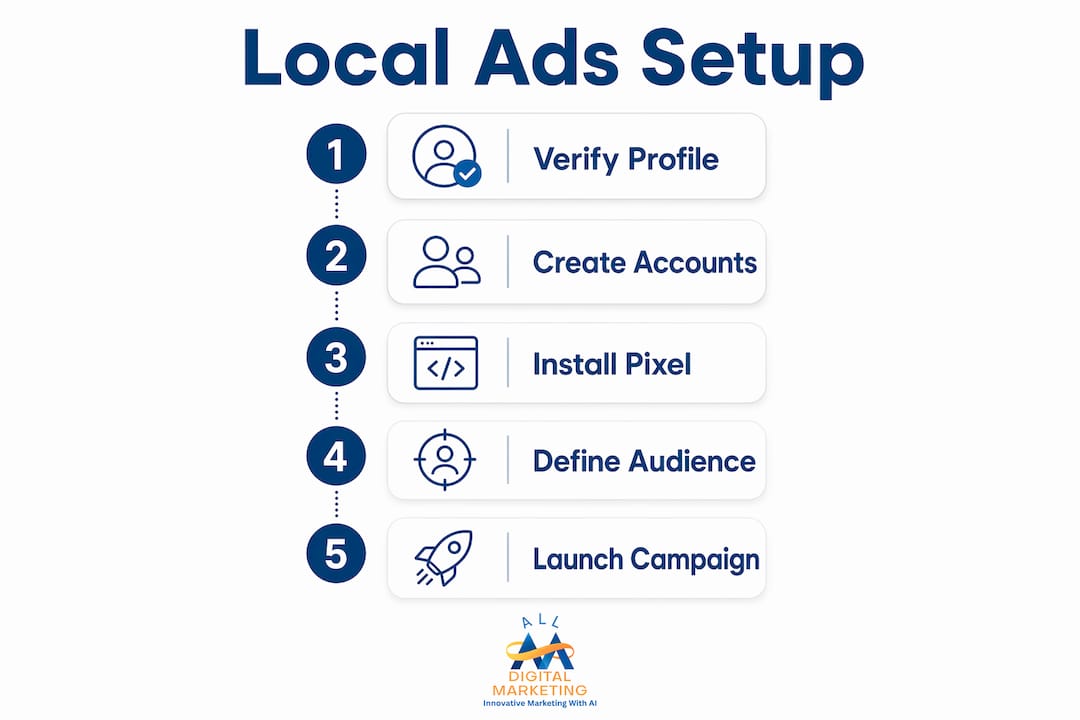
Installing the Meta Pixel on your website is a non-negotiable step. The Pixel tracks website visitors and lets you build retargeting audiences, which are groups of people who visited your site but did not convert. Retargeting is one of the highest-return tactics available to small businesses running ads for the first time.
Essential checklist before launch
Before you create a single ad, confirm these items are complete:
- Google Business Profile is verified and fully filled out
- Meta Business Manager account is active with a linked Ad Account
- Meta Pixel is installed and firing correctly on your website
- Your business address, phone number, and service area are consistent across all platforms
- You have a clear budget range in mind, even if it is a starting figure
- You have at least two or three photos of your actual business, team, or products ready for ad creative
Pro Tip: Use free marketing tools to check whether your business name, address, and phone number appear consistently across the web. Inconsistent listings hurt both your ad quality score and your local SEO rankings.
How do you set up and target local ads on Google and Meta?
The setup process differs between platforms, but the logic is the same: choose an objective, define your audience by location, set a budget, and build your creative.

Setting up Google Local Services Ads and Search campaigns
Google offers two main ad types for local businesses: Local Services Ads (LSAs) and standard Search campaigns. LSAs appear at the very top of search results and charge per lead, not per click. They work best for service businesses like plumbers, electricians, and HVAC companies. Standard Search campaigns work for any local business and charge per click.
Follow these steps to launch a Google Search campaign for local customers:
- Sign in to Google Ads and click "New Campaign."
- Select your campaign objective: "Leads," "Website traffic," or "Store visits."
- Choose "Search" as the campaign type.
- Under "Locations," enter your city, zip code, or draw a radius around your address.
- Set your daily budget. A starting range of $10–$30 per day gives Google enough data to learn.
- Write your ad headlines and descriptions. Include your city name and a specific offer.
- Add location extensions so your address and phone number appear directly in the ad.
- Set your bidding strategy to "Maximize conversions" or "Target CPA" once you have at least 30 conversions tracked.
Setting up Meta local awareness and lead ads
Meta's campaign structure has three levels: Campaign, Ad Set, and Ad. The Campaign level sets the objective. The Ad Set level controls your audience and budget. The Ad level holds your creative.
Follow these steps to launch a Meta local campaign:
- Open Meta Ads Manager and click "Create."
- Select your campaign objective. Use "Awareness" for new businesses and "Leads" or "Store traffic" for businesses with an established presence.
- At the Ad Set level, click "Locations" and enter your business address.
- Choose "People living in or recently in this location."
- Set your radius. Radius targeting works best when matched to your business type: restaurants do well at 5–10 km, home services at 15–40 km, and dental practices at 10–25 km.
- Layer in demographic filters like age and household income if your service has a specific customer profile.
- Set a daily budget between $10 and $50 to start.
- Upload your creative. Use a real photo of your business or team, not a stock image.
- Write copy that names your city or neighborhood. "Serving Austin families since 2010" outperforms "Best service in town" every time.
Pro Tip: Run your Meta ads during the hours your business is open. Ads that generate calls or messages outside business hours waste budget and frustrate potential customers.
Creative best practices for local ads
Authentic local creatives featuring real business photos and specific offers drive higher engagement than generic stock images. This is not a minor difference. Ads with real photos of your team, your storefront, or your work in progress consistently outperform polished but impersonal stock photography. Include a specific offer, a recognizable local landmark, or a neighborhood reference to signal that you are a real local business, not a national chain.
What are effective multi-platform strategies and budget allocation?
Running ads on a single platform limits your reach to one part of the customer journey. Combining Google and Meta covers the full path from discovery to decision.
Google captures customers who already know they need your service and are searching for it right now. Meta reaches people who fit your customer profile but have not started searching yet. Combining these platforms assigns each one a distinct role: Google handles intent capture, and Meta handles audience discovery.
Recommended starting budgets
For most consumer-facing small businesses, a practical starting point is $500–$1,000 per month on your primary platform and $300–$600 per month on your secondary platform. Management fees using AI-based tools can run as low as $49.99 per month per platform, making multi-platform ad management accessible even for tight budgets. These ranges are not fixed. They are starting points that you adjust based on what the data shows after the first 60–90 days.
How to allocate budget across platforms
- Put 60–70% of your total ad budget on the platform that drives the most leads or conversions.
- Use the remaining 30–40% on the secondary platform for awareness and retargeting.
- Do not split budgets equally between platforms until you have performance data to justify it.
- Review platform performance every two weeks during the first three months.
- Shift budget toward the top performer once you have clear data, typically after 60–90 days of active campaigns.
Retargeting as a budget multiplier
Retargeting is the practice of showing ads to people who already visited your website or engaged with your social content. These audiences convert at a much higher rate than cold audiences because they already know your business. Set up a retargeting audience in Meta using your Pixel data and a separate remarketing list in Google Ads using your website visitors. Allocate a small portion of your budget, around 15–20%, specifically to retargeting. The return on that spend typically exceeds your prospecting campaigns within the first month.
Pro Tip: Use consistent visuals and messaging across both Google and Meta. Coordinated creative across platforms increases conversion rates by reinforcing your brand at every touchpoint in the customer journey.
How do you optimize local ads and avoid common mistakes?
Optimization is not a one-time task. It is a weekly habit that separates businesses that get results from those that burn through budget.
Key metrics to track
The three metrics that matter most for local ad campaigns are:
- Click-through rate (CTR): A low CTR signals that your ad copy or creative is not resonating. Rewrite your headline or swap your image.
- Cost per lead (CPL): This tells you what you are paying for each inquiry. Compare it to the average value of a new customer to judge whether the campaign is profitable.
- Estimated foot traffic or store visits: Google Ads provides store visit estimates for eligible campaigns. Use this alongside call tracking to measure offline impact.
Monitoring these metrics guides every budget and creative decision you make. Do not wait until the end of the month to check performance. Review your campaigns every week during the first 90 days.
Common mistakes that kill local ad ROI
"The three most damaging mistakes in local advertising are setting a radius that is too broad, using generic stock photos instead of real business images, and ignoring retargeting entirely. Each one alone can cut your return on ad spend in half."
Overly broad radius targeting, generic stock photos, and neglecting retargeting are the top three pitfalls for local advertisers. A radius that is too wide wastes impressions on people who will never drive to your location. Stock photos reduce trust because they signal that you are not a real local business. Ignoring retargeting means you are paying to reach cold audiences repeatedly instead of converting warm ones.
Additional mistakes to avoid:
- Running ads without conversion tracking installed. You cannot optimize what you cannot measure.
- Using the same ad creative for more than 30 days without testing a new version.
- Sending ad traffic to your homepage instead of a dedicated landing page with a clear call to action.
- Ignoring negative keywords in Google Search campaigns, which causes your ads to show for irrelevant searches.
Pro Tip: Test two versions of your ad creative simultaneously. Run both for two weeks, then pause the lower performer and replace it with a new variation. This process, called A/B testing, keeps your campaigns fresh and your costs down.
Long-term local visibility
Paid ads deliver immediate visibility, but they work best when paired with a strong organic presence. A hyperlocal SEO strategy builds the organic rankings that support your paid campaigns and reduce your cost per acquisition over time. Businesses that combine paid and organic local marketing consistently outperform those that rely on ads alone.
Key Takeaways
The most effective approach to local business advertising combines Google's intent-based search ads with Meta's audience-based discovery campaigns, supported by retargeting and consistent creative across both platforms.
| Point | Details |
|---|---|
| Set up foundations first | Verify your Google Business Profile and install the Meta Pixel before spending on ads. |
| Match radius to business type | Restaurants target 5–10 km; home services target 15–40 km for efficient local reach. |
| Start with a defined budget | Begin at $10–$50 per day and scale only after 60–90 days of performance data. |
| Use real local creative | Authentic photos of your team or business outperform stock images in every local market. |
| Track and optimize weekly | Monitor CTR, cost per lead, and foot traffic estimates to guide budget and creative decisions. |
What I have learned after years of watching local ad campaigns succeed and fail
The businesses that get the best results from local advertising share one trait: they resist the urge to be everywhere at once. I have seen owners spread a $600 monthly budget across four platforms and wonder why nothing works. The math does not support it. Each platform needs enough data to learn, and that requires consistent spend over time.
The second pattern I notice is that owners underestimate the power of authentic creative. A photo of the actual team, the real storefront, or a genuine customer moment outperforms a polished stock image every single time. Local customers respond to familiarity. They want to see a face they might recognize or a street they drive past every day.
My honest advice: master Google and Meta before you add any other channel. Get your local search presence solid, run your ads consistently for 90 days, and let the data tell you where to put more money. The businesses that scale successfully are the ones that make decisions based on what the numbers show, not what feels right in the moment.
— Diane
How Digitalmarketingall helps local businesses build credibility alongside their ads
Local ads bring people to your door. Your online reputation determines whether they walk in or keep scrolling. Digitalmarketingall's review generation and management service helps local businesses build a steady stream of positive reviews on Google and other key platforms. Strong reviews lower your cost per acquisition by increasing the conversion rate of every ad you run. Customers who see a business with dozens of recent, positive reviews are far more likely to call or visit than those who see a sparse or mixed review profile. Digitalmarketingall combines reputation management with local ad strategy to give your business the credibility it needs to turn ad clicks into loyal customers.
FAQ
What is the best platform to start local business ads?
Google is the best starting platform for most local businesses because it captures customers who are actively searching for your service. Add Meta once your Google campaigns are running and generating data.
How much should a small business spend on local ads?
A practical starting budget is $10–$50 per day on your primary platform. Scale spending gradually after 60–90 days once you have clear performance data showing which campaigns generate leads.
What radius should I use for local Facebook ads?
The right radius depends on your business type. Restaurants perform well at 5–10 km, dental practices at 10–25 km, and home service businesses at 15–40 km from their location.
Why are my local ads not generating leads?
The most common causes are a radius that is too broad, generic stock photo creative, no retargeting setup, and sending traffic to a homepage instead of a dedicated landing page with a clear call to action.
Do I need a Google Business Profile to run local ads?
Yes. An optimized Google Business Profile is required for Google Local Services Ads and significantly improves the performance of standard Google Search campaigns by adding location extensions and building trust with searchers.