
TL;DR:
- Optimizing both your video's metadata and schema markup is essential for search engines to discover and rank your content effectively. Building engaging, well-structured videos with strong hooks and local keywords enhances viewer retention and local visibility. Consistently reviewing performance metrics and updating your strategy ensures long-term SEO success for local businesses.
You invest time and money into polished video content, publish it, and then watch the view count sit at a disappointing number while competitors appear at the top of search results. This happens to small businesses every day, and the cause is almost always the same: the video itself is solid, but the SEO groundwork is missing. Getting video content found by the right audience requires both technical preparation and smart in-video decisions. This guide walks you through every step, from setting up the right tools to applying schema markup, so your videos stop disappearing and start driving real traffic.
Table of Contents
- Setting foundations: What you need to enhance video SEO
- Write metadata and descriptions that get indexed
- Structure videos for engagement and ranking success
- Add schema markup and optimize for Google and YouTube
- Common mistakes and how to measure SEO success
- What most video SEO advice gets wrong
- How Digitalmarketingall.org accelerates your video SEO wins
- Frequently asked questions
Key Takeaways
| Point | Details |
|---|---|
| Optimize descriptions | Pack video descriptions with keywords, chapters, and relevant links for better discoverability. |
| Use schema markup | Add VideoObject schema to your site so Google can feature your videos in search results. |
| Engagement matters | Maximize watch time and viewer retention to boost ranking for both YouTube and Google. |
| Check analytics regularly | Monitor video performance using YouTube and Google tools to measure SEO progress and adjust strategies. |
| Avoid common SEO pitfalls | Stay clear of thin descriptions, missing schema, and weak calls to action to keep your videos ranking high. |
Setting foundations: What you need to enhance video SEO
Video SEO is the practice of optimizing your video content and all its supporting information so that search engines can find, understand, and rank it. This includes the video file itself, the metadata around it (titles, descriptions, tags), the page it lives on, and the structured data that tells Google exactly what the video is about. Understanding video content SEO basics before you start editing or uploading saves you from fixing avoidable mistakes later.
Before you optimize a single video, you need the right setup in place. Here is what you need:
- A verified YouTube channel or a reliable video hosting platform (Vimeo, Wistia, or self-hosted)
- Access to your business website with the ability to edit pages and add code snippets
- A keyword research tool such as Google Keyword Planner, Ubersuggest, or Ahrefs to identify what your customers actually search for
- Google Search Console connected to your website to monitor how videos appear in search
- YouTube Studio access for analytics and metadata editing
- A script or outline for each video before recording, so the content structure is intentional
One element that business owners often overlook is the opening of the video itself. Watch time and retention are key ranking signals, and both depend heavily on whether viewers stay past the first few seconds. A strong hook in the first five to ten seconds, combined with a clear video structure, directly affects how search engines evaluate your content.
The table below shows the key tools and their primary role in your video SEO workflow:
| Tool | Primary role |
|---|---|
| Google Keyword Planner | Find search volume and keyword ideas |
| YouTube Studio | Manage metadata, analytics, and cards |
| Google Search Console | Monitor video impressions and clicks |
| Schema markup generator | Create VideoObject structured data |
| Ahrefs or Ubersuggest | Competitive keyword and ranking research |
Pro Tip: Before recording, run your main topic through Google's search bar and note the autocomplete suggestions. These phrases reflect real searches and should shape your video title and description.
Understanding video marketing for sales also helps you align your video goals with business outcomes from the start, so you are not just optimizing for views but for leads and conversions.
Write metadata and descriptions that get indexed
With your tools and accounts ready, the next step is filling out every metadata field with precision. Metadata is how search engines read your video before they can even process the content inside it. Getting this right is one of the highest-impact actions you can take.
Here is how to approach each element:
- Video title: Place your primary keyword within the first three to four words of the title. Keep it under 60 characters so it displays fully in search results. Make it readable and specific. "Plumber in Austin: How to fix a leaking faucet fast" outperforms "Tips for plumbing" in both search and click-through rate.
- Description: Write detailed descriptions of 200 to 500 words with your primary keyword appearing in the first one to two sentences. Follow with timestamps, related terms, relevant links to your website or services, and a clear call to action.
- Tags: Use a mix of broad and specific tags. Include your primary keyword, location-based terms if relevant, and related phrases your audience uses.
- Thumbnails: Custom thumbnails with text overlays and clear visuals improve click-through rate, which is a signal both YouTube and Google use to evaluate relevance.
- Chapters: Add timestamps in the description to create chapters. This improves navigation, increases watch time, and makes your video eligible for chapter-based features in search results.
The comparison below shows the difference between a weak and a strong description approach:
| Description element | Weak approach | Strong approach |
|---|---|---|
| Keyword placement | Buried in paragraph 3 | First sentence |
| Length | 30 words | 300+ words |
| Timestamps | None | Every 2-3 minutes |
| Links | None | Website, services, blog |
| Call to action | None | Clear and specific |
Using semantic search strategies means including related terms and phrases in your description, not just the exact keyword. Google's algorithm understands context, so a description that uses terms related to your main topic signals stronger relevance than one that repeats the same keyword multiple times.
Your call to action should be specific. "Visit our website" is weak. "Call us at [number] or book a free consultation at [link]" gives viewers a clear next step and gives search engines a content signal about your intent.
Pro Tip: Copy your video description into a text editor and check that your primary keyword appears in the first 100 characters. That portion is what Google often uses in search snippets, so keyword placement there directly affects how your video appears in results.
For businesses with a Google Business Profile, adding video content and optimizing it correctly can significantly boost local visibility. Reviewing Google Business Profile video SEO best practices helps you connect your YouTube content to your local search presence in a way that most competitors skip entirely.
Structure videos for engagement and ranking success
Beyond metadata, it is the content itself that keeps viewers watching and signals relevance to search engines. A well-structured video earns longer watch time, higher retention, and more engagement, all of which feed directly into ranking.
Here is what strong video structure looks like in practice:
- Seconds 0 to 10: State what the viewer will learn and why it matters to them. Do not waste time on long intros or logo animations. Get to the value immediately.
- Seconds 10 to 60: Deliver the first key point or piece of value. This early engagement determines whether viewers stay for the full video.
- Middle section: Break content into clearly labeled segments. Use on-screen text, chapter transitions, or verbal cues like "Now let's look at..." to guide viewers through the content.
- Final 20 to 30 seconds: Add end screens and cards that direct viewers to related videos, your website, or a subscription prompt. These keep viewers in your content ecosystem and signal ongoing engagement to the algorithm.
Watch time and retention are key ranking signals, and both are directly tied to how well your video is structured. A video that loses 60% of its audience in the first 30 seconds will rank poorly regardless of how good the metadata is.
Understanding video watch time strategies gives you a clear picture of how video length and pacing affect performance. Shorter videos (under three minutes) work well for quick how-to queries. Longer videos (ten minutes or more) tend to rank better for complex topics and build more authority over time.

Statistic callout: Videos with strong hooks in the first five to ten seconds consistently outperform those without in both watch time and search ranking, according to video-driven SERP research. This single element has more impact on ranking than almost any other in-video decision.
Reviewing video content marketing tips from businesses that have successfully ranked locally shows a consistent pattern: they treat every video as a structured piece of content with a beginning, middle, and end, not just a recording. They also use end screens to link to related videos, which increases session time and signals content depth to the algorithm.
For local businesses specifically, video structure should also reflect local intent. Mention your city, neighborhood, or service area naturally within the first 60 seconds. This helps dominate local search with video by aligning your content with the geographic queries your customers are actually typing.
Pro Tip: Record a short "pattern interrupt" at the five-second mark. This could be a surprising fact, a bold claim, or a direct question aimed at your viewer. It resets attention and dramatically reduces early drop-off.
Add schema markup and optimize for Google and YouTube
With strong engagement built into your video, the next layer is making sure search engines can read and categorize your content accurately. Schema markup is structured data code added to your website that tells Google exactly what your video is about, who made it, and where to find it.
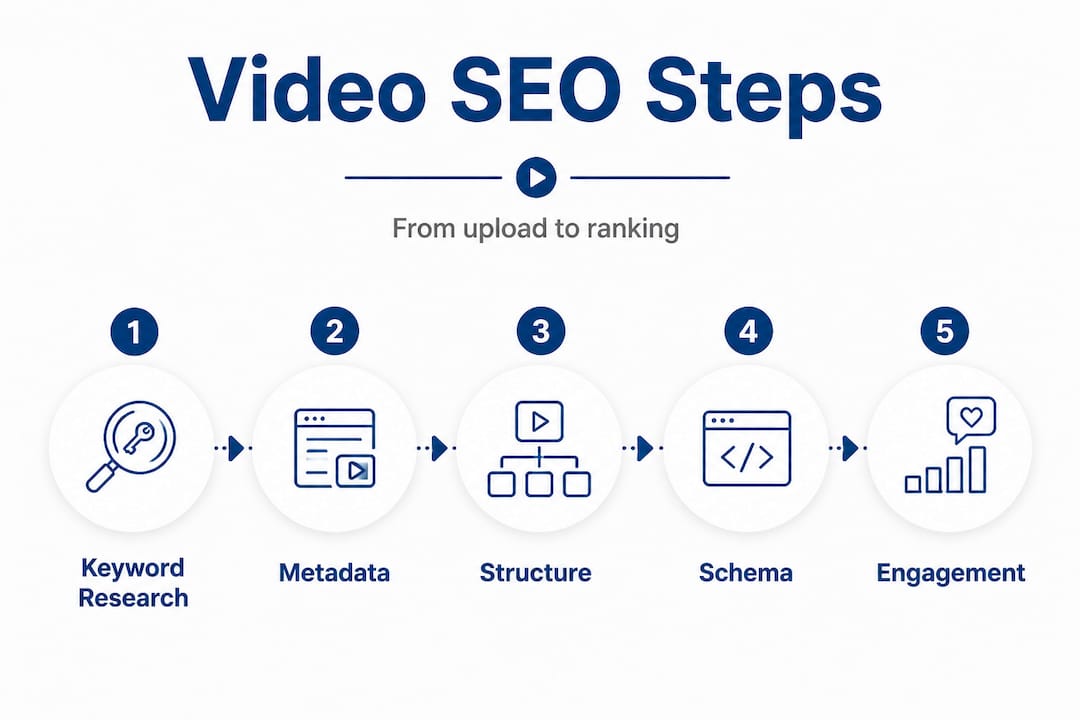
Here is how to implement VideoObject schema step by step:
- Identify the page where your video is embedded on your website.
- Generate a VideoObject schema using Google's Structured Data Markup Helper or a schema generator tool.
- Fill in all required fields: name, description, thumbnailUrl, uploadDate, duration, and contentUrl.
- Add optional but valuable fields: embedUrl, interactionStatistic (view count), and transcript.
- Paste the JSON-LD code into the "<head>` section of the page or use your CMS plugin to insert it.
- Test the markup using Google's Rich Results Test tool to confirm it is valid and eligible for rich results.
VideoObject schema markup with name, description, thumbnailUrl, uploadDate, duration, and contentUrl increases your odds of appearing in video carousels and rich results in Google search, which dramatically increases visibility compared to a standard blue link.
The table below shows what Google and YouTube each prioritize when ranking video content:
| Platform | Top ranking factors |
|---|---|
| Schema markup, transcripts, contextual page content, backlinks | |
| YouTube | Watch time, engagement (likes, comments), keyword match, CTR |
| AI search tools | Entity-rich content, structured long-form, clear topic focus |
"Implementing VideoObject schema is one of the most underused tactics in local business video SEO. Most competitors skip it entirely, which means doing it correctly gives you a direct advantage in search visibility."
Transcripts are equally important for Google. When you upload a transcript or enable auto-captions and edit them for accuracy, Google can read the full text of your video. This means every keyword spoken in your video becomes indexable content. Always review auto-generated captions for errors, especially for business names, locations, and technical terms.
For businesses focused on video rankings, reviewing YouTube ranking factors in detail helps you align your YouTube strategy with what the platform actually rewards, rather than guessing.
Common mistakes and how to measure SEO success
After publishing, the work is not done. Avoiding common errors and tracking the right metrics determines whether your video SEO efforts compound over time or stall out.
The most common mistakes that hurt video SEO:
- Skipping chapters and timestamps in descriptions
- Ignoring schema markup on website-hosted videos
- Using vague or generic titles that do not match actual search queries
- Writing thin descriptions under 100 words with no links or calls to action
- Failing to add end screens or cards that drive continued engagement
- Not editing auto-generated captions, leaving keyword errors and inaccuracies
- Publishing videos without a keyword strategy, then wondering why they do not rank
Here is how to measure whether your video SEO is working:
- YouTube Analytics: Check average view duration, audience retention graphs, and traffic sources. If most viewers find your video through YouTube search, your keyword strategy is working.
- Google Search Console: Under the "Search results" section, filter by video to see impressions, clicks, and average position for your video content.
- Google Analytics: Track how much traffic from YouTube or embedded videos converts into leads, form fills, or calls on your website.
- CTR monitoring: If your impressions are high but clicks are low, your thumbnail or title needs work. A CTR below 4% on YouTube is a signal to test new thumbnails and titles.
- Ranking checks: Use a rank tracking tool to monitor where your videos appear in Google for target keywords over time.
YouTube SEO emphasizes watch time and engagement while Google prioritizes transcripts, schema, and contextual page content. AI-powered search tools favor entity-rich, structured long-form content over ten minutes, while short-form content excels for quick queries. Knowing this distinction helps you plan your video library with both platforms in mind.
Reviewing SEO strategies for 2025 and beyond gives you a broader picture of how video fits into your overall search strategy. Video is not a standalone tactic. It works best when it is connected to a well-optimized website, a strong Google Business Profile, and a consistent content publishing schedule.
For a deeper look at the full content marketing picture, the video marketing guide covers how to build a video strategy that supports both SEO and audience growth over time.
Pro Tip: Set a monthly calendar reminder to review your top five videos in YouTube Analytics. Look for drops in retention and update the description, thumbnail, or title to test improvements. Video SEO is not a one-time task.
What most video SEO advice gets wrong
Most video SEO guides focus almost entirely on YouTube tactics. They tell you to optimize titles, use keywords in descriptions, and post consistently. That advice is not wrong, but it is incomplete. And for local businesses, it can actually point you in the wrong direction.
Here is the core problem: YouTube and Google are two different search engines with different ranking priorities. A video optimized purely for YouTube may never appear in a Google search result. A video with great schema markup but poor watch time will rank on Google but fail on YouTube. Real visibility requires both, and most advice treats them as the same thing.
The second issue is that small business owners often copy strategies from large brands or YouTube creators with millions of subscribers. Those strategies are built for scale and broad audiences. Your goal is different. You want to reach people in your city or region who need your specific service. That requires local keyword intent, geographic mentions in the video and description, and connection to your Google Business Profile, not just high production value or posting frequency.
The third issue is treating video SEO as a one-time setup. You optimize a video, publish it, and move on. But search behavior changes, competitors publish new content, and algorithm updates shift what gets rewarded. The businesses that consistently rank well treat video SEO as an ongoing process. They revisit old videos, update descriptions, add new chapters, and test different thumbnails based on data.
Our recommendation is a simple three-part framework. First, optimize every video for both platforms simultaneously by completing all metadata fields AND adding schema markup to your website. Second, tailor every video to your local audience by including location-specific language and connecting your content to your business profile ranking strategies. Third, review performance monthly and make at least one improvement to your top-performing videos based on actual data.
This approach is less exciting than chasing the latest algorithm update, but it is what actually builds lasting video visibility for local businesses.
How Digitalmarketingall.org accelerates your video SEO wins
Understanding the strategy is one thing. Executing it consistently across every video, every page, and every platform is where most businesses fall short. At Digitalmarketingall.org, we specialize in connecting your video SEO to a full local visibility strategy that includes schema setup, keyword alignment, and reputation management. Whether you need help setting up custom website solutions that properly host and embed your videos, or you want to strengthen your local presence by building more business reviews that support your credibility in search, we have the tools and expertise to make it happen. You can also optimize your Yelp presence to extend your local reach beyond Google. Take the next step and let us help you turn your video content into a consistent source of local leads.
Frequently asked questions
What is VideoObject schema and why is it important for SEO?
VideoObject schema is structured data that helps Google identify and display your videos in search results, boosting visibility and eligibility for video carousels. Implementing VideoObject schema with fields like name, description, thumbnailUrl, and contentUrl gives your videos the best chance of appearing as rich results.
How long should my video descriptions be for SEO?
Aim for 200 to 500 words, placing your main keyword near the beginning, with chapters, links, and related terms to improve indexability. Detailed descriptions with timestamps and calls to action consistently outperform short descriptions in both search ranking and viewer engagement.
What engagement metrics matter most for video SEO ranking?
Watch time, retention, and click-through rate are the most important metrics for ranking on both YouTube and Google. Strong hooks in the first 5 to 10 seconds directly improve retention, which is one of the strongest signals both platforms use to evaluate content quality.
Is there a difference between optimizing for Google and YouTube?
Yes, YouTube prioritizes watch time, engagement, and video structure, while Google looks for transcripts, schema markup, and contextual relevance on the page. YouTube SEO and Google SEO reward different signals, so a complete strategy addresses both platforms separately.
Can short-form or long-form videos rank better for SEO?
Short videos answer quick queries effectively, but long-form videos over 10 minutes build authority and tend to earn higher rankings for complex topics, especially in AI-powered search results that favor structured, entity-rich content.
Recommended
- Leverage video content for SEO success in 2026
- Skyrocket Your Business with Video Content Marketing in 2025
- Skyrocket Your YouTube Channel: Secrets to Rank High & Win Customers
- Ranking Higher in Searches: Simplified SEO Strategies
- Video SEO Optimization Tips for YouTube and Google (2026) - SEOLEVELUP, LLC
- Content is King: Crafting High-Quality Content for SEO Success