

Set your Google Business Profile to a service-area business if you travel to customers instead of hosting them, hide your public address the moment you make that switch, and add up to 20 named service areas by city, ZIP code, or region. Skip the mileage radius entirely. Prioritize your top-performing cities and counties, get your primary category right, and build a steady flow of reviews. That combination determines whether you show up in local search at all.
TL;DR:
- Prioritize adding only the service areas where you actively want more leads, avoiding towns with minimal search demand or infrequent jobs.
- Ensure your profile classification matches your business operations, with only one verified location per physical site to prevent suspensions.
- Keep your address hidden if you do not serve customers at your location, and verify it with a real, staffed address to meet Google’s guidelines.
- Build a consistent review flow and maintain citation accuracy across directories to strengthen your local search prominence and ranking.
- Focus most ongoing efforts on generating reviews and managing citations, as these have a stronger impact on local ranking than expanding service areas or adding photos.
Table of Contents
- Service Area Business Setup: How It Differs From Storefronts and Hybrids
- Choosing Between a Single SAB, a Hybrid, or Multiple Locations
- Setting Up Your Service Area, Step by Step
- Verification Rules and How to Avoid Suspension
- How Ranking Actually Works for Service-Area Profiles
- Managing the 20-Area Limit and the Two-Hour Rule
- Digital Marketing All's Compliance Checklist and Cadence
- Where to Verify the Rules Yourself
- Why Most SAB Setup Guides Get the Priorities Backward
- Sources
- FAQ
Service Area Business Setup: How It Differs From Storefronts and Hybrids
A service-area business (SAB) travels to customers rather than receiving them at a fixed location. Think plumbers, mobile pet groomers, landscapers, and home cleaning crews. Google treats these profiles differently than a retail shop or a restaurant with a front door people walk through.
There are three profile types, and picking the wrong one is one of the most common setup mistakes local owners make:
- Storefront business: customers visit you (a bakery, a dental office, a hardware store). Your address shows publicly on the map.
- Service-area business: you go to customers and don't serve anyone at your business address, so that address stays hidden.
- Hybrid business: a mix of both. An auto shop that also offers roadside assistance can show its storefront address while also defining a service area, according to Google's overview of service business profiles.
The customer-facing difference matters more than most owners realize. A hidden address means your map pin shows a general area rather than a pinpoint location, and searchers see a service-area radius message instead of driving directions to your door. Choosing storefront when you're actually an SAB exposes a home address you never intended to publish.
Choosing Between a Single SAB, a Hybrid, or Multiple Locations
Before you touch the profile settings, run through a short set of questions. Getting the classification wrong now creates cleanup work later, and in some cases triggers a suspension.
- Do customers ever visit your business address? If yes, even occasionally, you're likely a hybrid, not a pure SAB.
- Is the address staffed during posted business hours? An empty office or a home with no signage doesn't qualify for storefront treatment.
- Do you operate from more than one staffed location? Each staffed location with its own hours and address can merit a separate profile. But Google requires exactly one profile per physical location. Google's guidance is explicit that duplicate listings for the same address get flagged and often suspended, so resist the urge to create a second profile "just to rank for another neighborhood."
- Would a separate profile confuse customers about where to reach you? If the answer is yes, consolidate into one SAB profile with multiple service areas rather than splitting your presence.
Multiple staffed locations, each with regular hours and real foot traffic, deserve their own verified profiles. A single mobile operation covering twenty towns from one warehouse does not, no matter how tempting it feels to game the system with extra listings.
Setting Up Your Service Area, Step by Step
Once you know which profile type fits, the actual setup takes minutes. The steps live inside your existing Google Business Profile dashboard, not in some separate tool.
- Sign in and open your profile from Google.
- Click Edit profile, then select Location.
- Choose Service area.
- Add cities, ZIP codes, or regions one at a time. Google shows suggestions based on your verified address, but you can type in any area you actually serve.
- Repeat until you've added up to 20 areas, the maximum Google permits for service-area and hybrid businesses.
- Click Save.
That's the entire mechanical process. The judgment call is what you put into those 20 slots.
Resist the temptation to fill every slot with the maximum number of towns just because you can reach them in an emergency. A landscaping company based in one suburb doesn't need to list a town 90 minutes away where it has done exactly one job in three years. Every area you add should represent a place where you actually want more leads, not just a place you're technically capable of servicing. If your territory includes dozens of small towns, listing counties or metro regions instead can cover more ground without burning through your slots one town at a time.
Pro Tip: Check search demand before adding a town to your service area list. A city with high population but almost no search volume for your service type is a wasted slot compared to a smaller town where people are actively searching.
Changes typically take up to two days to appear across Google Search and Maps. In some cases, especially if you're also changing your business address or category at the same time, Google may ask you to re-verify. Don't panic if that happens. Re-verification is a standard check, not a sign you did something wrong, and it's a lot less painful than a suspension.
For a full walk-through of the initial profile creation process, our step-by-step Google Business Profile setup guide covers everything before you get to the service-area step.
Verification Rules and How to Avoid Suspension
Google still requires a real, physical address behind every service-area profile, even though that address never appears publicly. Google's guidelines for representing your business are specific: PO boxes don't qualify, and neither do most virtual office addresses unless the location is genuinely staffed during posted hours.
That address exists for one purpose: verification. Once confirmed, it becomes the anchor point Google uses to calculate distance in local search rankings, which is a separate function from public display.
The most common reasons SAB profiles get suspended:
- Publicly displaying a home or personal address that was supposed to stay hidden.
- Running multiple listings tied to the same physical location, often created to try ranking for extra neighborhoods.
- Verifying through an unstaffed mail-forwarding address or a shared coworking address with no dedicated presence.
- Letting business name, category, or service-area details drift out of sync with what's listed on your website and other directories.
Google's own support documentation notes that consistency across your profile fields and any third-party citations directly reduces suspension risk, a point worth taking seriously since reinstatement can take weeks. If you're ever suspended, gather proof before you appeal: photos of branded vehicles or uniforms, invoices showing completed jobs in your listed service areas, and be ready for a video verification call where you show real business operations, not just a phone screen recording an empty office.
How Ranking Actually Works for Service-Area Profiles
Three factors decide where your SAB profile lands in local search: relevance, distance, and prominence. Google spells this out clearly in its local ranking documentation, and understanding the mechanics changes how you prioritize your time.
Distance works differently for SABs than for storefronts. Since your address is hidden, Google calculates distance from that verified but unpublished location, not from wherever the searcher happens to be standing. That means a mobile business verified near the center of its customer base tends to outperform one verified on the outskirts, even if both serve the identical set of towns.
Relevance comes down to categories and services. Pick the fewest categories that accurately describe your core business rather than stacking on every category that might loosely apply. A tree removal company that also tags itself as landscaping, lawn care, and general contractor dilutes its relevance signal instead of strengthening it. List your top five services explicitly in the services section of your profile, using the exact terms customers search for.
Prominence is where most of the controllable, ongoing work lives:
- Generate reviews consistently rather than in occasional bursts. A steady trickle signals an active, real business better than 40 reviews in one week followed by silence.
- Respond to every review, good or bad. Engagement itself is a signal Google factors into prominence.
- Keep your name, address, and phone number identical across every directory and citation source, from your own website to third-party listing sites.
- Post updates and add fresh photos regularly. Idle profiles read as lower-prominence to Google's systems.
Pro Tip: If you're cleaning up inconsistent citations across the web, a directory submission service like StartupSubmit can push your corrected business details to dozens of listing sites at once instead of updating each one by hand.
Our local search ranking factors breakdown goes deeper into how relevance and prominence interact if you want the full mechanics behind these three factors.
Managing the 20-Area Limit and the Two-Hour Rule
Twenty service areas sounds generous until you're covering a sprawling metro region with dozens of small towns and suburbs. Google's own guideline suggests staying within roughly a two-hour drive of your base, which rules out padding the list with far-flung towns just because you'd technically accept a job there.
Prioritize your 20 slots using a simple framework:
- Current revenue: which towns already generate paying work?
- Search demand: where are people actively searching for your service, even if you haven't landed jobs there yet?
- Customer density: which areas have enough population and the right demographics to sustain repeat business?
- Travel cost: does the extra mileage eat into your margin on a typical job?
If a single service area contains dozens of small municipalities, list counties or broader regions instead of burning individual slots town by town. And if you're running staffed offices in two different metro areas, each with its own hours and address, those deserve separate verified profiles rather than one overstretched SAB trying to cover both.
Digital Marketing All's Compliance Checklist and Cadence
Getting the setup right once isn't the finish line. Profiles drift out of compliance over months, usually through small, uncorrected changes.
Run this before you publish or after any major edit:
- Confirm your address is hidden if you don't serve customers at that location.
- Verify your primary and secondary categories match your actual core service.
- List your top five services with the exact terms customers search.
- Schedule review outreach to at least a handful of recent customers.
- Audit your citations across major directories for name, address, and phone consistency.
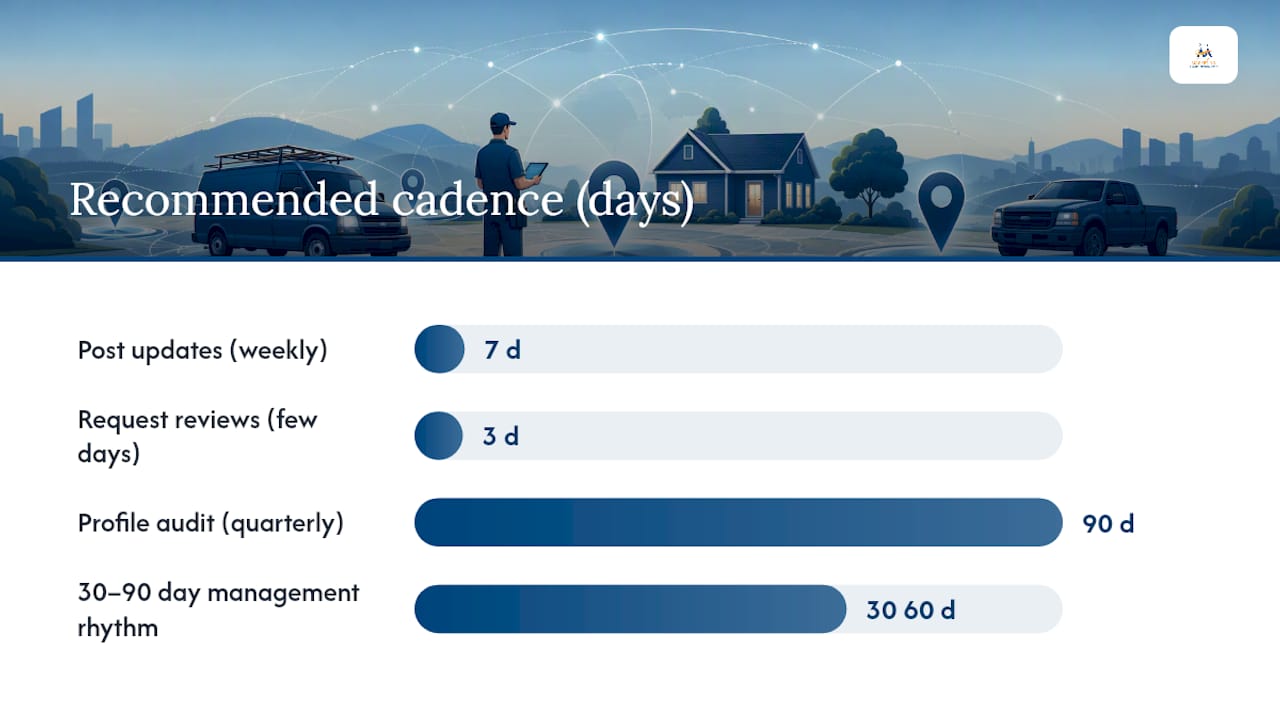
For ongoing health, a 30 to 90 day rhythm works well for most small operations: post updates weekly, request reviews within a few days of every completed job, and run a full profile audit every quarter to catch drift before it becomes a suspension risk. Our 30 to 90 day GBP management plan lays out a sample version of this cadence if you want a template to adapt.
Pro Tip: If review requests keep slipping through the cracks because you're busy running jobs, tools built for small-business marketing automation, like AmmarAI's guidance on AI for small business, can help you build a lightweight follow-up sequence without hiring anyone new.
If suspension does happen despite the prep, document everything before appealing: branded vehicle photos, staffed-hours proof, service invoices tied to your listed areas, and readiness for a video call showing real operations.
Where to Verify the Rules Yourself
Google's own support pages are the final word on anything policy-related, and they're worth bookmarking directly rather than trusting secondhand summaries. Start with the service-area management guide for the mechanics of adding areas, then review the local ranking factors page and the representation guidelines for the rules that most often trigger suspensions.
For implementation help beyond the policy basics, our local SEO guide covers reputation management and profile optimization in more depth than any single blog post can.
Why Most SAB Setup Guides Get the Priorities Backward
Most advice on this topic treats the 20-area limit as a race to fill every slot, and treats reviews as an afterthought bolted onto the end of a setup checklist. That ordering is backward. Distance and relevance only get you into consideration; prominence, driven overwhelmingly by review volume and quality, is what actually separates the profile that ranks from the one that sits on page two.
The conventional advice also underplays how fragile hidden-address profiles are. Owners treat verification as a one-time hurdle, then let citation details drift for years. That drift, not some algorithm change, is what triggers most suspensions I've seen discussed in Google's own guidance.
If you're setting up a service-area profile today, get the classification right first, the address visibility second, and then spend the bulk of your ongoing effort on reviews and citation consistency. Everything else, category tweaks, extra service areas, another round of photos, matters far less than a business owner's instinct usually tells them. A managed approach like Local Domination exists precisely because most owners underestimate how much ongoing maintenance a compliant, high-ranking SAB profile actually requires.
— Diane O'Brien
FAQ
What Are Some Examples of Service-Area Businesses?
Plumbers, mobile pet groomers, landscapers, home cleaning crews, HVAC repair technicians, and mobile car detailers are all classic examples. Any business that travels to the customer rather than hosting them at a fixed location qualifies.
How Can I Earn $100 to $200 a Day Using Google Maps?
There's no guaranteed daily figure Google publishes, but businesses that show up consistently in local search tend to convert map visibility into booked jobs through a properly configured service-area profile, strong reviews, and accurate service listings. The realistic path is optimizing your profile and converting that visibility into calls and bookings, not a shortcut tied to Maps itself.
What Is the Easiest Service Business to Start?
Businesses with low equipment costs and high recurring demand, like house cleaning, lawn care, or mobile pet services, tend to be the easiest to launch because they require minimal upfront investment and can be run from a home base with a hidden address on Google Business Profile.
Do Service-Area Businesses Show Up on Google Maps?
Yes. Service-area businesses appear on Google Maps and in local search results, but instead of a precise address pin, searchers see a general coverage area, since the verified address stays hidden per Google's representation guidelines.
How Many Service Areas Can I List on My Profile?
Google allows up to 20 named service areas defined by city, ZIP code, or region. Mileage radius is not an accepted format, and Google recommends staying within roughly a two-hour drive of your verified base.