

Negative keywords are strategic exclusions that shape intent signals and protect ad spend, not a one-time cleanup task. The right approach starts with picking an aggression level (growth, balanced, or efficiency) and a review cadence before you touch a single search term. This article breaks down match types, discovery workflows, account structure, governance, and measurement so you can build a negative keywords strategy that holds up under Google's increasingly automated matching systems.
TL;DR:
- Using broad match negatives can accidentally exclude profitable traffic, so match types should be carefully chosen based on the desired level of precision.
- Negative keywords should be added according to a predetermined aggression level and review window aligned with the sales cycle, not impulsively.
- Regular analysis of search terms report helps identify irrelevant queries for immediate negative keyword addition and prevents over-exclusion.
- Conflicts between negative and positive keywords can silently kill performance, making conflict checks crucial before applying exclusions.
- Ongoing governance, including scheduled audits and clear documentation, is essential for maintaining an effective negative keyword strategy at scale.
Table of Contents
- What Negative Keywords Are and How Negative Match Types Work
- When to Add Negative Keywords: Decision Triggers and Review Windows
- How to Find Negative Keyword Opportunities
- Managing Negatives Across the Account: Lists, Levels, and Conflicts
- Measuring the Impact of Negative Keywords
- Common Mistakes and Golden Rules
- Digital Marketing All's Approach to Negative Keyword Governance
- The Real Shift Practitioners Need to Make in 2026
- Get Managed Negative Keyword Governance Without the Guesswork
- Sources
- FAQ
What Negative Keywords Are and How Negative Match Types Work
Negative keywords tell Google which search queries should never trigger your ads. They function as exclusions, not bid adjustments, and they operate on the opposite logic of positive keywords: instead of expanding reach, they narrow it deliberately, according to Google Ads Help.
The mechanics matter more than most advertisers realize. Google Ads gives you three negative match types, and each one behaves differently from its positive counterpart:
- Negative broad blocks any search containing all your negative terms, in any order, anywhere in the query.
- Negative phrase blocks searches containing your terms in that exact sequence, though other words can surround them.
- Negative exact blocks only the precise query you specify, with no variation allowed.
A campaign selling custom furniture might add "cheap" as a negative broad keyword to block "cheap custom furniture," "furniture cheap delivery," and "cheap furniture near me" in one move. Add "office chairs" as a negative phrase instead, and you block "buy office chairs" and "office chairs for sale" but let through "chairs for office use," since the word order changed. According to Google Ads Help's documentation on negative keywords, these distinctions determine how surgical your exclusion actually is.
Two platform quirks trip up even experienced advertisers. First, negative keywords do not honor close variants the way positive keywords do; a negative for "shoe" will not automatically block "shoes" or misspellings. Second, Google caps negative keywords at 10 words and enforces character limits, so long-tail phrases sometimes need splitting into multiple negatives or a broader match type. Symbols like hyphens and apostrophes are typically ignored during matching, which means "kids-shoes" and "kids shoes" often behave identically as negatives.
Match-type discipline is what separates a negative keywords strategy that protects budget from one that quietly blocks legitimate traffic. Defaulting everything to negative broad feels efficient, but it is also the fastest way to accidentally exclude a profitable segment you never meant to touch.
When to Add Negative Keywords: Decision Triggers and Review Windows
Adding negatives without a rule set turns into guesswork fast. The fix is defining an aggression level up front and matching it to a review window, so every exclusion decision traces back to a stated goal rather than a gut feeling.
Three aggression levels cover most account situations:
- Growth mode: cut only search terms that are wildly off target or have burned 3x your target cost-per-acquisition over a 90-day window with zero conversions. This preserves volume while the algorithm is still learning.
- Balanced mode: exclude terms that cost more than your average order value without converting, reviewed on a 30-day cycle. This is the default setting for most established accounts.
- Efficiency mode: cut anything that spends past a fixed dollar threshold, say $50, without a single conversion in 30 days. This suit accounts under pressure to hit a strict cost-per-acquisition target.
Review windows should match your sales cycle, not a calendar habit. A 30-day window suits fast-turnaround ecommerce; a 90-day window fits considered purchases like insurance or B2B software, where a search term needs more time to prove itself. A 365-day lookback works well for seasonal businesses checking whether last year's "irrelevant" queries actually converge with this year's promotions.
Pro Tip: Never cut a search term after fewer than 20 clicks unless the query is obviously off-topic (like "free" or "jobs" appearing on a paid product page). Fewer clicks than that and you are making a decision on noise, not data.
The combination that works: pick one aggression level, attach it to a review window that matches how long your typical customer takes to convert, and write the rule down. Search Engine Land's 2026 analysis of negative keyword strategy frames this pairing as the foundation of a defensible, repeatable process rather than ad hoc pruning.
How to Find Negative Keyword Opportunities
The Google Ads search terms report is where every serious negative keywords strategy begins. It shows you the actual queries that triggered your ads, not just the keywords you bid on, which is where the gap between intent and reality shows up.
Pulling the report correctly:
- Navigate to Campaigns > Search terms inside Google Ads, and filter by date range to match your chosen review window.
- Pull these columns at minimum: campaign, ad group, search term, match type, cost, clicks, and conversions.
- Sort by cost descending first. Wasted spend hides in the terms burning the most budget without converting, so start there before scanning for irrelevant terms alphabetically.
- Cross-reference against your existing negative lists to avoid re-flagging terms you already excluded elsewhere.
Once you have the data, classify every meaningful row into one of four buckets:
- Irrelevant: has nothing to do with your product or service. Add as a negative immediately.
- Relevant but underperforming: matches intent but the landing page or bid is wrong. Fix the destination or adjust bids instead of excluding it.
- Converting: proves the query has commercial value. Promote it to a standalone keyword so you can control its bid directly.
- Ambiguous: unclear intent with limited data. Flag it and revisit at the next review cycle rather than deciding on thin evidence.
This four-bucket method comes directly from practitioner workflows documented by Surfside PPC, and it forces a decision on every row instead of only the obvious offenders.
When you add a negative directly from the search terms report, Google defaults it to negative exact match. That default is often too narrow if the underlying problem is a whole category of intent rather than one query. If "office chair rental" and "office chair repair" both show up as irrelevant, a single negative phrase for "office chair" catches both without you manually excluding every variation.
Third-party tools and AI-assisted platforms can accelerate discovery by surfacing semantic negative candidates you might miss scanning manually, particularly on accounts generating thousands of search terms per week. Tools built for AI-powered keyword discovery can cluster queries by topic and flag patterns a human reviewer would take hours to spot. The catch: AI suggestions still need a person validating them against account context before they go live. A term that looks irrelevant in isolation might be a legitimate niche your account is quietly winning. According to Search Engine Land, the accounts getting the best results in 2026 run a hybrid workflow where AI suggests and humans approve, rather than fully automating either side.

Managing Negatives Across the Account: Lists, Levels, and Conflicts
Where you apply a negative matters as much as which one you choose. Google Ads gives you four levels: ad group, campaign, shared list, and account level, and picking the wrong one is one of the most common ways advertisers accidentally throttle their own traffic.
- Ad group level fits negatives specific to one product line inside a broader campaign, like excluding "wholesale" from a retail ad group while allowing it elsewhere.
- Campaign level works for exclusions that apply to an entire campaign but not the whole account, such as blocking a competitor name only in your brand campaign.
- Shared lists let you maintain one negative list and attach it to multiple campaigns simultaneously, which is the most efficient way to enforce account-wide rules like blocking "free," "jobs," or "reviews" everywhere.
- Account-level negatives apply across eligible Search and Shopping inventory, including Performance Max in most configurations, according to Google Ads Help. Display and Video campaigns handle negatives differently and can hold up to 1,000 negative keywords at the account level, a limit worth checking before you plan a large exclusion push.
Conflicts are the silent budget killer. If a campaign-level negative accidentally overlaps with an active positive keyword, that keyword goes dark and nobody notices until performance drops. Google Ads' built-in Keyword Conflicts tool flags these overlaps before you save changes, and running that check should be a non-negotiable step every time you add a batch of negatives, not an occasional afterthought.
Pro Tip: Before enabling any feature that expands query matching, such as broader automated targeting inside Performance Max or AI Max campaigns, build your account-level negative list first. Negatives get evaluated before the expansion kicks in, so a preemptive exclusion list protects budget the moment expanded matching goes live, a point Search Engine Land's 2026 negative keyword strategy piece calls out directly.
Governance ties it all together. Use consistent naming conventions for shared lists, write a one-line reason for every negative you add, and keep a change history so a mistaken exclusion can be reversed in minutes instead of days.
Measuring the Impact of Negative Keywords
A negative keywords strategy only proves itself when you can point to a number that moved. Track click-through rate, conversion rate, cost per click, cost per acquisition, and impression share before and after a batch of exclusions, alongside raw volume trends so you can spot whether you traded reach for efficiency or actually improved both.
Google Ads' Change history log is the most underused tool for this. It timestamps exactly when negatives went live, which lets you isolate their effect from other changes happening in the same window, like a bid adjustment or a new ad creative. Running a simple before-and-after comparison against that timestamp, or a formal A/B experiment where one campaign gets the new negatives and a matched campaign does not, gives you a cleaner read than eyeballing a dashboard.
Watch for two warning signs that a negative keywords strategy has gone too far:
- A steep, sudden volume drop across impressions or clicks, especially right after a large negative import, usually signals over-exclusion rather than genuine waste reduction.
- Shrinking data for Smart Bidding models, which need a steady flow of conversion signals to optimize; cut too many query paths and the algorithm starts making decisions on less information, not more.
One data point worth building into your own review process: if 10% or more of your visible search terms end up flagged as negatives in a given cycle, that is usually a sign of a broader targeting or match-type problem, not proof your negative list is working well. Fix the keyword targeting itself before adding another round of exclusions.
When presenting results to stakeholders, pair the efficiency win with the volume context. "We cut cost per acquisition by trimming irrelevant traffic" lands better, and holds up to scrutiny better, when it comes with the click volume chart showing reach held steady.
Common Mistakes and Golden Rules
Most negative keyword damage comes from a handful of repeatable mistakes, and avoiding them is simpler than fixing the fallout afterward.
- Don't import large generic negative lists wholesale. A list built for a different industry or account will almost certainly block terms that convert well for you specifically.
- Always run a conflict check before saving. A shared list can silently override an active keyword in a completely different campaign if nobody looks.
- Default to phrase match for multiword exclusions when you need precision. Broad match negatives are powerful but forgiving of collateral damage; phrase match gives you control over word order without the rigidity of exact match.
- Keep review cycles short and documented. Weekly or biweekly reviews with a written reason attached to each negative, as recommended by Surfside PPC's workflow guidance, catch problems early and give you an audit trail when a stakeholder asks why a term got cut.
Treat these as your baseline, not your ceiling. The accounts that manage negatives well tend to have fewer surprises during quarterly reviews, simply because the reasoning is already written down.
Digital Marketing All's Approach to Negative Keyword Governance
Digital Marketing All runs negative keyword management as a hybrid workflow: AI tools surface semantic candidates from the search terms report at scale, and a human strategist reviews every suggestion before it goes live. Automation catches volume; judgment catches context an algorithm cannot see, like a niche query that looks irrelevant but actually converts for a specific client.
Every negative added carries a written reason field, gets checked against active keywords for conflicts before saving, and sits inside a scheduled audit cycle rather than a one-time cleanup....
That structure is what keeps a negative keywords strategy from decaying into a stale list nobody remembers building.
The Real Shift Practitioners Need to Make in 2026
The conventional advice on negative keywords treats them like a spring cleaning task: build a list once, block the obvious junk, move on. That framing is outdated. Modern bidding systems, especially Smart Bidding and expanded matching inside Performance Max, read your negatives as signals about the customer you actually want, not just terms to avoid.
What gets underrated is the review cadence itself. Most advertisers obsess over which match type to use and skip the harder question: how often are you actually looking? A weekly or biweekly loop with a written reason per exclusion catches drift before it compounds, and it gives you a defensible answer when a client or manager asks why performance shifted.
My priority for any advertiser reading this: pick your aggression level before you touch the search terms report, not after. Deciding in the moment, term by term, is how accounts end up with inconsistent, unexplainable negative lists. Structure first, then execute.
— Diane O'Brien
Get Managed Negative Keyword Governance Without the Guesswork
Building a negative keywords strategy that actually holds up takes ongoing attention most in-house teams don't have the bandwidth for, especially once accounts scale past a few thousand search terms a month. Digital Marketing All runs this as a managed service: weekly search term audits, shared negative lists structured by account level, and a written justification attached to every exclusion before it goes live.
This governance work sits inside the agency's broader LLM Directory & AI Search Roadmap, which maps where your account is losing budget to irrelevant queries and where expanded automated matching needs preemptive negative coverage. For businesses where reputation and query intent intersect, like local service providers fielding review-related searches, the review generation and management service works alongside PPC governance to keep brand-sensitive terms under control.
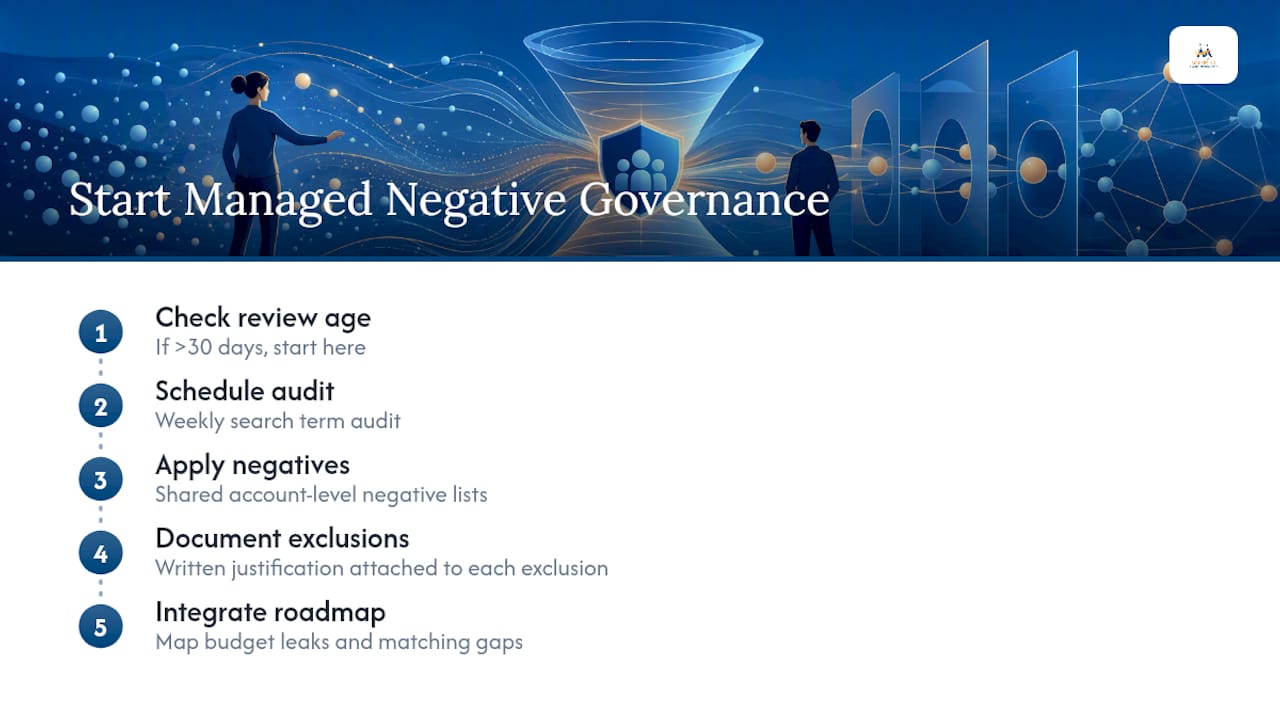
If your search terms report has not been reviewed in over 30 days, that is the first place to start. Reach out to Digital Marketing All to get a search term audit scheduled and see exactly where your budget is leaking.
Sources
- About negative keywords - Google Ads Help
- The real strategy behind negative keywords in 2026 - Search Engine Land
FAQ
What Is an Example of a Negative Keyword?
If you sell new furniture and add "used" as a negative keyword, your ads stop showing for searches like "used office furniture," which keeps budget away from shoppers who want secondhand items you don't sell.
What Is the Main Benefit of Using Negative Keywords?
Negative keywords cut wasted spend on searches that will never convert and sharpen the intent signal your account sends to Google's bidding algorithms, which tends to improve conversion rate and cost per acquisition over time.
What Does Negative Marketing Look Like in Practice?
Negative marketing usually refers to campaigns that highlight a competitor's weaknesses or contrast your product against an inferior option, which is a different concept from negative keywords, though both aim to sharpen who sees your message.
Can You Add Negative Keywords to Performance Max?
Yes, Performance Max campaigns support account-level negative keyword lists, and building that list before enabling expanded automated matching helps protect budget since negatives are evaluated before the expansion applies.
How Often Should I Review My Negative Keyword List?
Most accounts benefit from a 30-day review cycle for fast-moving campaigns and up to 90 days for considered purchases with longer sales cycles, always paired with a written reason for each new exclusion.