

The best internal linking strategy pairs pillar and hub-and-spoke clustering with contextual, descriptive anchors, keeping every priority page within three clicks of a high-authority entry point. Start by auditing your site for orphan pages and identifying your top authority pages. Then, wire content so extractive passages sit within a shallow click path, since AI answer engines favor exactly that structure for citations.
TL;DR:
- Prioritize building pillar and cluster pages within three clicks of the homepage to maximize crawl frequency and PageRank distribution.
- Focus on adding two to five contextual internal links per 1,000 words, emphasizing descriptive anchor text to boost relevance and prevent cannibalization.
- Conduct quarterly site audits to identify orphan pages, broken links, and high-authority pages with low outbound internal links, then plan targeted wiring fixes accordingly.
- Ensure internal links are crawlable, especially on mobile, avoiding JavaScript-only triggers, internal nofollow tags, or canonicalization issues that prevent discovery.
- Structure content to minimize click depth for key passages, as shallow link paths influence AI citation potential and improve overall search visibility.
Table of Contents
- What Is an Internal Linking Strategy, and What Types of Links Matter?
- Why Internal Linking Matters for SEO and AI Visibility
- Core Internal Linking Best Practices You Should Apply First
- How to Audit, Plan, and Wire Your Site for Internal Links
- Fixing Technical Blockers That Make Internal Links Invisible
- How Do You Measure Whether Internal Linking Is Working?
- How Digital Marketing All Applies This Playbook
- Your 30/60/90-Day Internal Linking Checklist
- What Actually Moves the Needle in Internal Linking
- Put This Strategy to Work With Digital Marketing All
- Sources
- FAQ
What Is an Internal Linking Strategy, and What Types of Links Matter?
An internal link connects one page on your domain to another. That sounds almost too simple to write down, but the type of internal link you choose, and where you place it, determines whether it actually moves rankings or just sits there as dead weight.
Four types do most of the work on any site:
- Contextual links live inside body copy, embedded in a sentence where the topic naturally calls for it. These carry the most weight because they signal relevance through surrounding text.
- Navigational links make up your main menu and category structure. They tell both users and crawlers how your site is organized at the top level.
- Breadcrumb links show the path back to a parent category, reinforcing site hierarchy on every page a visitor lands on.
- Footer and related-content links catch overflow navigation and often surface "you might also like" modules, but they carry less topical signal than a link buried in a paragraph.
Each type serves three functions: helping users navigate, helping crawlers discover new URLs, and distributing authority across the site. That third function traces back to PageRank, Google's original link-scoring concept. PageRank does not treat every link equally. It flows more equity through links a real user would actually click, an idea formalized in Google's Reasonable Surfer patent. A link buried in a footer of 40 items gets treated very differently than one placed mid-sentence in relevant content.
That distinction is why anchor text choice and placement matter more than link count. Google's own guidance recommends descriptive, concise anchors that make sense even when read out of context, and explicitly warns against generic phrases like "click here" that carry zero topical signal. If your internal linking strategy treats every link as interchangeable, you're leaving equity on the table that a smarter structure would capture.
Why Internal Linking Matters for SEO and AI Visibility
Internal links do three jobs simultaneously: they guide crawlers to new content faster, they distribute ranking authority across your site, and they keep visitors reading longer. Skip any one of them and you're leaving performance on the table.
Crawlability comes first. Search engine bots follow links to discover pages, and a page with no internal links pointing to it, an orphan page, often waits far longer to get indexed, if it gets indexed at all. Once a page is discovered, internal links continue to influence how much authority it inherits. Ahrefs notes that internal links remain one of the few fully controlled SEO levers, and that deliberate wiring changes frequently produce measurable ranking movement within weeks, not months.
The AI citation angle: A 2026 analysis from Mavik Labs found that AI systems preferentially cite passages reachable within a shallow link graph, roughly two to three hops, and visible early on the page. If your best answer to a common question sits five clicks deep with no contextual path to it, an AI answer engine is far less likely to surface it as a citation.
User behavior reinforces the same pattern search engines reward. Related-content links and contextual jumps keep readers moving through a site rather than bouncing after one page, which extends session depth. Search engines read that engagement as a quality signal. The overlap between what helps users, what helps crawlers, and what helps AI systems find your best material is no coincidence. All three reward the same underlying structure: fewer clicks to the good stuff, and clear contextual paths to get there.
Core Internal Linking Best Practices You Should Apply First
Not every linking tactic deserves equal attention. Here's the order of priority, ranked by impact.
- Build pillar and hub-and-spoke clusters first. Pick one comprehensive pillar page per topic, then link it to and from every supporting cluster page. Moz's structural guidance backs a related rule: keep priority pages within three clicks of your homepage, since click depth reliably predicts both crawl frequency and how much PageRank a page inherits.
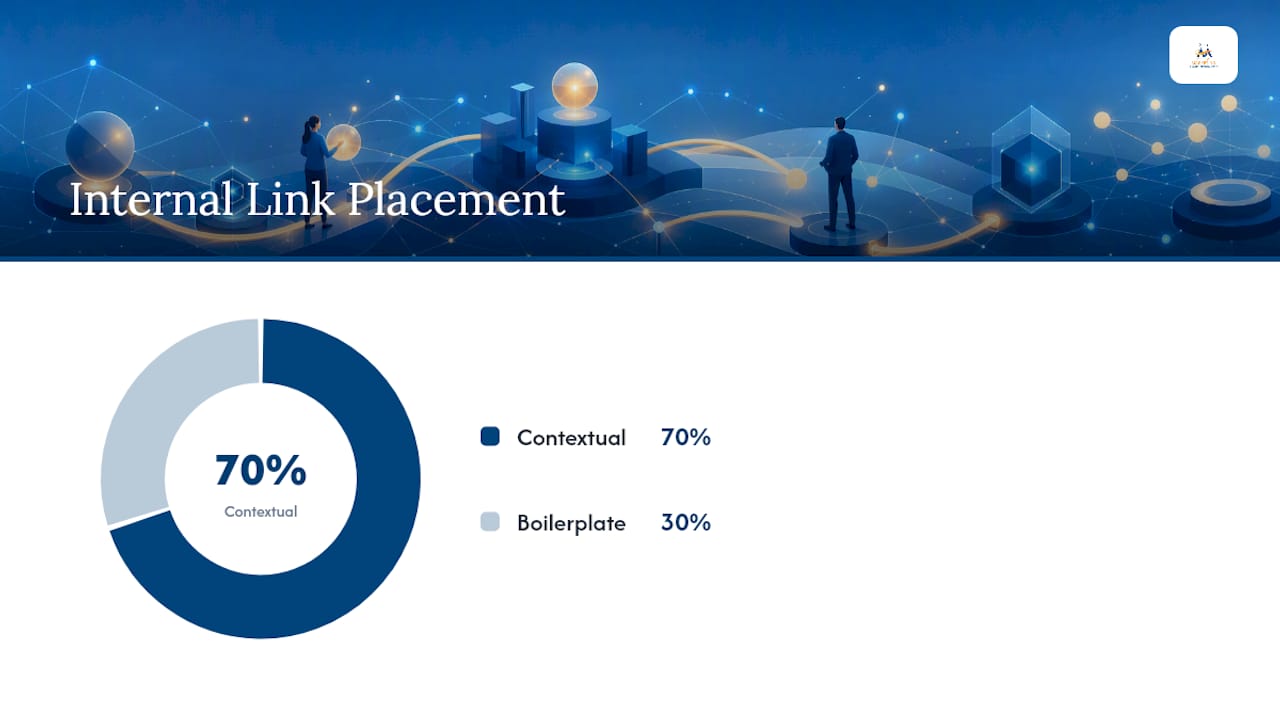
- Favor contextual links over boilerplate navigation. Aim for roughly 70% of your strategic internal links to live inside body copy rather than in menus, sidebars, or footers. A practical starting density is two to five contextual links per 1,000 words, scaling up to five or ten for longer pieces, according to guidance compiled in the Link Building Journal's internal linking guide.
- Write descriptive, varied anchor text. Two to eight words, specific enough to stand alone, and never a repeat of "click here" or "learn more." Anchor variety also prevents cannibalization, where two different pages compete for the same query because they're both linked with identical phrasing.
- Cap link counts deliberately. Overlinking dilutes the weight each link carries and confuses users about where to click next. If you notice five different anchors pointing at the same URL with five different phrasings, or the reverse, one phrase pointing at five different URLs, that's a cannibalization signal worth fixing.
- Link bidirectionally when you publish. New content should link out to two or three existing authority pages immediately, and those existing pages should get updated to link back to the new piece. This pairing shortens the window a new page spends orphaned, which speeds up discovery and indexing.
Pro Tip: Before writing a single new anchor, search your CMS for every existing use of your target keyword phrase. If three other pages already use identical anchor text pointing at three different URLs, you've found a cannibalization problem hiding in plain sight, and fixing it usually takes less time than writing the new content that revealed it.
Anchor text quality and click depth are not independent variables. A perfectly written descriptive anchor buried six clicks deep still underperforms a mediocre anchor placed two clicks from your homepage. Fix structure first, then refine the wording.
How to Audit, Plan, and Wire Your Site for Internal Links
Building an internal linking strategy from scratch, or fixing a neglected one, follows three phases: audit what exists, plan the target structure, then execute the wiring changes.
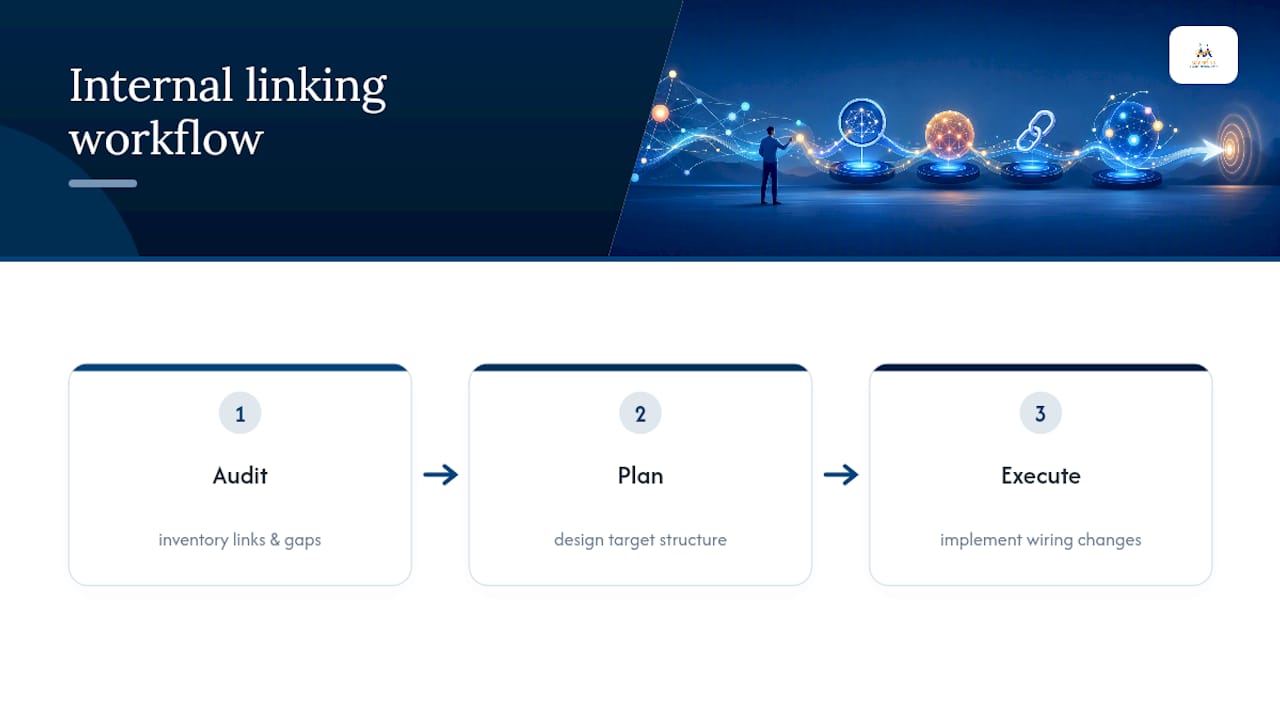
Audit: find the gaps before you fix anything
Start with a crawl using a site crawler (Screaming Frog and Sitebulb both handle this well) cross-referenced against Google Search Console's coverage reports. You're looking for four specific problems:
- Orphan pages with zero internal links pointing to them, often found by comparing your XML sitemap against your crawler's discovered-link list.
- Click depth distribution, flagging any page more than three clicks from your homepage that you consider a priority.
- Top inbound link sources, the pages currently sending the most internal link equity, so you know which pages have surplus authority worth routing elsewhere.
- Broken internal links, which waste crawl budget and frustrate users who hit a dead end.
Plan: map clusters and identify power pages
Once you know where the gaps are, group your content into topic clusters and assign one pillar page per cluster. Look specifically for "power pages": pages with strong backlink profiles or high organic traffic that currently send little to no internal equity onward. These are your most valuable linking sources, and most sites underuse them badly.
| Audit finding | What it signals | Fix priority |
|---|---|---|
| Zero inbound internal links | Orphan page, invisible to crawlers via internal paths | Immediate |
| More than 3 clicks from homepage | Priority page buried too deep in architecture | High |
| High backlinks, low outbound internal links | Power page wasting equity | High |
| Duplicate anchor text, different URLs | Cannibalization risk | Medium |
| Broken internal link | Wasted crawl budget, dead end for users | Immediate |
Execute: wire the changes into templates, not just individual pages
Manual link additions on existing pages matter, but the durable fix lives in your templates. Update related-content modules to pull from the correct cluster, add a contextual link block to your article template, and build the habit of bidirectional linking into your publishing checklist so it happens automatically, not as an afterthought. Ahrefs' guide on structuring pillar and cluster pages is a useful reference when you're building this into a CMS workflow for the first time.
Set a naming convention for internal anchor text variants so writers aren't guessing, and add "add 2 to 3 contextual links to existing cluster content" as a required line item in your editorial checklist before anything gets published.
Fixing Technical Blockers That Make Internal Links Invisible
Even a well-planned linking strategy fails if crawlers can't actually follow the links you've built. Four technical issues cause most of the damage.
- Pagination needs real HTML links, not JavaScript-only triggers. Paginated pages should canonicalize to themselves, not to page one, since Ahrefs points out that incorrect canonicalization can cause deeper paginated pages to get treated as duplicates and dropped from the index.
- Mobile parity has to match desktop exactly. If your mobile template hides a navigation link that exists on desktop, Google's mobile-first indexing means that link may not count at all. Server-side rendering, or at minimum crawlable JavaScript, is worth confirming with a developer if your site relies on client-side rendering for key navigation. A partner like Bitrupt's web development team can audit whether your framework is rendering links in a crawler-visible way.
- Avoid unnecessary internal nofollow tags. Google's crawlability guidance is direct on this point: internal links should be crawlable and dofollow by default, with mobile-rendered links matching what desktop users see.
- Check your sitemap against your actual crawl. Run a crawler against your live site and compare the discovered URLs to your XML sitemap. Any page that appears in the sitemap but never turns up as a crawled internal link target is functionally orphaned, regardless of what your sitemap claims.
These fixes rarely take more than a day or two of developer time once identified, but they're the reason a technically sound linking plan sometimes underperforms on paper. The strategy was fine. The crawler simply never saw it.
How Do You Measure Whether Internal Linking Is Working?
Internal linking only proves its value when you track the right numbers on a schedule, not just once after a redesign.
Five metrics matter most: crawl coverage (are pages getting indexed faster after you add links to them), indexation rate, organic traffic lifts on newly linked pages, ranking position changes for target queries, and, increasingly, AI citation appearances for the specific passages you restructured for shallow click depth.
Why this matters right now: the Mavik Labs 2026 analysis ties AI answer engine citations directly to link-graph depth, meaning your internal linking audits now need to track a metric that didn't exist in most reporting templates two years ago.
For tooling, lean on a combination of:
- Google Search Console, for indexation status and internal link count reports.
- A site crawler like Screaming Frog or Sitebulb, for click-depth mapping and orphan detection.
- Log-file analysis, to see which pages Googlebot is actually visiting versus which pages your sitemap claims exist.
- Internal-link opportunity reports, available in most enterprise SEO platforms, to flag pages that mention a topic without linking to the relevant cluster page.
Cadence matters as much as the tools themselves. Run an immediate check after any major template change, site migration, or content pruning pass. Schedule a full audit quarterly. In between, a monthly quick scan for new orphan pages and broken links catches problems before they compound.
How Digital Marketing All Applies This Playbook
The firm builds internal linking directly into broader visibility work, including local SEO, Google Business Profile optimization, and AI-focused search box optimization, because a page that's invisible to crawlers stays invisible to AI answer engines too.
A typical workflow looks like this:
- Audit the client's site for orphan pages, broken links, and click-depth outliers.
- Prioritize power pages, meaning pages with strong existing traffic or backlinks that currently send little internal equity onward.
- Add contextual links, usually two to three per priority page, pointing at cluster content that supports the client's core service pages.
- Measure traffic and ranking shifts on the linked pages over the following weeks, then adjust anchor text or placement based on what moved and what didn't.
This is the same audit-plan-execute-measure loop covered above, applied against real client sites where visibility, both in Google's results and in AI-generated answers, translates directly into leads.
Your 30/60/90-Day Internal Linking Checklist
Spreading this work over three phases keeps it from stalling out after week one.
- Days 1 to 30: Run a full crawl to find orphan pages and broken links. Identify your top 20 authority pages by backlinks and organic traffic. Add initial contextual links from those 20 pages to your most important underlinked content.
- Days 30 to 60: Deploy full hub-and-spoke wiring for two to three pillar topics. Update your CMS templates so related-content modules and contextual link blocks apply automatically to new content going forward.
- Days 60 to 90: Measure ranking and traffic changes on the pages you touched. Refine anchor text where you spot cannibalization or thin variety. Lock in a quarterly audit schedule and add bidirectional linking to your permanent editorial checklist.
Each phase builds on the last. Skipping the audit and jumping straight to hub-and-spoke wiring means you're building structure on top of gaps you haven't found yet, which usually means redoing work in month three that a proper audit in month one would have caught the first time.
What Actually Moves the Needle in Internal Linking
Most internal linking advice online still treats this as a mechanical checklist: link things, use keywords in anchors, done. That framing misses what's actually changed. The sites winning right now treat internal linking as an argument about relevance, made through both link placement and anchor wording, not a box to check after publishing.
The overrated tactic is link volume for its own sake. Piling on internal links without a clustering logic behind them creates noise, not authority. What's underrated is click depth discipline. Getting a priority page from five clicks down to two often produces a bigger ranking shift than adding twenty new contextual links scattered across unrelated pages.
The AI citation layer is where most site owners are still behind. Structuring content so extractive passages sit within a shallow link path is not a future consideration. It is already influencing which pages get cited by AI answer engines today. If your internal linking strategy still optimizes purely for the old crawl-and-rank model, you're solving last decade's problem while a new one goes unaddressed.
Start with the audit. Everything else in this playbook depends on knowing where your gaps actually are before you start wiring fixes.
— Diane O'Brien
Put This Strategy to Work With Digital Marketing All
Reading a playbook is one thing. Auditing dozens of URLs, mapping clusters, and rewiring templates across an entire site is another, and it's exactly where most business owners run out of time before they run out of ideas. Digital Marketing All builds internal linking into its full-service SEO and AI visibility work, so your priority pages get the contextual links and shallow click depth this article describes without you having to learn a crawler tool from scratch. That structural work also feeds directly into reputation and visibility efforts, including the kind of review generation and management that keeps your highest-authority pages showing up favorably across Google and AI-driven search results. If your site has orphan pages, buried priority content, or an anchor-text strategy that's never been touched, request a visibility audit from Digital Marketing All and find out exactly where your linking gaps are costing you rankings.
Sources
- Make links crawlable and useful - Google Search Central
- Internal Links for SEO: An Actionable Guide - Ahrefs
- Internal Links SEO Best Practices - Moz
- Internal Linking Strategy 2026: Site Architecture That Ranks | Mavik Labs
FAQ
What Is an Internal Linking Strategy?
An internal linking strategy is a deliberate plan for connecting pages within the same domain using contextual, navigational, and structural links to distribute authority, guide crawlers, and help users find related content. The strongest versions organize content into pillar and cluster groups rather than linking pages at random.
What Is an Example of an Internal Link?
A common example is a blog post about "keyword research" linking mid-paragraph to a pillar page on "SEO strategy" using descriptive anchor text like "building a full SEO strategy" instead of "click here." That single contextual link passes topical relevance and helps both readers and crawlers understand how the two pages relate.
How Do You Add an Internal Link to a Page?
Identify a relevant existing page, then insert a hyperlink within body copy using anchor text that describes the destination page's topic in two to eight words. Avoid generic phrasing, since Google's own guidance notes that descriptive anchors carry meaningfully more topical signal than vague ones.
What Are Two Ways to Classify Internal Links?
Internal links are commonly classified by placement (contextual links inside body copy versus structural links in navigation, breadcrumbs, or footers) and by function (links that aid crawl discovery versus links that pass topical authority between related pages). A single link often serves both roles at once, but contextual placement tends to carry more weight for authority signals.
How Often Should You Audit Internal Links?
Run a full internal link audit quarterly, with lighter monthly scans for new orphan pages or broken links in between. Any major site migration, template change, or large content pruning pass should trigger an immediate check outside that regular schedule.