

If your organic traffic just fell off a cliff, the most likely culprit is one of three things: a click-through rate collapse from AI Overviews and zero-click search, an actual ranking loss tied to an algorithm update, or a technical or tracking fault that only looks like a traffic drop. You can tell which one you're dealing with in about ten minutes. Run these three checks before you touch a single page.
First, open Google Search Console and compare the last 28 days against the prior period, then against the same period last year, to rule out seasonality. Second, open GA4 and isolate the Organic Search channel to see whether the decline shows up there too, or only in one data source. Third, search your top three affected queries live, in incognito mode, and check whether an AI Overview or featured snippet now sits above the organic results.
Pro Tip: If impressions in Search Console stayed flat but clicks dropped, you're almost certainly looking at a CTR or zero-click problem, not a ranking loss. If both impressions and clicks fell together, treat it as a ranking or indexing issue instead.
Key Takeaways
Fixing an organic traffic drop requires diagnosing whether the cause is CTR/zero-click, ranking loss, or a technical/tracking fault before making any content changes.
| Point | Details |
|---|---|
| Diagnose before you fix | Separate CTR loss, ranking loss, and technical faults using GSC and GA4 before touching content. |
| Stable impressions, falling clicks | This pattern points to AI Overviews or SERP feature cannibalization, not a ranking problem. |
| Fix crawlability first | Robots.txt errors, noindex tags, and redirect issues block recovery no matter what else you fix. |
| Don't rewrite before diagnosing | Mass content edits without a confirmed cause waste weeks and can trigger further quality reassessment. |
| Get expert help when timelines slip | Digital Marketing All runs recovery audits combining technical remediation, AEO tactics, and content rehabilitation into one engagement. |
Table of Contents
- The 10-Minute Triage Checklist to Fix an Organic Traffic Drop
- How Do You Use Google Search Console to Diagnose a Traffic Drop?
- Are GA4 and Search Console Showing the Same Numbers?
- Is an AI Overview or Zero-Click Feature Stealing Your Clicks?
- What Technical Issues Cause a Sudden Organic Traffic Drop?
- Has Your Content Fallen Out of Step With Search Intent?
- Could Lost Links or a Manual Action Explain the Drop?
- Recovery Playbook: What to Fix First, Next, and Later
- Which Tools and Reports Do You Actually Need to Run?
- How Long Does It Take to Recover Lost Organic Traffic?
- How We Investigate a Traffic Drop
- Get Help Recovering Lost Organic Traffic
- Sources
- FAQ
The 10-Minute Triage Checklist to Fix an Organic Traffic Drop
Before you diagnose anything, confirm the drop is real. A surprising number of "traffic disasters" turn out to be a broken GA4 filter or a date range set to the wrong time zone.
- Check the GA4 property and filters. Confirm you're looking at the correct property, the date range matches what you think it does, and the channel is filtered to Organic Search, not "All Traffic."
- Cross-reference GSC and GA4. Pull organic clicks from Search Console's Performance report and organic sessions from GA4's Traffic Acquisition report for the same window. A gap of more than 10 to 15% between the two usually points to a tracking issue rather than a real search decline.
- Run a spot-check on five to ten high-impression queries. Search them live and note which ones now show an AI Overview, a featured snippet, or a "People Also Ask" block eating space above the fold.
- Screenshot the GSC Performance graph with clicks and impressions plotted together. This is the single image most stakeholders need to understand the shape of the problem, and it's the fastest way to justify the next phase of investigation.
Budget 10 minutes for this. If clicks fell but impressions held steady, you're chasing a CTR or zero-click problem, covered in the SERP inspection section below. If both fell together, move straight to the technical audit. If GSC and GA4 disagree by a wide margin, skip ahead to the analytics integrity checks, because nothing else you diagnose will matter until the numbers agree.
How Do You Use Google Search Console to Diagnose a Traffic Drop?
Search Console is where you find out exactly which pages and queries account for the loss, and Google's own troubleshooting guidance says to start here before touching code or content. Open the Performance report and set the comparison to the last 16 months so you can see the drop against a full seasonal cycle rather than a narrow window that might just reflect a slow month.
Google's diagnostic guidance recommends comparing the affected period against a similar historical period specifically to rule out seasonal variation before assuming a real decline. A retailer that always dips in February shouldn't panic over a February dip. Once you've confirmed the drop isn't seasonal, apply filters one at a time: page, query, country, device, and search appearance. Each filter isolates a different fingerprint.
Page-level analysis tells you whether the loss concentrates on a handful of URLs or spreads evenly across the site. A handful of affected pages usually means a content or technical issue specific to those templates. A site-wide, proportional decline across every page type usually means either an algorithm update or a sweeping technical problem like a robots.txt change.
Query-level analysis is where CTR and ranking losses reveal themselves. Sort your query table by impressions, then look at the CTR and average position columns side by side. Three patterns matter:
- Impressions flat, clicks down, position flat: this is a pure CTR loss, almost always driven by a new SERP feature above your listing.
- Impressions down, clicks down, position down: this is a real ranking loss, likely tied to a core update or a competitor content upgrade.
- Impressions down, clicks flat or up, position flat: this often means query volume itself dropped, which points to demand shifting rather than anything you did wrong.
Export the query table with clicks, impressions, CTR, and average position as columns, then sort by the biggest absolute drop in clicks rather than percentage change, since a page that lost 2,000 clicks matters more than one that lost 90% of a tiny 10 click baseline.
Pro Tip: Build a quick pivot table in a spreadsheet that isolates pages with stable or rising impressions alongside a falling CTR percentage. That combination is the cleanest signal of AI Overview or snippet cannibalization, and it tells you exactly which pages deserve a title and meta rewrite first.
Are GA4 and Search Console Showing the Same Numbers?
Before you trust any diagnosis, confirm your measurement tools agree with each other. A shocking share of "traffic drops" reported to agencies turn out to be tracking failures, not search visibility problems.
Check these common failure points first:
- A broken or missing GA4 tag on a page template, often introduced during a redesign or a new page builder rollout.
- A Google Tag Manager container that didn't publish correctly after a recent edit, leaving old tracking code live on some pages and new code on others.
- Cookie-consent banners gating analytics more aggressively than intended, especially after a consent management platform update.
- Template-level snippet loss, where one page type (like a blog category or product variant) never got the analytics code in the first place.
To verify, compare GSC clicks to GA4 organic sessions for the same date range and device type. If GSC shows steady or rising clicks while GA4 shows a cliff, the problem is almost certainly measurement, not search visibility. Use browser developer tools to check whether the GA4 script fires on the affected pages, and run Google's Tag Assistant to confirm events are firing correctly. If your CMS deploys through a CDN or server-side rendering layer, check server logs to confirm bots and users are actually receiving the tracking code, not a cached version from before your last deploy. Anything that requires a code fix should go to engineering immediately, since analytics gaps compound the longer they run unnoticed.
Is an AI Overview or Zero-Click Feature Stealing Your Clicks?
Once you've confirmed the drop is real and your tracking is sound, look at what the search results page actually shows for your affected queries today. This is the step most teams skip, and it's often the whole story.
Open an incognito browser window, set your location to match your target market, and search your top five to ten affected queries exactly as a user would type them. Note every feature above the organic results: AI Overview, featured snippet, video carousel, shopping module, or an expanded "People Also Ask" block. Do this on both desktop and mobile emulation, since AI Overviews frequently appear differently across devices.
The data here is stark. Ahrefs found that AI Overviews can reduce the top-ranking result's click-through rate by as much as 58%, and the firm reported that 68% of Google searches ended without any click at all in early 2026. Pew Research independently confirmed the behavioral pattern, finding that users click links less often when an AI-generated summary appears in the results.
You don't need an enterprise tool to spot this. A manual sweep across your top 20 queries by impression volume, tracked in a simple spreadsheet, will show you which SERPs have changed format since your traffic dropped. Compare the top three organic results' content type, too: if they've all shifted from long articles to comparison tables or calculators, that's an intent-format shift worth addressing before you rewrite anything.
Pro Tip: If your own content appears as a linked citation inside the AI Overview, you're in a strong position: the fix is usually tightening your answer-first structure and schema, not chasing rankings. If a competitor's page is cited instead, the fix runs deeper: you need to earn that citation through clearer, more concise answers and better structured data, a tactic covered in Digital Marketing All's AI Overview strategy guide*.*
What Technical Issues Cause a Sudden Organic Traffic Drop?
Technical problems are the most fixable cause of a traffic drop, and also the most embarrassing to discover after the fact, since they're often self-inflicted during a redesign, migration, or routine deploy. Work through these in priority order, because some technical faults block Google entirely while others just degrade quality signals.
- Check robots.txt first. A single accidental
Disallow: /line, often added during staging and never removed, blocks crawlers from your entire site. This is the single most common cause of a sudden, site-wide collapse. - Check meta robots and canonical tags. A templating bug that pushes
noindextags live across a page type, or canonical tags pointing to the wrong URL, will quietly deindex pages without any visible error on the front end. - Confirm sitemap accuracy. An outdated sitemap that still lists old URLs, or fails to list new ones, slows discovery and can mislead Google about which version of a page is canonical.
- Audit redirects for chains and loops. After any migration or URL structure change, check for 301 redirect chains longer than two hops, and confirm old URLs actually redirect rather than 404.
- Check server response codes at scale. A spike in 5xx errors, even intermittent ones during peak traffic, tells Google your site is unreliable and can suppress crawl frequency.
Google's own troubleshooting guide names indexing failures, robots.txt misconfigurations, manual actions, and site moves as the most common causes of traffic drops, and it directs you to the Page Indexing, Coverage, and URL Inspection reports in Search Console to confirm which pages are affected.
Beyond crawlability, check rendering. If your site relies on client-side JavaScript rendering and a recent deploy broke the render path, Googlebot may be seeing a blank page even though users see full content. Use URL Inspection's "Live Test" feature to render a sample page exactly as Google sees it. Also check Core Web Vitals in Search Console for a sudden regression in loading speed or interaction responsiveness, since a hosting change or bloated third-party script can quietly tank performance scores.

For a full crawl, run Screaming Frog against the affected section of your site and export a coverage report cross-referencing status codes, indexability, and canonical tags in one view. Pair that with a log-file review to see exactly which URLs Googlebot is actually requesting, since crawl behavior sometimes reveals problems a simple site crawl misses. Fix indexing and crawlability blockers first, then move to performance and rendering; content quality fixes come last, because they're wasted effort if Google can't crawl the page in the first place.
Has Your Content Fallen Out of Step With Search Intent?
If technical checks come back clean and the SERP inspection shows no dramatic zero-click shift, the remaining explanation is usually content quality or intent mismatch, particularly after a core update. Google's algorithm updates increasingly reward pages that demonstrate direct experience and original analysis over templated, generic explanations, and industry analysis has tied recent core updates to steep declines for thin, AI-era content that lacks genuine expertise.
Start by mapping your lost queries back to the pages that used to rank for them. For each one, ask whether the page still matches what today's top results deliver. If the SERP has shifted toward comparison tables, calculators, or short answer blocks and your page is a 2,000 word narrative essay, that's a format mismatch, not a quality problem you can fix by adding more words.
Watch for these decay signals specifically:
- Templated boilerplate that reads the same across dozens of pages with minor word swaps.
- Thin sections that state a claim without backing it with a number, a source, or a specific example.
- Missing signals of direct expertise, like author credentials, named case studies, or original data.
- Duplicate or overlapping pages competing for the same query, splitting both authority and click share, a pattern known as cannibalization.
Once you've identified the gap, choose one of four paths: refresh (update stats, add missing sections, tighten the intro), consolidate (merge two competing pages into one stronger one with a redirect from the weaker URL), redirect (retire a page entirely if a stronger one already covers it), or rewrite (start over when the format itself no longer serves the intent). Tactically, add a direct answer-first section near the top, inline specific statistics with sources, restructure headers as natural questions, and add FAQ or HowTo schema where it fits, all of which improve your odds of earning a citation inside an AI Overview rather than losing the click entirely.
Pro Tip: Score each affected page on impact (how many clicks it lost), effort (hours to fix), and confidence (how sure you are the fix addresses the actual cause). Prioritize high-impact, low-effort, high-confidence pages first. Never rewrite at scale before you've diagnosed the specific cause; a mass rewrite based on a guess wastes weeks and can trigger a fresh quality reassessment you didn't need.
Could Lost Links or a Manual Action Explain the Drop?
Backlinks and account-level penalties cause a smaller share of drops than technical or content issues, but they're worth ruling out, especially if the decline was sudden and site-wide.
- Check the Links report in Search Console and, if you have access, an Ahrefs backlink report to see whether a batch of high-authority links disappeared or a spike of spammy, toxic links suddenly appeared pointing at your domain.
- Open Manual Actions and Security Issues in Search Console immediately; a manual action or a flagged malware/phishing issue will explain a drop on its own and requires a specific remediation and reconsideration request before rankings recover.
- Watch competitor SERPs for new entrants, sponsored placements, or richer result formats that didn't exist during your last ranking check, and log what you find with dates so the pattern is documented.
- If you find toxic link spam, disavow the worst offenders rather than the whole list, fix any security compromise at the source, and only then submit a reconsideration request if a manual action applies.
Ahrefs' step-by-step SOP for diagnosing sudden drops treats this as one of the later checks, not the first, because technical and measurement issues are both more common and faster to confirm.
Recovery Playbook: What to Fix First, Next, and Later
Once you know your diagnosis category, sequence the fixes. Don't jump straight to content rewrites just because that feels like the most proactive move; fix measurement and technical blockers first, since content changes are wasted if Google can't crawl or correctly track the page.
- Measurement fixes (hours to 2 days, owner: analytics team). Repair broken GA4 tags, fix GTM deployment issues, and confirm consent settings aren't over-gating tracking.
- Technical fixes (1 to 4 weeks, owner: development team). Correct robots.txt and noindex errors, fix redirect chains, resolve server errors, and address Core Web Vitals regressions.
- Ranking-quality fixes (4 to 12+ weeks, owner: content team). Refresh, consolidate, or rewrite pages showing decay signals; add original data and clearer expertise markers.
- AEO and CTR fixes (2 to 6 weeks, owner: content and SEO team). Rewrite titles and meta descriptions for pages losing CTR to SERP features, restructure headers into direct-answer format, and add schema to improve citation odds inside AI Overviews.
Sequence carefully around known algorithm rollouts. If Google is actively rolling out a core update, hold off on mass content edits until the update finishes, since changes made mid-rollout make it harder to isolate what actually caused any recovery or further decline. Pilot content fixes on a sample of five to ten pages first, measure the response over two to three weeks, and only scale the approach once you see a real signal.
A simple project tracker entry might read: "Page: /services/local-seo, Diagnosis: CTR loss to featured snippet, Fix: rewrite meta description + add FAQ schema, Owner: content lead, Target date: two weeks out, Success metric: CTR recovers to within 10% of prior baseline." Copy that structure across every affected page and you have a working recovery board instead of a vague to-do list.
Which Tools and Reports Do You Actually Need to Run?
You don't need a dozen platforms to run this diagnosis; you need to know exactly which report inside each tool answers which question.
In Google Search Console, run the Performance report with the query, page, and search appearance filters, the Coverage (Page Indexing) report to confirm crawlability, and URL Inspection for a live render test on sample pages. In GA4, open Traffic Acquisition filtered to the default channel grouping to isolate Organic Search sessions, and compare against GSC clicks for the same window. In Google Trends, compare your primary query terms over the same period to see whether search demand itself declined, which changes the diagnosis entirely if it did.
For crawl-level detail, run a full Screaming Frog crawl of the affected site section and export status codes, canonical tags, and indexability flags in one CSV. Use Ahrefs or SEMrush to pull an organic pages report sorted by traffic decline, which surfaces exactly which URLs lost the most estimated visits since your baseline period.
Pro Tip: Save every export with the date in the filename. Recovery work stretches across weeks, and a dated trail of GSC and crawl exports is the only reliable way to prove a fix worked when someone asks for evidence three months later.
If your in-house team can't get through this checklist within a week, that's the point to bring in an outside audit rather than let the drop compound.
How Long Does It Take to Recover Lost Organic Traffic?
Recovery timelines vary by diagnosis category, and setting the wrong expectation with stakeholders causes more frustration than the traffic drop itself. Monitor daily in Search Console and GA4 for the first two weeks after any fix, then shift to a weekly check for eight to twelve weeks, and settle into a monthly cadence once metrics stabilize, tracking not just sessions but conversions and any visibility inside AI answer features.
| Diagnosis Category | Typical Fix Window | Resource Level |
|---|---|---|
| Measurement/tracking error | few days | In-house analytics, low cost |
| Technical fault (robots, redirects, indexing) | 1 to 4 weeks | In-house dev or agency, low to moderate cost |
| Content/ranking quality issue | 4 to 12+ weeks | Content team or agency, moderate to high cost |
| CTR/AEO issue (SERP feature displacement) | 2 to 6 weeks | SEO/content team, moderate cost |
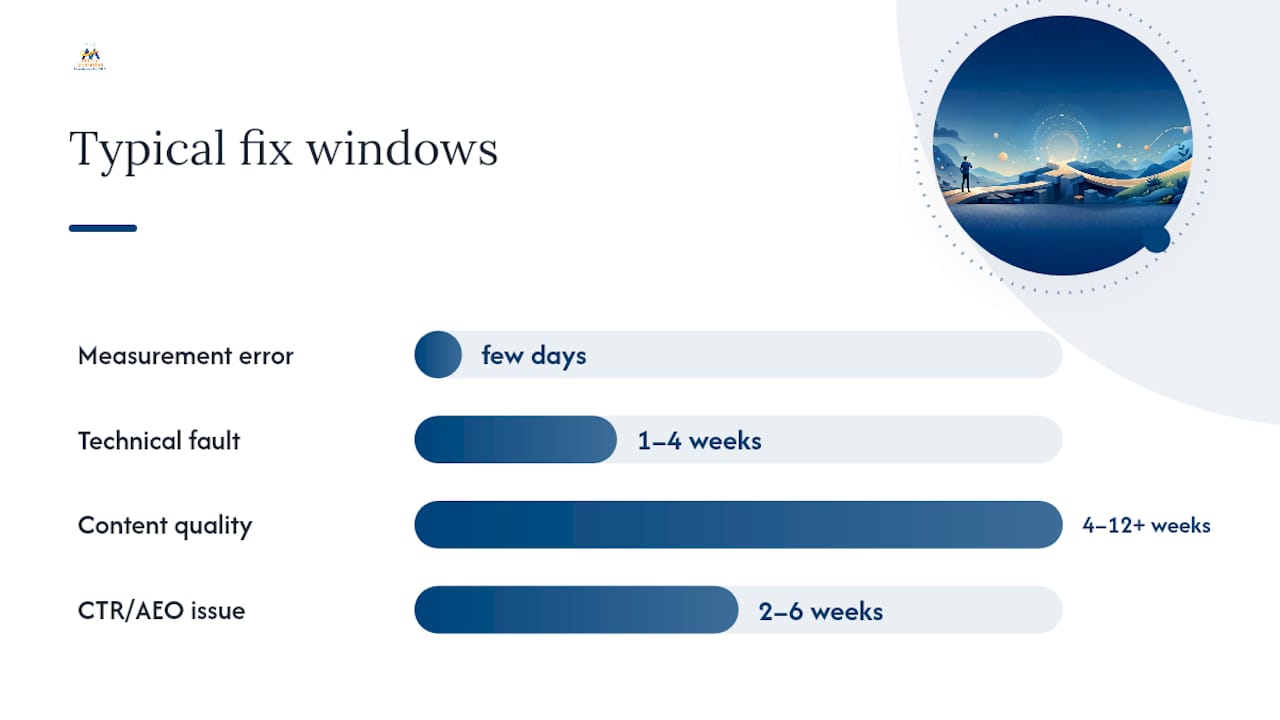
Beyond raw sessions, track conversions and qualified leads generated from organic traffic, since a recovery in clicks that doesn't convert isn't a full recovery. Increasingly, teams also track Share of Model, a rough measure of how often your brand or content gets cited inside AI Overviews and chat-based answer engines, since that citation volume is becoming a visibility metric in its own right even when it doesn't produce a click.
How We Investigate a Traffic Drop
Every audit at Digital Marketing All follows the same order, and the sequence matters more than any single tool. Confirm the drop is real against a seasonally matched baseline. Triage it into a CTR, ranking, technical, or measurement bucket using the ten-minute checklist above. Isolate which pages and queries carry the loss. Inspect the live SERP for format shifts. Run the technical audit. Only then touch content, and only on the highest-impact pages first.
A recent case followed exactly this pattern. Search Console showed impressions holding steady while clicks fell, an unmistakable CTR fingerprint. A live SERP check confirmed why: three of their top five money-page queries now displayed AI Overviews that summarized competitor content instead of theirs. The fix wasn't a rewrite. It was restructuring the top of each affected page into a direct-answer format, adding FAQ schema, and tightening title tags to match the exact phrasing users searched. Clicks on those pages recovered within five weeks, without touching a single unrelated page on the site.
The lesson holds across nearly every audit: don't rewrite at scale before you've diagnosed the actual cause, and prioritize the pages where high impressions meet high potential CTR impact, because that's where a small fix returns the most traffic, fastest.
Get Help Recovering Lost Organic Traffic
A do-it-yourself audit gets you the diagnosis. Turning that diagnosis into recovered rankings, restored clicks, and actual leads is where most in-house teams run out of bandwidth, especially when the fix spans development, content, and reputation work all at once. Digital Marketing All runs targeted traffic recovery audits that combine the technical remediation, AEO implementation, and content rehabilitation covered in this guide into one coordinated engagement, instead of leaving you to coordinate three separate vendors.
A typical engagement moves fast: the first 30 days cover diagnosis and technical fixes, days 30 to 60 focus on content remediation and schema implementation, and days 60 to 90 track recovery against the KPIs that matter, including review volume and reputation signals that influence both rankings and conversion once traffic returns. To request a remediation audit, have your Search Console and GA4 access ready along with a list of the pages you believe are most affected. That's enough to start.
Sources
- AI overviews reduce clicks — what publishers need to know | Ahrefs
- Troubleshooting a drop in Search traffic - Search Console Help
- How to use Search Console for seasonal trend analysis | Accio (guide referencing Google diagnostics)
FAQ
Is SEO Dead Now That AI Overviews Answer Queries Directly?
No. SEO has shifted rather than disappeared: rankings still drive who gets cited inside AI Overviews, and organic visibility now includes earning citations inside AI-generated answers, not just blue links.
How Can I Improve Organic Traffic After a Drop?
Diagnose the exact cause first using Search Console and GA4, fix technical blockers before content, and prioritize pages with high impressions and low CTR, since those recover fastest with the least effort.
Why Do Most Pages Get Little or No Organic Traffic From Google?
Most pages fail to rank competitively because they don't fully match search intent, lack original expertise or data, or compete against stronger, more specific pages, and thin or templated content is increasingly penalized in core updates.
What Is the 80/20 Rule in SEO?
How Long Does It Take to Recover From a Google Algorithm Update?
It depends on the cause: measurement fixes can resolve in under a week, technical fixes typically take one to four weeks, and content-quality remediation after a core update often takes four to twelve weeks or longer to show measurable recovery.