

TL;DR:
- Most small businesses benefit from combining platform-native bidding with lightweight oversight tools for pacing, alerts, and reporting.
- Affordable options like Google Ads Editor, SpyFu, and Adzooma help manage campaigns effectively without complex tools.
For most small businesses, the right approach combines platform-native bidding with a lightweight oversight layer for pacing, alerts, and reporting. You don't need a single "magic" platform. You need tools that fill specific gaps without creating new complexity.
Quick shortlist:
- Best overall: Adzooma — approachable interface, built for small teams, covers Google and Meta
- Best for budget: Google Ads Editor + SpyFu — both free or low-cost, cover the fundamentals
- Best for automation layering: Optmyzr — rule engine and scripting for teams ready to go deeper
- Best for reporting and oversight: Semrush — competitor intelligence plus cross-channel visibility
- Best for ad testing: Adalysis — automated A/B testing and audit alerts for search campaigns
- Best for beginners: Adzooma — the lowest learning curve on this list
When to consider agency help instead: If your team has no one dedicated to managing campaigns, buying tool subscriptions often costs more than it saves. Digital Marketing All offers fully managed PPC services that handle strategy, tracking setup, and reporting so you can focus on running your business.
Table of Contents
- How these PPC tools compare at a glance
- Top picks: mini-reviews for each tool
- How to choose the right PPC tool for your small business
- What types of PPC tools do you actually need?
- Strategic automation: what to trust and how to set guardrails
- Which tool fits your business size and primary need?
- How these tools were evaluated
- What users say about these tools
- Data security and privacy when using PPC tools
- Key Takeaways
- The case for keeping humans in the loop
- Prefer managed PPC over managing tools yourself?
- Further reading and authoritative sources
- FAQ
How these PPC tools compare at a glance
The table below covers all ten featured tools across the dimensions that matter most to small businesses. Pricing reflects publicly available information; always confirm current tiers directly with each vendor.
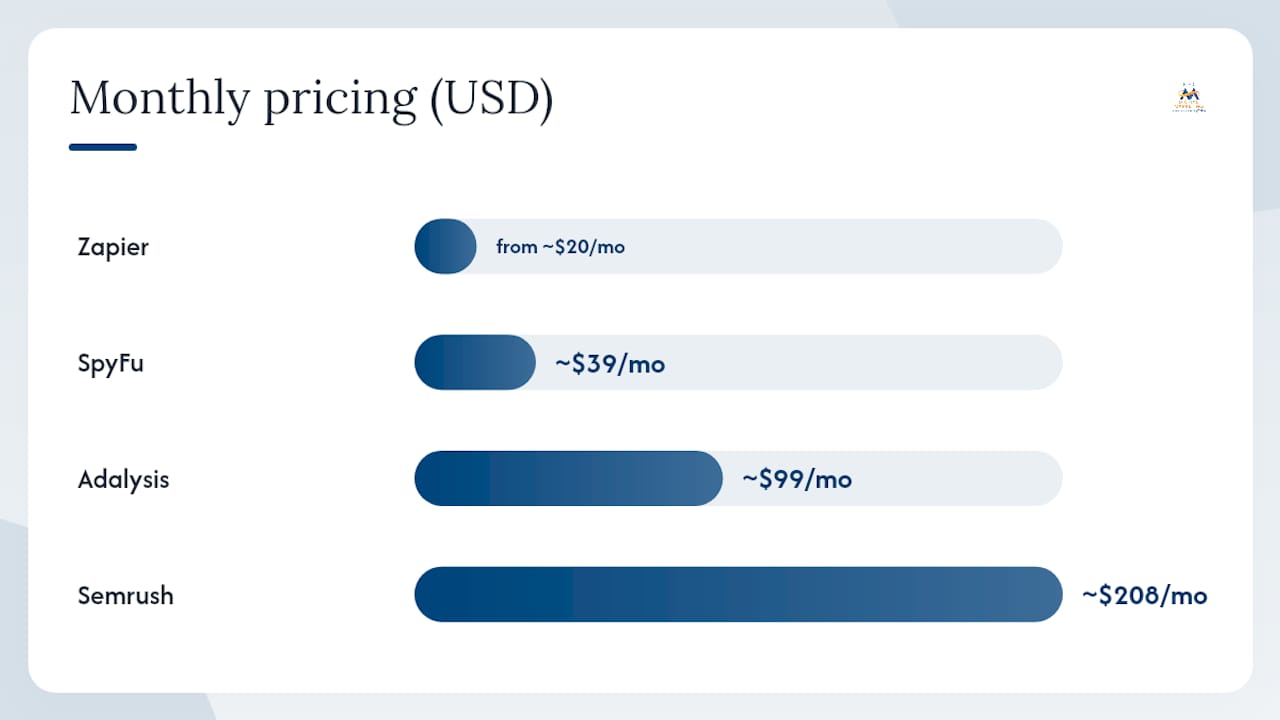
| Tool | Best For | Pricing | Platforms | Key Features | Ease of Use |
|---|---|---|---|---|---|
| Adzooma | Small businesses, beginners | Free tier; paid plans available | Google, Microsoft, Meta | Campaign management, reporting, recommendations | Very easy |
| Google Ads Editor | Solo/small teams, bulk edits | Free | Offline bulk editing, account organization | Easy | |
| SpyFu | Competitive research, keyword discovery | Entry-level ~$39/mo | Google, Microsoft | Competitor PPC history, keyword research | Easy |
| Adalysis | Ad testing, account audits | Starts ~$99/mo | Google, Microsoft | A/B ad testing, audit alerts, account diagnostics | Moderate |
| Semrush | Competitor intelligence, keyword planning | Starts ~$208/mo | Google, Microsoft, Meta | PPC research, keyword tools, broader marketing suite | Moderate |
| AdEspresso | Meta creative testing, small teams | — | Meta (Facebook/Instagram), Google | Ad creation, multivariate testing, simple reporting | Easy |
| Zapier | Lightweight integrations, data flows | Free tier; paid from ~$20/mo | Connects any platform via API | Workflow automation, CRM sync, alert pipelines | Easy–Moderate |
| Optmyzr | Granular automation, search campaigns | Starts ~$208/mo | Google, Microsoft | Rule engine, script builder, bid optimization | Moderate–Advanced |
| Skai | Growing SMBs, cross-channel scale | Custom pricing | Google, Microsoft, Meta, Amazon | Cross-channel bidding, budget allocation, reporting | Advanced |
| Marin | Large advertisers, agencies | Custom pricing | Google, Microsoft, Meta, Amazon | Attribution, automation, cross-channel management | Advanced |
Pricing reality for small businesses: Most small teams spend $0–$150/month on PPC tools. Google Ads Editor and Zapier's free tier cover a lot of ground at zero cost. SpyFu and AdEspresso are the most accessible paid options. Optmyzr, Skai, and Marin are built for accounts with higher monthly ad spend and more complex needs.
Platform support summary:
- Google Ads: All ten tools support it in some form
- Microsoft/Bing Ads: Optmyzr, Adalysis, Semrush, SpyFu, Skai, Marin, Google Ads Editor (via separate Microsoft Ads Editor)
- Meta (Facebook/Instagram): AdEspresso, Semrush, Skai, Marin, Adzooma
- Amazon Ads: Skai, Marin
- Other/API connections: Zapier (virtually any platform)
Top picks: mini-reviews for each tool
These reviews focus on what actually matters for small-business decision-making: cost, setup time, platform coverage, and practical trade-offs.
Adzooma
Adzooma is purpose-built for small and medium-sized businesses that want a single dashboard for Google, Microsoft, and Meta campaigns without a steep learning curve. Its recommendation engine flags underperforming campaigns and suggests fixes in plain language, which makes it genuinely useful for owners who aren't PPC specialists. The free tier covers basic management; paid plans add more automation and reporting depth.
Pros: Low barrier to entry, covers three major platforms, clear recommendations interface Cons: Less granular control than Optmyzr, limited for complex multi-channel accounts Example use case: A local service business managing Google and Facebook ads with one part-time marketer
Google Ads Editor
Free, offline, and surprisingly powerful. Google Ads Editor lets you make bulk changes to campaigns, ad groups, keywords, and bids without touching the live interface. For small teams doing detailed account work, it's the most cost-effective tool on this list. Native scripts and automated rules can extend its value further at no additional cost.
Pros: Completely free, offline access, bulk editing, no learning-period risk Cons: Google Ads only, no reporting or competitor research, requires manual execution Example use case: A solo practitioner restructuring ad groups or updating bids across dozens of campaigns
SpyFu
SpyFu surfaces historical PPC keyword data and competitor ad copy going back years. For a small business entering a competitive market, seeing which keywords rivals have tested and dropped is genuinely useful intelligence. Entry-level pricing makes it one of the most affordable paid research tools available.
Pros: Low cost, strong competitor keyword history, easy to navigate Cons: No campaign management, data depth varies by market, less useful for niche industries Example use case: An e-commerce store researching which product keywords competitors have abandoned
Adalysis
Adalysis automates ad A/B testing and runs continuous account audits, surfacing issues like disapproved ads, low-quality scores, and budget pacing problems before they compound. It's the right tool when your primary pain point is ad creative performance and account health, not bid management. G2 reviewers consistently highlight its audit depth as a differentiator.
Pros: Automated testing saves hours of manual work, audit alerts catch problems early Cons: Narrower scope than all-in-one platforms, pricing starts at ~$99/month Example use case: A search-focused advertiser running multiple ad variations who needs systematic testing
Pro Tip: Adalysis works best when your account already has clean structure and consistent conversion tracking. Set it up after you've standardized your campaigns, not before.
Semrush
Semrush is primarily an SEO and marketing intelligence platform, but its paid search tools are strong enough to justify the subscription for small teams that also need keyword research and competitor analysis. The PPC Keyword Tool and Ad History features give you a clear picture of what competitors are bidding on and what's working in your category.
Pros: Competitor intelligence is best-in-class, covers SEO and PPC in one subscription Cons: Expensive if you only need PPC features, interface can feel overwhelming at first Example use case: A growing SMB that wants to coordinate SEO and paid search strategy from one platform
AdEspresso
AdEspresso makes it easy to build and test multiple Meta ad variations without navigating Facebook's native interface. Its split-testing workflow is straightforward enough for small teams with no dedicated media buyer. Google Ads support is available but secondary to its Meta strength.
Pros: Simple creative testing, clear performance comparisons, good for Meta beginners Cons: Limited outside Meta, less useful if Google is your primary channel Example use case: A local retailer testing five different ad images for a Facebook campaign
Zapier
Zapier doesn't manage ads directly. What it does is connect your PPC platforms to your CRM, reporting tools, Slack alerts, and spreadsheets without custom code. For a small business that needs automated lead notifications or weekly spend reports delivered to email, Zapier fills that gap at minimal cost. Its integration catalog covers virtually every major ad platform and business tool.
Pros: Free tier covers basic workflows, enormous integration library, no coding required Cons: Not a PPC management tool, requires some setup logic, can break if APIs change Example use case: Automatically logging new Google Ads leads into a CRM and sending a Slack alert
Optmyzr
Optmyzr is the most powerful rule-based automation tool on this list for search campaigns. Its visual script builder and rule engine let you automate bid adjustments, budget pacing, and account changes based on custom triggers without writing code from scratch. It's best suited to teams managing $5,000+ per month in ad spend who want granular control that platform-native tools don't offer.
Pros: Highly customizable automation, strong Google and Microsoft Ads coverage, visual rule builder Cons: Steeper learning curve, pricing starts ~$208/month, overkill for small accounts Example use case: A multi-location business automating bid adjustments based on weather, inventory, or day-of-week performance data
Pro Tip: Automated bidding strategies need sufficient conversion volume — typically 30–50 conversions in a 30-day window — to stabilize. If your account doesn't hit that threshold, start with manual or enhanced CPC bidding before layering Optmyzr's automation.
Skai
Skai handles cross-channel bidding, budget allocation, and reporting at a scale that goes beyond what most small businesses need today. Its strength is coordinating spend across Google, Meta, Amazon, and Microsoft from a single interface. G2 reviewers note its reporting depth as a standout. For a growing SMB approaching $10,000+ per month in total ad spend, it becomes a serious option.
Pros: True cross-channel management, enterprise-grade reporting, strong Amazon Ads support Cons: Custom pricing (typically enterprise-level), complex setup, not built for small accounts Example use case: A multi-channel e-commerce brand coordinating Google Shopping, Meta, and Amazon campaigns
Marin
Marin is an enterprise attribution and automation platform built for large advertisers and agencies. Its cross-channel attribution modeling and bid management are sophisticated, but the complexity and pricing put it out of reach for most small businesses. Worth knowing about as a future upgrade path if your ad spend scales significantly.
Pros: Robust attribution, handles complex multi-channel accounts, strong agency tooling Cons: Enterprise pricing, long onboarding, not practical for accounts under $20,000/month Example use case: A national brand or agency managing coordinated campaigns across four or more platforms
How to choose the right PPC tool for your small business
The right tool depends on three things: your monthly ad spend, your team's technical comfort, and your primary pain point. Here's a practical framework.
Decision checklist:
- Ease of use: Can your team operate it without a dedicated PPC specialist? Adzooma and Google Ads Editor are the clearest options for lean teams.
- Ad spend threshold: Tools like Optmyzr, Skai, and Marin require enough conversion volume to justify their cost and complexity. Under $3,000/month, platform-native tools plus a free reporting layer often outperform paid subscriptions.
- Platform compatibility: Confirm the tool covers every platform you actively use. A tool that only manages Google Ads is a liability if 40% of your budget runs on Meta.
- Automation style: Do you want monitoring and alerts (Adalysis, Zapier) or full bid automation (Optmyzr, Skai)? Monitoring tools are lower risk for small accounts.
- Integrations: Check that the tool connects to your analytics platform (Google Analytics 4), your CRM, and any conversion tracking you rely on.
- Support and onboarding: Smaller vendors often offer better onboarding support. Ask specifically about response time SLAs before committing.
Questions to ask during a trial or demo:
- Can I export raw data at any time, without restrictions?
- Does the platform maintain an audit log of automated changes?
- What happens to my campaigns if I cancel the subscription?
- How does the tool handle conversion tracking discrepancies between platforms?
Red flags to watch for: Hidden fees tied to ad spend percentage, automation that makes changes without a review queue, and tools that don't support your conversion tracking setup. Choosing tools that complement native platform automation rather than trying to replace it is a more reliable approach for small accounts.
When your team is spending more time managing tools than managing strategy, that's the signal to consider agency-managed services. Digital Marketing All handles the full stack: tracking setup, campaign structure, bid strategy, and reporting, so you're not paying for software you don't have time to use properly.
Pro Tip: Before signing up for any paid PPC tool, run a free trial and test one specific workflow end-to-end: import your account, generate a report, and make one automated change. If you can't complete that in under an hour, the tool's learning curve will cost you more than its subscription fee.
What types of PPC tools do you actually need?
Understanding the functional categories helps you match your immediate pain point to the right solution, rather than buying a platform that does everything poorly.
-
Platform-native automation (Google Smart Bidding, Meta Advantage+): Free, built into the ad platform, handles auction-level bid decisions. Start here. Every small business should use these before adding third-party tools.
-
Third-party bid engines (Optmyzr, Skai, Marin): Add custom rules, cross-platform coordination, and advanced automation on top of native bidding. Appropriate when native tools don't give you enough control or visibility at your spend level.
-
Reporting and dashboards (Semrush, Adzooma, Zapier): Consolidate performance data across platforms and automate delivery to stakeholders. Useful from day one, even at low spend.
-
Competitor and keyword research (SpyFu, Semrush): Surface what competitors are bidding on, which keywords they've tested, and where gaps exist. Most valuable during campaign setup and quarterly strategy reviews.
-
Ad creation and A/B testing (Adalysis, AdEspresso): Systematize creative testing so you know which headlines, images, and offers actually convert. Critical for accounts where creative performance is the main variable.
-
Workflow automation and integrations (Zapier): Connect ad platforms to CRMs, reporting tools, and alert systems. Fills gaps that dedicated PPC tools leave open.
Matching your need to a category:
- Low budget + local targeting = Google Ads Editor (free) + Zapier for reporting
- Meta-heavy creative testing = AdEspresso + platform-native reporting
- Competitive market entry = SpyFu for research + Google Ads Editor for execution
- Search campaign optimization = Adalysis for testing + Optmyzr if spend justifies it
- Cross-channel coordination at scale = Skai or Marin
Strategic automation: what to trust and how to set guardrails
The recommended approach for small businesses in 2026 is clear: use platform-native bidding for auction execution and a lightweight oversight layer for pacing, alerts, and cross-channel reporting. Trying to replace native automation with third-party tools typically hurts performance rather than helping it.
Platform algorithms have access to real-time auction signals that no third-party tool can replicate. What third-party tools do well is surface what the platform is doing, catch anomalies, and coordinate spend across channels. Monitoring, alerting, and anomaly detection tools are increasingly valuable precisely because they give you visibility without interfering with the platform's optimization logic.
The learning period constraint is the most overlooked risk for small accounts. Automated bidding strategies need roughly 30–50 conversions in a 30-day window to stabilize. New campaigns or low-volume accounts that switch to Target CPA or Target ROAS before hitting that threshold often see erratic spend and poor results. Use manual CPC or enhanced CPC until you have the signal density to support smart bidding.
Implementation checklist before adding any automation layer:
- Verify conversion tracking is firing accurately across all campaigns
- Clean up search-term noise with a solid negative keyword list
- Standardize campaign and ad group naming conventions
- Confirm budget caps are set at the campaign level, not just the account level
- Set up at least one anomaly alert (spend spike, conversion drop) before enabling automated rules
Pro Tip: Automation should be treated as an efficiency layer, not a replacement for human strategy. Set your KPIs, offers, and guardrails manually. Let automation handle execution. Review automated changes weekly, especially in the first 30 days.
Which tool fits your business size and primary need?
Solo or sole proprietor (under $1,000/month ad spend)
Start with Google Ads Editor for account management and SpyFu for competitive research. Both are free or low-cost. Add Zapier's free tier to automate lead notifications. Avoid paid management platforms at this spend level; the subscription cost relative to ad spend rarely makes sense. For local PPC campaigns, platform-native tools plus a Google Analytics 4 connection cover most reporting needs.
Small team ($1,000–$5,000/month ad spend)
This is where Adzooma or AdEspresso earn their subscription. Adzooma covers Google and Meta from one interface with clear recommendations. AdEspresso is the better pick if Meta is your primary channel and creative testing is your main need. Add Adalysis if search campaign health and ad testing are priorities. Small businesses spending under $5,000 per month generally benefit more from lightweight tools and platform-native automation than from enterprise platforms.
Growing SMB ($5,000–$20,000/month ad spend)
At this level, Optmyzr's rule engine starts paying for itself if you're running search campaigns across Google and Microsoft. Semrush becomes worthwhile for teams that want competitor intelligence alongside campaign management. If you're running cross-channel campaigns at the higher end of this range, Skai is worth evaluating. This is also the threshold where AI-driven PPC strategies and managed services from an agency like Digital Marketing All often deliver better returns than adding more tool subscriptions.
How these tools were evaluated
Every tool on this list was assessed against criteria that reflect real small-business constraints, not enterprise feature checklists.
Evaluation criteria:
- Community and review signals: — What do verified users on G2 and Capterra report about real-world performance and support quality?
Tools were included based on consistent appearance in industry roundups, verified user reviews on G2 and Capterra, and alignment with the layered automation approach recommended by practitioners in 2026.
What users say about these tools
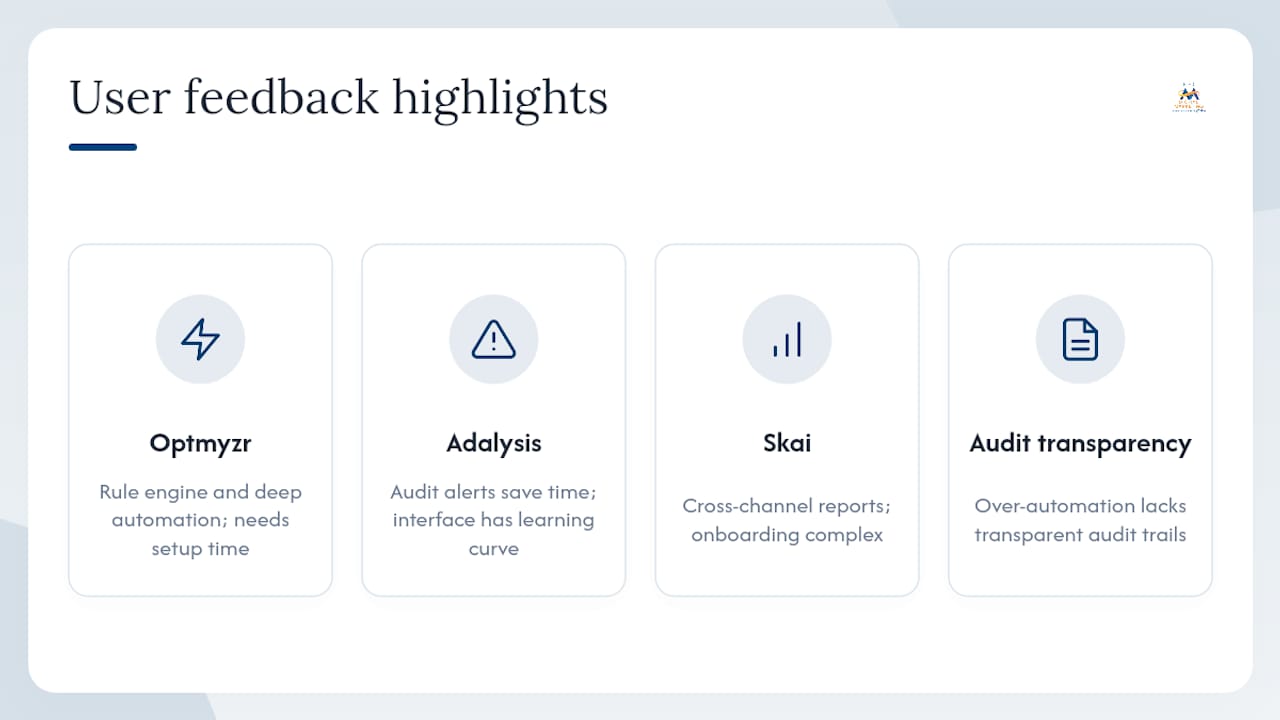
User feedback on G2 and Capterra reveals consistent patterns across tool categories that are worth knowing before you commit to a trial.
Optmyzr users on G2 and Capterra consistently praise its rule engine and automation depth, but note that getting full value requires a meaningful time investment in setup. Teams that treat it as a plug-and-play solution tend to underuse it.
Adalysis reviewers on G2 and Capterra highlight the audit alert system as a genuine time-saver, particularly for catching disapproved ads and budget anomalies before they affect performance. The most common criticism is that the interface takes some getting used to.
Skai (formerly Kenshoo) reviews on G2 and Capterra reflect its enterprise positioning: users appreciate the cross-channel reporting depth but frequently mention that onboarding is complex and support response times vary.
Across all categories, the most consistent user complaint is over-automation without transparency: tools that make account changes without a clear audit trail frustrate users who need to understand what changed and why. This aligns with the broader practitioner consensus that visibility and audit trails matter more than automation volume in 2026.
For mobile app campaigns that require attribution across paid channels, tools like AppsFlyer and Adjust fill a gap that most PPC management platforms don't address. A detailed comparison of AppsFlyer vs. Adjust is worth reviewing if mobile user acquisition is part of your paid strategy.
Data security and privacy when using PPC tools
Connecting a third-party PPC tool to your ad accounts means granting API access to your campaign data, spend history, and in some cases your customer conversion data. That's a meaningful trust decision, and it deserves more attention than most small businesses give it.
Key considerations:
- Data residency: Where does the tool store your campaign and conversion data? EU-based businesses have GDPR obligations; US businesses should check whether the vendor's data practices align with applicable state privacy laws (CCPA in California, for example).
- API permission scope: Most tools request read/write access to your ad accounts. Confirm you can limit permissions to read-only for reporting tools that don't need to make changes.
- Conversion data handling: Tools that ingest conversion events (lead form submissions, purchases) may be subject to data processing agreements. Review the vendor's DPA before connecting conversion tracking.
- Account access offboarding: Confirm the process for revoking API access and deleting your data when you cancel. Some platforms retain data for extended periods by default.
- SOC 2 compliance: Enterprise tools like Skai and Marin typically hold SOC 2 Type II certification. For smaller tools, check whether they publish a security overview or trust page.
The practical minimum for any small business: review the OAuth permissions before connecting, use a dedicated manager account rather than your primary login, and audit connected third-party apps in your Google Ads and Meta Business Manager settings at least quarterly.
Key Takeaways
For most small businesses, the best PPC toolkit combines platform-native bidding with a lightweight oversight layer, not a single all-in-one platform.
| Point | Details |
|---|---|
| Start with native tools | Google Ads Editor and platform smart bidding cover most needs under $1,000/month at zero cost. |
| Match tool to spend level | At lower spend levels, lightweight tools outperform enterprise platforms; with higher spending, Optmyzr or Skai become viable. |
| Automation needs signal density | Automated bidding requires 30–50 conversions per 30-day window to stabilize; launch with manual bidding first. |
| Prioritize visibility over automation | Tools with clear audit trails and anomaly alerts deliver more value than opaque full-account automation. |
| Digital Marketing All | For businesses that prefer managed PPC over tool subscriptions, Digital Marketing All handles strategy, tracking, and reporting end-to-end. |
The case for keeping humans in the loop
There's a version of PPC tool selection that sounds appealing: buy one platform, connect your accounts, and let the algorithm handle everything. That version rarely works for small businesses, and the user reviews confirm it.
The tools that consistently earn high marks from small-business users are the ones that make it easier for a human to make better decisions, not the ones that remove humans from the process. Adalysis surfaces problems so you can fix them. Optmyzr lets you encode your own logic into rules. Google Ads Editor makes bulk changes faster. Even Zapier's value is in giving you better information, not in replacing your judgment.
The platforms that try to automate everything, including strategy, tend to produce results that look fine in a dashboard and disappoint in reality. Smart bidding optimizes for the conversion signal you give it. If that signal is "form fills" and half your form fills are spam, the algorithm will optimize for spam. No tool fixes a bad input.
The practical implication: spend less time evaluating which tool has the most features, and more time asking whether your conversion tracking is accurate, your account structure is clean, and your team has the bandwidth to act on what the tool surfaces. Standardizing your workflow before buying tools is the step most small businesses skip, and it's the one that determines whether any tool actually helps.
Prefer managed PPC over managing tools yourself?
There are solid tools on this list, and for the right team, they deliver real results. But tool subscriptions require time, expertise, and consistent attention to pay off. If your business doesn't have a dedicated person managing campaigns, the monthly cost of software often exceeds the value it returns.
Digital Marketing All offers fully managed PPC services built for small and medium-sized businesses. The agency handles conversion tracking setup, campaign structure, bid strategy, creative testing, and reporting, so you get the benefits of a professional PPC operation without the overhead of managing platforms yourself. The approach combines AI-powered visibility strategies with hands-on campaign management, including Google Business Profile optimization and local search prominence for businesses that compete in specific markets.
For businesses that want to see what a managed approach looks like before committing, the first step is a straightforward audit of your current campaigns and tracking setup. You can request a review to get a clear picture of where your ad spend is going and what's actually driving results.
Further reading and authoritative sources
- PPC Automation in 2026: What to Automate — Pace Ads: Practitioner-level breakdown of which PPC tasks to automate and which to keep under human control in 2026.
- PPC Automation Strategy: How to Stay in Control — Aubado: Explains why visibility and audit trails matter more than automation volume for small accounts.
- Google Ads Automation: Tools & Best Practices — Clyde: Covers the learning period constraint and conversion volume requirements for smart bidding strategies.
- PPC Automation: Tools & Strategy Guide — Hawky.ai: Broad overview of tool categories and the case for complementary rather than monolithic automation.
- PPC Management Selection Guide 2026 — ToolsInfo: Industry roundup with spend-level guidance and tool shortlists for different business sizes.
- Optmyzr Reviews — G2: Verified user reviews covering real-world strengths and limitations of Optmyzr for search campaign automation.
- Adalysis Reviews — Capterra: User feedback on Adalysis's audit and testing features from verified buyers.
- 7 Local PPC Tips for Small Business Ads — Digital Marketing All: Practical local PPC tactics that complement the tool recommendations in this guide.
- AI-Powered PPC Guide: Local Lead Generation — Digital Marketing All: Overview of AI-driven PPC approaches for local businesses, with guidance on automation guardrails.
FAQ
What is the best PPC tool for a small business on a tight budget?
Google Ads Editor is free and handles bulk campaign management effectively. SpyFu adds competitive research starting around $39/month. Together, they cover the fundamentals without a significant monthly commitment.
Which SEO tool is best for small businesses that also run paid search?
Semrush is the strongest option for small teams that want both SEO and PPC research in one platform. Its Ad History and PPC Keyword Tool give useful competitor intelligence alongside its core SEO features.
When should a small business use automated bidding?
Automated bidding strategies like Target CPA or Target ROAS work best once an account reaches 30–50 conversions in a 30-day window. Below that threshold, manual or enhanced CPC bidding typically produces more stable results.
Do small businesses need a third-party PPC management tool?
Not always. Platform-native tools cover most needs for accounts under $3,000/month. Third-party tools like Optmyzr or Adalysis add value when your team needs custom automation, systematic ad testing, or cross-platform reporting that native dashboards don't provide.
What's the difference between a PPC tool and a managed PPC service?
A PPC tool gives your team software to manage campaigns more efficiently. A managed service like Digital Marketing All handles strategy, execution, tracking, and reporting on your behalf, which suits businesses without dedicated in-house PPC expertise.